
If you’re serious about stopping distractions, you need to build a fortress for your focus. This means getting real about what’s actually stealing your attention, intentionally designing your workspace for deep work, and putting proven systems and tools in place to protect your time.
This isn’t about finding some magical productivity hack. It’s about a practical, personalized strategy to reclaim your day and finally get meaningful work done.
Winning The Battle for Your Attention

Feel like your focus is constantly under siege? You’re not imagining it. Our world is practically designed to pull us in a million different directions, and just “trying harder” is a losing battle. These interruptions aren’t just little annoyances; they’re a massive drain on our potential.
The cost is genuinely shocking. Employees lose an incredible 720 work hours every year to distractions at work. That’s like losing three full months out of the year. A 2025 report from Resume Now found that 58% of employees waste at least 30 to 60 minutes every single day on things that have nothing to do with their job.
This guide takes a different path. Forget vague advice and relying on sheer willpower. We’re going to lay out a clear roadmap built on four core pillars—all designed to put you back in control, starting today.
The Four Pillars of Focus
Think of this as your framework for action. By mastering these four areas, you can build a powerful defense against the constant pull of distractions.
- Awareness: You can’t fix a problem you don’t fully understand. The first step is to become a detective of your own attention, pinpointing exactly what pulls you off task and when.
- Environment: Your physical and digital spaces are either a sanctuary for focus or a minefield of interruptions. I’ll show you how to design them for deep work.
- Systems: Discipline is a finite resource. Instead of relying on it, we’ll use proven frameworks like the Pomodoro Technique and task batching to create a structure that saves your mental energy.
- Tools: Technology is often the villain, but it can also be your greatest ally. We’ll explore how to make tools work for you, not against you.
A huge part of this is internal. Before you change your environment, you need to master your mind and control your thoughts. This mental groundwork makes every other strategy ten times more effective.
The real goal here is to make focus the path of least resistance. When you thoughtfully design your environment and your workflows, you don’t have to spend all your energy fighting off distractions.
To give you a bird’s-eye view, here’s a quick summary of how these pillars come together. Think of it as the game plan for taking back your attention.
Your Quick-Start Guide to Beating Distraction
| Pillar | Core Principle | Key Action |
|---|---|---|
| Awareness | You can’t fix what you don’t measure. | Identify and track your specific distraction triggers. |
| Environment | Make focus the easy choice. | Design your physical and digital spaces to minimize interruptions. |
| Systems | Structure protects your mental energy. | Implement routines like time blocking and task batching. |
| Tools | Use technology to fight technology. | Adopt tools like website blockers to enforce your focus goals. |
This table lays out the core concepts we’re about to dive into. We’ll break down each of these pillars with practical, actionable steps you can start using immediately.
Pinpoint Your Personal Focus Killers

You can’t fight an enemy you don’t understand. We all have that vague feeling of being “distracted,” but knowing exactly what’s derailing your focus is the first real step to getting it back. It’s time to stop guessing and start gathering some actual intelligence on where your attention is going.
Think of yourself as a detective for the next few days. Your mission: conduct a simple distraction audit. This isn’t about judging yourself—it’s about building awareness. The goal is to move from a feeling of being unfocused to having hard evidence of what your personal focus killers really are.
Internal vs. External Triggers: Know the Difference
Every time you get pulled off task, there’s a trigger. These usually fall into two main camps, and learning to tell them apart is crucial for figuring out why you get distracted and how to stop for good.
-
External Triggers: These are the obvious ones. The ping of a new email, a Slack notification banner, a coworker asking a “quick question,” or your dog barking from the other room. They’re all sensory inputs from your environment that hijack your attention.
-
Internal Triggers: These are much sneakier because they come from inside your own head. It could be a feeling of boredom with a tedious task, anxiety about a looming deadline, a sudden “great idea” for a totally different project, or simply the ingrained habit of checking social media.
An internal trigger, like feeling overwhelmed by a big project, often prompts you to seek an external distraction, like scrolling through your phone. Identifying the initial feeling is just as important as noticing the action that follows.
How to Run Your Own Distraction Audit
So, how do you actually track these focus killers? You’ve got a couple of options, from low-tech to fully automated. The best method is whichever one you’ll actually stick with for a few days.
The simplest way is to keep a notepad or a digital doc open next to you. Every time you catch yourself off-task, quickly jot down three things:
- The time: When did it happen?
- The trigger: What was it, specifically? (e.g., “Slack notification,” “thought about what’s for dinner,” “opened a news site”)
- The feeling: What were you feeling right before? (e.g., “bored,” “stuck on a problem,” “anxious”)
This manual approach forces you to become consciously aware of your habits in the moment. After just a day or two, you’ll start seeing clear patterns. Maybe you’ll realize your focus tanks around 3 PM, or that one particular project always sparks anxiety that leads you down a rabbit hole of procrastination.
Let Automation Uncover Your Hidden Habits
If you want a more data-driven and effortless approach, technology can be an incredible ally. Instead of relying on manual logs, an automatic time tracker gives you an unbiased, minute-by-minute account of where your digital attention really goes.
Tools like a dedicated time tracking app for macOS run silently in the background, logging the apps and websites you use without you having to do a thing. This eliminates the guesswork and reveals the subtle habits you might not even realize you have.
I once worked with a project manager who was convinced email was her biggest time-waster. After using an automatic tracker for just one week, she discovered the real culprit was something else entirely. It wasn’t the number of emails she was getting; it was the constant context switching between her project management software, team chat, and her calendar. The tracker showed she was flipping between those three apps dozens of times an hour, and each switch was draining her mental battery.
That insight was a game-changer. Armed with specific data, she created a targeted solution: she started batching her work, setting aside dedicated blocks of time for only using the project tool, followed by another block for all communications. This simple change, prompted by real data from her audit, dramatically improved her ability to do deep, meaningful work.
Designing an Environment for Deep Work
Your workspace is either a launchpad for productivity or a minefield of distractions. It’s a hard truth, but just showing up to your desk isn’t enough. You have to consciously build an environment that works for you, not against you. This means grabbing the reins of both your physical surroundings and your digital chaos to make focus the easiest choice.
The idea isn’t to create some sterile, joyless box to work in. It’s about building a sanctuary where deep, meaningful work can actually happen. We do this by adding a bit of positive friction—making it just a little bit harder to get distracted than it is to stay on task. This small shift can make a world of difference in what you accomplish.
Taming Your Physical Space
Your brain is constantly scanning your environment, taking cues from everything it sees. A messy desk, a noisy room, or a revolving door of people stopping by all send the same subconscious signal: “It’s okay to lose focus here.” If you want to get serious work done, you have to change that message.
Start by creating a dedicated no-interruption zone. You don’t need a corner office for this. It can be a specific chair, a particular corner of the dining table, or one side of your desk. The rule is simple: when you’re there, you’re there to work. Let family, roommates, or colleagues know that this zone means you’re off-limits unless the building is on fire.
A simple visual cue can work wonders. Putting on headphones (even with no music) or placing a small sign on your desk can signal your focus mode to others. It’s a polite but firm boundary that protects your attention without you having to constantly police it.
Your environment is the invisible hand that shapes your behavior. By intentionally designing your workspace for focus, you’re not just tidying up—you’re programming yourself for success before you even start working.
And then there’s noise. It’s the undisputed champion of focus-killers. A 2019 poll found that a staggering 80% of people point to chatty coworkers as their top distraction, with general office noise right behind at 70%. One of the best investments you can make for your productivity is a solid pair of noise-canceling headphones. The simple act of silencing the world around you can feel like a superpower, as detailed in these workplace distraction statistics.
Conquering Digital Chaos
While your physical space is important, your digital environment is where the modern battle for attention is truly fought. Every notification, every open tab, every app icon is engineered to pull you away from what you’re supposed to be doing. It’s time to fight back.
First, go on a notification-killing spree. Turn off every single non-essential alert on your computer and phone. No banners, no sounds, no little red bubbles. They’re all designed to manufacture a false sense of urgency. Trust me, if something is truly mission-critical, someone will call you. Everything else can wait.
Next, get your digital desktop in order. Before you start a task, close every application and browser tab that isn’t absolutely necessary for the job at hand. A clean screen helps create a clear mind, removing the visual clutter that tempts you to “just quickly check” something else.
Using Friction to Your Advantage
One of the smartest things you can do is make your distractions harder to get to. It sounds simple, but it works. I know a graphic designer who literally doubled her productive hours with two small changes.
First, she started leaving her phone in another room while she worked. That tiny bit of effort—having to physically get up and walk across the house—was enough friction to break the mindless scrolling habit. Second, she began using a website blocker during her creative sprints.
This is where tools become your best friend. A good web blocker creates a hard boundary that sheer willpower often can’t match. By blocking access to your personal time-wasting sites for a set period, you remove the temptation completely. If you’re new to this, our guide on how to use a web blocker effectively is a great place to start.
These tactics aren’t about self-punishment. They’re about rigging the game so your focused self can win. When you take control of your physical and digital worlds, you stop leaving your productivity up to chance.
Choosing and Implementing Your Focus System
Once your environment is set up for success, it’s time to install an operating system for your workflow. Think of a focus system as a framework that saves you from the mental drain of constantly deciding what to do next. It’s about protecting you from your own worst impulses.
Instead of burning through your limited willpower, you can lean on a proven structure that makes deep, focused work your default mode. These aren’t rigid, one-size-fits-all rules; they’re flexible toolkits. The real trick is finding a system that clicks with your work style, your natural energy rhythms, and the kind of tasks you tackle every day.
Let’s break down some of the most effective frameworks you can start using today to get your attention back and produce better work in less time.
The Pomodoro Technique: Taming Overwhelm with Timed Sprints
The Pomodoro Technique is popular for a reason: it’s incredibly simple and it just works. Created by Francesco Cirillo back in the 1980s, this time management method uses a timer to chop your work into focused 25-minute sprints, with short breaks in between. The psychology behind it is brilliant—it takes a huge, intimidating project and turns it into a series of small, manageable chunks.
Here’s the basic flow:
- Pick one single task to work on.
- Set a timer for 25 minutes and work on only that task. No cheating.
- When the timer dings, take a 5-minute break. Get up, stretch, grab some water.
- After four of these “Pomodoros,” give yourself a longer break of 15-30 minutes.
This rhythm helps you fight the urge to multitask and gives you a clear finish line for each burst of focus, making it much easier to get started on something you’ve been avoiding. For a complete guide, check out how to set up and use a Pomodoro timer. During your breaks, practices like using mindful breathing tools for enhanced focus can be a great way to reset and come back even sharper.
Task Batching: The Cure for Context Switching
Every time you jump from writing a report to answering an email and then back to a spreadsheet, your brain pays a little tax. It’s called context switching, and it’s a massive, hidden productivity killer.
Task batching is the perfect antidote. The idea is simple: group similar tasks together and knock them all out in one dedicated block of time.
Instead of letting emails interrupt you all day, you might schedule two or three 30-minute blocks just for clearing your inbox. This works for almost anything:
- Making all your phone calls in one go.
- Processing all your invoices and expenses at once.
- Filming several short videos in a single afternoon.
- Running all your errands in a single trip.
By sticking to one type of activity, your brain stays in the same “mode.” This cuts down on the mental friction and time you waste getting re-oriented, helping you work faster and smarter.
This flowchart gives you a simple way to think about structuring your focus, hitting both the physical and digital sides of your workspace.
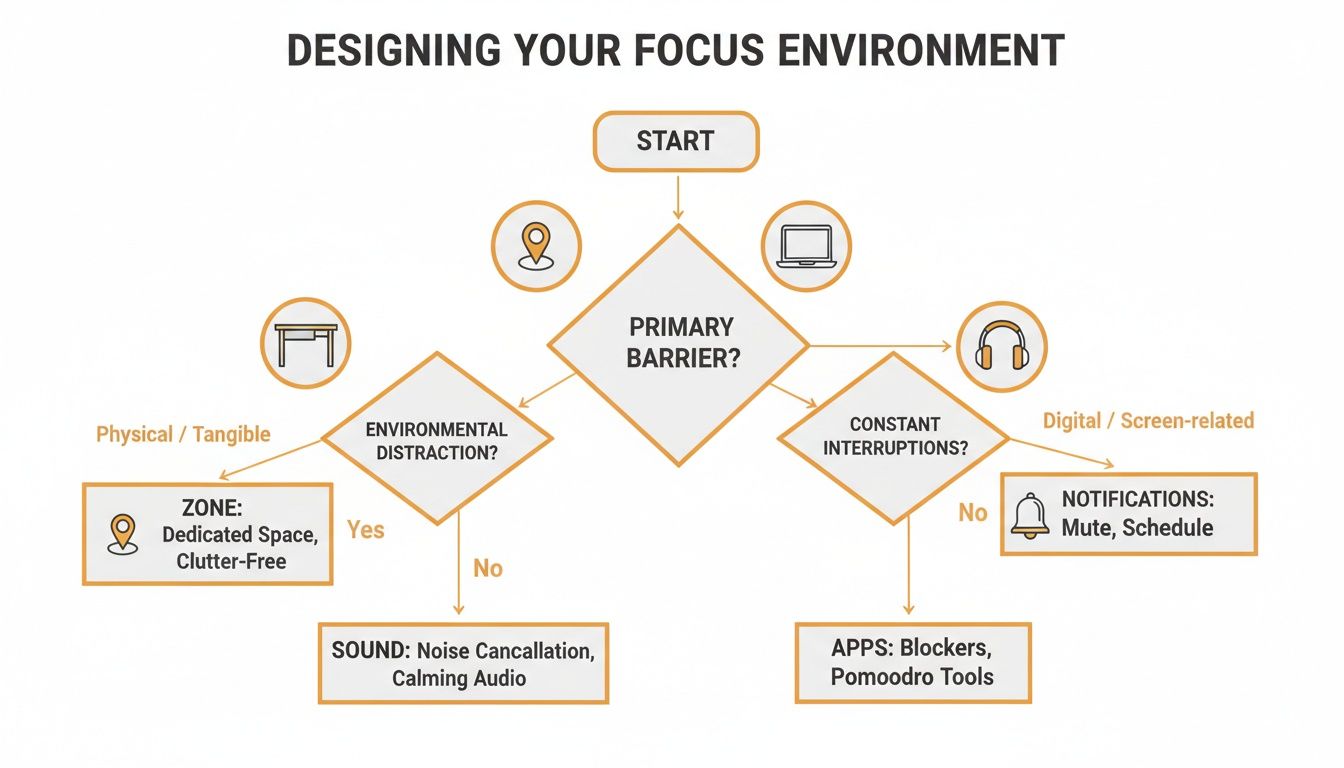
The key takeaway is that a truly focused environment requires a two-pronged attack on both the tangible stuff around you and the virtual distractions on your screen.
Deep Work: Carving Out Time for What Matters
Some tasks need more than a 25-minute sprint. They demand long, uninterrupted stretches of pure concentration. Author Cal Newport calls this “deep work”—the ability to focus without distraction on something that’s cognitively demanding.
Failing to protect this time comes at a devastating cost. A well-known study found it takes an average of 23 minutes and 15 seconds just to get back on track after an interruption. This isn’t just a pet peeve; scheduling deep work is a modern necessity.
A deep work block is a non-negotiable appointment you make with your most important task. It’s a signal to yourself and everyone else that for the next 90-120 minutes, your priority is singular focus.
Putting this into practice is straightforward. Look at your calendar at the start of the week and block out one or two 90-minute sessions. Treat them like you would a critical meeting. During this time, notifications are off, email is closed, and you work on nothing but that high-priority project. It might feel weird at first, but this is where the real breakthroughs happen.
Choosing Your Ideal Focus Technique
So, which system is right for you? There’s no magic bullet. The best approach is the one that fits your personality and the type of work you do. This table breaks down the options to help you decide where to start.
| Technique | Best For | Core Principle | How to Start |
|---|---|---|---|
| Pomodoro | Procrastinators and anyone easily overwhelmed by large tasks. | Break down big projects into short, manageable sprints with built-in breaks. | Pick one task and commit to a single 25-minute session today. |
| Task Batching | People who wear many hats and constantly switch between different activities. | Group similar tasks together to minimize mental friction and context switching. | Identify two recurring tasks (e.g., email, social media) and schedule a specific block for each tomorrow. |
| Deep Work | Complex, creative, or strategic projects that require intense concentration. | Schedule long, uninterrupted blocks of time to focus on your most important work. | Block off a 90-minute “deep work” session in your calendar for later this week and guard that time fiercely. |
The best part is that these systems aren’t mutually exclusive. You might use Pomodoros to get through your batched emails or schedule a deep work session to tackle the first phase of a big project. Experiment and see what combination gives you the best results.
Using Technology as Your Focus Ally
It sounds counterintuitive, I know. How can you use technology to stop being distracted by technology? But instead of seeing our devices as the enemy, we can turn them into powerful tools for building focus. The right apps can enforce the boundaries that our willpower alone often can’t, transforming a distraction machine into a dedicated workhorse.
This isn’t about adding more complexity or a dozen new apps to your workflow. It’s about being smart and using a few key tools to automate your discipline. When you let an app handle the hard work of “staying on task,” you free up precious mental energy for the deep, meaningful work that actually matters.
Build Your Digital Fortress
Your first line of defense is a solid website and app blocker. There’s no getting around it. Tools like Freedom or Cold Turkey are brilliant for creating hard stops against your worst time-wasting habits. They’re the digital bouncer for your attention, making it physically impossible to “just quickly check” Twitter or the news when you’re supposed to be locked in.
You wouldn’t try to get serious work done in the middle of a loud party, right? A site blocker simply shuts the party down, giving you the digital silence you need to concentrate. You set the rules—which sites to block and for how long—and the software enforces them without a second thought.
Beyond blocking out the noise, you can also design an environment that encourages focus. Minimalist writing apps like Ulysses or Bear are fantastic for this. They strip away all the distracting toolbars and menus of a typical word processor, leaving you with a clean, simple page that invites you to do just one thing: write.
Ditch the Guesswork for Automated Insights
Blockers are great for enforcement, but to really understand your habits, you need data. This is where modern time-tracking software comes in, especially tools that work automatically. Let’s be honest, manual time logs are a pain. We forget to start or stop the timer, and we almost always misremember how we actually spent the last hour.
Automatic trackers like Chronoid run quietly in the background, creating an honest, minute-by-minute record of every app and website you touch. This isn’t just about logging hours; it’s about finding the hidden patterns that are torpedoing your focus. The AI-powered insights can show you things you’d never spot on your own.
Instead of relying on a vague feeling that you’re getting distracted, you get objective data that answers specific questions like, “How much time did I actually lose switching between Slack and my code editor today?” It’s the difference between guessing you have a problem and knowing precisely what it is.
The dashboard below is a great example of how Chronoid can make your digital activity crystal clear.
This kind of visual breakdown instantly highlights where your time is going and when you’re most productive, all without you having to lift a finger.
Unify Your Focus Toolkit
The real magic happens when you can connect awareness with action in a single, streamlined process. Juggling a separate time tracker, a Pomodoro timer, and a website blocker creates its own kind of digital clutter. For anyone serious about conquering distraction, an integrated solution is the way to go.
A platform like Chronoid pulls all these essential functions under one roof. You can automatically track your activity, use that data to identify your biggest time-wasters, and then immediately set up a scheduled focus session or block distracting sites right inside the app. It creates a simple, powerful loop:
- Track: Automatically log what you do to see where your time really goes.
- Analyze: Let AI insights pinpoint your specific distraction patterns and triggers.
- Act: Use the built-in blocker and focus sessions to proactively defend your attention.
With this kind of unified approach, technology stops being the source of your distraction. It becomes the command center for your focus, giving you the structure and data you need to do your best work, day in and day out.
Got Questions About Staying Focused? Let’s Tackle Them.
Even with the best game plan, trying to build unbreakable focus can feel like an uphill battle. It’s totally normal to hit a few snags or have questions bubble up. Let’s walk through some of the most common hurdles people run into and get you some practical answers to keep you on track.
”Seriously, How Long Will This Take?”
This is always one of the first questions, and the answer is probably a bit longer than you’d like. We’ve all heard the old “21 days to form a habit” myth, but modern research gives us a more honest number. On average, it takes about 66 days for a new habit to feel second nature. For some people it’s faster, for others it’s longer.
The key takeaway here is that consistency is everything. This isn’t about being perfect right out of the gate. Your real goal is to build momentum.
Start with something small and manageable, like promising yourself one solid 25-minute Pomodoro session every morning. If you miss a day, don’t sweat it—that doesn’t erase all your progress. Just pick it right back up the next day.
Think of it like training at the gym. You wouldn’t expect to be a pro weightlifter after a week. Real, lasting focus is built with steady, repeated effort over a couple of months, not a short-lived burst of inspiration.
”What If I Have to Be ‘On’ All the Time for My Job?”
This is a huge one, especially if you’re in a client-facing role or part of a super-collaborative team. The answer isn’t to vanish from the face of the earth for hours at a time. It’s about being smart, setting expectations, and carving out little pockets of protected time for yourself. Being constantly available is just a fast track to burnout and shallow, unsatisfying work.
Start by just talking to your team. You might be surprised at how understanding they are once you explain you’re trying to block off time to do your best work.
Here are a few things you can try right away:
- Set Up “Office Hours.” Let colleagues know you’re free for interruptions and quick questions between 10-11 AM and 3-4 PM, but other times are dedicated to deep work.
- Use Your Status. Simple but effective. Tools like Slack or Microsoft Teams have status messages for a reason. A quick “Deep Work - slow to respond” sets a clear, polite boundary.
- Batch Your Reactive Tasks. Instead of jumping on every single email or message the second it lands, schedule a few blocks a day to clear them all out at once. This lets you stay on top of things without letting your inbox run your schedule.
When you create these boundaries, you can be a great teammate and protect the time you need for the projects that actually move the needle.
”I Keep Turning Off My Focus Apps. What Gives?”
We’ve all been there. This usually happens when you treat the app like a magic fix instead of a tool that supports a bigger strategy. If you’re constantly overriding your focus apps, it’s a huge clue that there’s a deeper issue you need to address.
First, check if your goals are realistic. If you’re used to checking your phone every five minutes, trying to block it for three hours straight is a recipe for failure. Start smaller. Try a 20 or 30-minute focus session and build from there as your focus muscle gets stronger.
Second, get curious about why you feel the need to bail. The next time you get that itch to turn off the blocker, just pause. Are you bored? Anxious? Is the task just plain hard? The distraction is usually just a symptom—often, you’re just trying to escape an uncomfortable feeling.
Try the five-minute rule: just commit to working on the task for five minutes. You’d be amazed how often the hardest part is simply getting started.
Finally, don’t be afraid to add a little friction. Many focus apps have “locked modes” that make it incredibly difficult to quit mid-session. Sometimes, that bit of tough love is exactly what you need to push through the impulse and start building a habit that sticks.
Ready to stop guessing and start building a workflow that actually works? Chronoid brings everything you need into one place. With automatic time tracking, AI-powered insights, and a built-in focus suite, you can finally understand where your attention is going and take back control. Start your free 7-day trial and see what a difference it makes.