If you're serious about productivity, a dedicated time tracking app for macOS is more than a nice-to-have. It’s a game-changer. It goes far beyond just logging hours, giving you a clear, honest look at where your day really goes. The goal is to reclaim your focus, bill clients with confidence, and spot those time-draining habits that you might not even realize you have. It's all about making every minute on your Mac count.
Why Your Mac Needs a Smarter Time Tracking App

Ever get to 5 p.m. and wonder where the day went? It’s a classic feeling for anyone juggling a dozen apps, endless browser tabs, and constant pings. Your Mac is built for multitasking, but that same strength can make deep, focused work a real challenge.
Now, you might think of Apple’s Screen Time. It’s a decent built-in feature, but it’s really designed for a bird's-eye view of your device usage, not for professional-grade productivity. It can tell you that you spent three hours in your browser, but it won't know if that time was for a client project or just falling down a rabbit hole. For anyone who needs to bill for their time or manage project budgets, that lack of detail is a huge blind spot.
Navigating Your Workday with a Digital GPS
Think of it like this: trying to track your time manually with a spreadsheet is like using an old paper map to navigate a new city. Sure, you can probably get where you're going, but it's clumsy. You have to constantly stop what you're doing to check your notes, and it's incredibly easy to make a wrong turn and not realize it until you're miles off course.
A dedicated time tracking app for macOS is the GPS for your workday. It just runs in the background, quietly mapping out your entire journey without you having to do a thing. It logs every app, every document, and every website, giving you a perfect, second-by-second record of your day.
This kind of automatic, detailed tracking gives you the clarity to see where you’re most effective and, just as importantly, where you’re getting sidetracked. It lets you make smart decisions based on real data, not just guesswork.
From Logging Hours to Gaining Insight
The true value here isn’t just about having a log of your hours; it's about understanding what that log means. A good time tracker answers the questions that manual methods simply can't:
- Accurate Billing: How much time did you actually spend on that client project, counting all the quick emails and tiny revisions?
- Productivity Patterns: Are you a morning person or a night owl? What apps or websites are your biggest focus-killers?
- Resource Allocation: Is a project taking way longer than you estimated? Maybe it's time to rethink your approach or adjust the budget.
Whether you're a freelancer, a developer, a student, or part of a team, this kind of insight is pure gold. It turns time from a confusing mystery into your most valuable and manageable asset.
How Automatic Time Tracking Actually Works
Think of it like having a personal assistant sitting quietly beside you, taking detailed notes on how you spend your time on your Mac. You're never interrupted. You don't have to tell it what you're doing. That’s really what an automatic time tracking app is all about. Instead of constantly hitting a start/stop button, the software handles everything in the background.
It all starts with a simple, passive observation. The app keeps an eye on your active window—that could be a specific document in Pages, a design project in Figma, or a particular website you're visiting. It logs the window title, the application name, and how long you're there. It's important to be clear: this is not screen recording or keylogging. The app never captures what’s on your screen or what you type.
This raw data, on its own, is just a running list of your digital movements. Not super helpful, right? The real magic happens when the app takes that log and turns it into a clear, organized story of your day.
Turning Raw Data into Meaningful Insights
Imagine all that collected data as a big pile of puzzle pieces. The time tracker's job is to act like a puzzle master, putting all those pieces together to show you the full picture of your workday. It looks at the stream of activity and starts grouping related tasks together.
For example, say you spend ten minutes in Safari researching a topic, then flip over to a Microsoft Word document to start writing. The software is smart enough to see that those two activities are probably part of the same project. It then categorizes them for you, often based on rules you can set up yourself. This intelligent sorting saves you from hours of manual work trying to remember what you did and assign it to a project later.
The biggest win with this "set it and forget it" approach is honesty. Let's face it, our memory isn't perfect. It’s so easy to forget that five-minute email you sent or the ten minutes you spent on a quick revision. Automatic tracking catches all of it, giving you a truly accurate record of your time.
Why This Approach Is a Game-Changer
Automating this process completely changes your relationship with time management. The mental chore of "don't forget to track this" just disappears. That frees up your brainpower to focus on what actually matters—your work. It might not seem like much, but studies show the average employee spends nearly 28% of their workweek on email, and a lot of that is billable time that gets lost when you track things by hand.
At the end of the day, a time tracking app for macOS that works automatically gives you two huge advantages:
- Complete Accuracy: It captures all your work, including those small, easy-to-forget tasks that really add up.
- Frictionless Workflow: You can stay deep in your zone without the constant, jarring interruption of managing a timer.
This combination of passive observation and smart categorization gives you a data-driven, honest look at your productivity. If you want to dive into the technical details, you can learn more about how automatic tracking works on our documentation page. It’s this seamless process that finally helps you understand where your time really goes.
Choosing the Right Time Tracking App for Your Mac
Picking the right time tracking app for your Mac isn't just about logging hours. It's about finding a productivity partner that melts into your workflow without getting in the way and, most importantly, respects your privacy. With a sea of options out there, it’s easy to feel lost, but focusing on a few key things can lead you straight to the perfect tool.
The market is booming, largely thanks to the shift to remote work and the universal desire to get more done. It’s a huge industry; the Apple App Store alone is projected to hit $138 billion in revenue, with productivity tools being a massive piece of that pie. You can read more about the scale of the app market on sqmagazine.co.uk. All this choice is great, but it means you have to be smart about what you pick.
Here’s a quick look at how these automatic trackers actually work—it's a simple, three-step flow that turns your digital activity into a clear, useful record of your day.
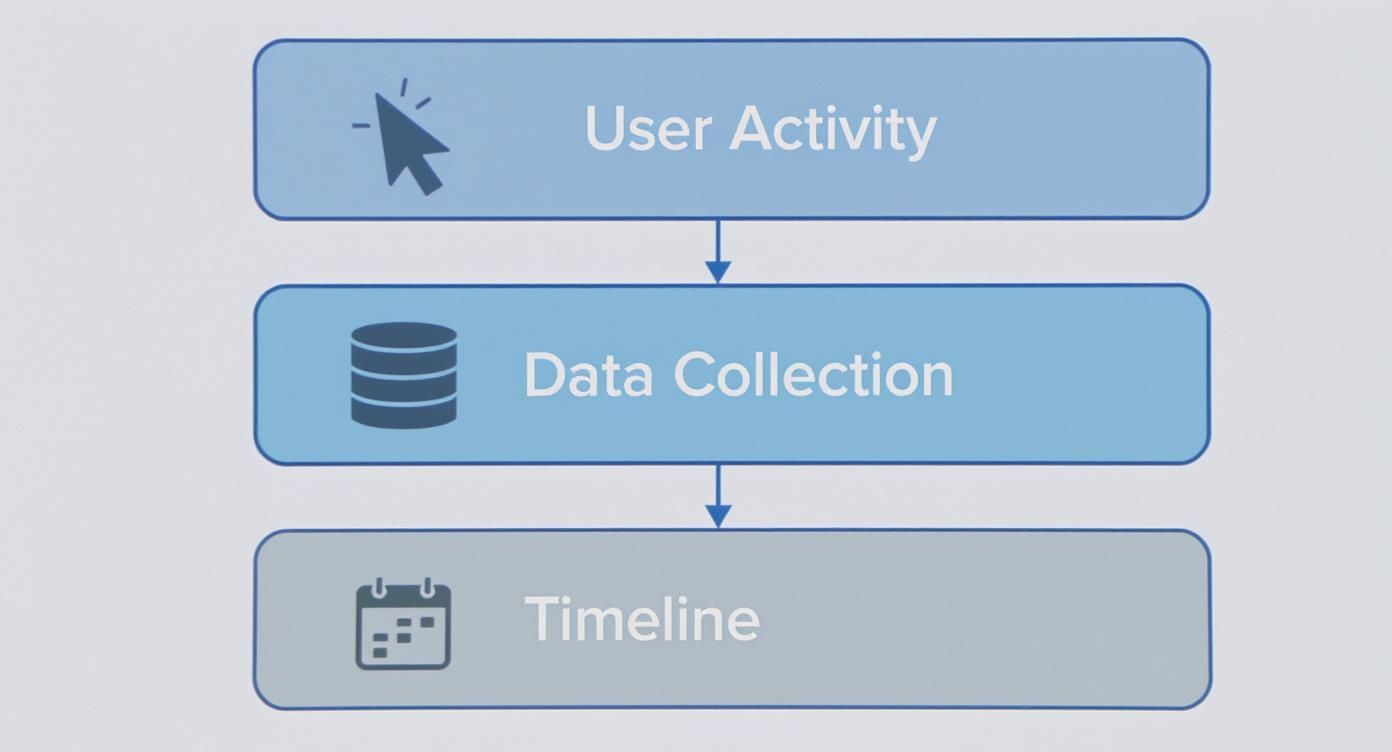
As you can see, the app observes what you're doing, collects those data points, and then neatly organizes everything into a timeline. The best part? It happens in the background, no manual entry required.
When you're comparing apps, it's helpful to have a clear framework. Below is a table that breaks down the most important features to look for in a Mac-native time tracker.
Key Feature Comparison for macOS Time Trackers
| Feature | Why It Matters for macOS Users | What to Look For |
|---|---|---|
| Local Data Processing | Your activity data is sensitive. Local processing keeps it on your machine, preventing it from being sent to a third-party cloud where you lose control. | Look for explicit "on-device," "local-first," or "privacy-focused" statements. The app should function offline. |
| Automatic Categorization | The whole point is to save time. A smart app learns your habits and groups tasks into projects automatically, so you don't have to sort everything manually. | AI-powered or rule-based systems that can bundle apps, websites, and documents into specific projects. |
| Idle Time Detection | You step away from your Mac for a call or a break. This feature spots inactivity and asks what you want to do with that time, keeping your records accurate. | Customizable timers that prompt you after a few minutes of no keyboard or mouse activity. |
| Native macOS Design | An app built for Mac just feels right. It runs smoothly, looks clean, and works well with the OS, including support for both Intel and Apple Silicon chips. | Check for a clean interface that follows Apple's design guidelines and mentions of native performance. |
| Multi-Platform Sync | Your work doesn't always happen on one device. The ability to sync or account for time spent on a phone or another computer gives you a full picture. | Look for companion apps (iOS/Android) or integrations that pull data from other sources. |
By prioritizing these features, you can filter out the noise and find a tool that genuinely supports your work instead of just adding another task to your plate. Now, let's dig a little deeper into a few of these must-haves.
Privacy First: Local Data Processing
Your digital activity is your business. That’s why the number one thing to look for is local data processing. This means all the analysis of what you’re doing happens right there on your Mac—nothing gets sent to a cloud server you can't see or control.
Think of it this way: it’s the difference between keeping a private journal in a locked safe in your house versus storing it in a public locker. An app that works locally ensures your digital footprint stays yours, and only yours. For anyone dealing with confidential client information, this is an absolute deal-breaker.
Let the App Do the Work: Intelligent and Automatic Categorization
The whole point of an automatic time tracker is to eliminate busywork, not create more of it. That’s where intelligent categorization comes in. A truly great app doesn’t just spit out a long list of every app and website you touched. It learns how you work and starts grouping activities into projects for you.
A truly smart time tracker should feel like a helpful assistant who organizes your notes before you even ask. It should learn that when you're using Xcode and browsing Stack Overflow, you're working on "Project Phoenix."
This kind of smart sorting saves you from the tedious task of manually organizing your time at the end of the day or week. It turns raw data into meaningful insights with almost no effort.
The Little Things That Matter: Essential Real-World Features
Beyond the big-ticket items like privacy and automation, a few other features separate the good apps from the great ones. A top-tier time tracking app for macOS should absolutely include:
- Idle Detection: Life happens. You get pulled away for a phone call or step out to grab coffee. Idle detection notices when you've been inactive and politely asks how to log that time when you return. This keeps your records clean and your billable hours spot-on.
- A Native macOS Interface: An app built from the ground up for Mac will feel like a natural extension of your desktop. It follows Apple's design philosophy, runs efficiently on both older Intel and newer Apple Silicon Macs, and integrates seamlessly for a stable, bug-free experience.
- Platform Support: While you want a fantastic Mac-native app, your work might spill over onto other devices. The best tools offer ways to sync with or account for time spent elsewhere, giving you a complete, unified view of your entire workday.
Real-World Workflows for Mac Professionals
Knowing the features of a great time tracking app for macOS is one thing, but seeing how it solves real problems is what makes it all click. Let's move from theory to practice and see how different professionals weave these tools into their daily grind, turning raw data into real results.
These aren't just made-up examples; they're common situations where automatic tracking becomes a game-changer for Mac users. Whether it's about getting paid fairly or keeping complex projects from going off the rails, the right app can completely reshape how you work.
The Freelance Designer's Billing Workflow
Picture Sarah, a freelance graphic designer. Her days are a chaotic mix of client work—logos for one, web mockups for another, and urgent revisions for a third. Before she started tracking her time, invoicing at the end of the month was a total nightmare. She’d piece things together from calendar events and hazy memories, always worried she was leaving money on the table.
Now, her process is incredibly smooth. An automatic tracker runs quietly on her Mac, logging every minute she spends in Adobe Illustrator, Figma, and her email app. When it's time to send an invoice, she doesn't guess. She just generates a perfect report detailing every second of billable work. This hasn't just boosted her income by capturing all those lost minutes; it’s also built incredible trust with her clients, who love the transparent, accurate billing.
For freelancers, an automatic time tracker isn't just a nice-to-have. It's a core business tool that guarantees you’re paid fairly for every bit of creative energy you pour into your work.
The Software Developer's Focus Workflow
Next, think about Alex, a software developer building a sophisticated app. His most precious resource is deep, uninterrupted focus. But constant context-switching between writing code, fixing bugs, and hopping into team meetings was destroying his concentration. He needed to understand not just how long he was working, but how well.
Alex now uses his time tracking app for macOS to guard his deep work sessions. He can see exactly how much time he spends in his code editor versus how much gets eaten up by Slack or his browser. After looking at his activity, he discovered that small but frequent interruptions were costing him nearly an hour of productive coding time every single day.
With that insight, he now sets up focus blocks that automatically restrict distracting websites and schedules specific times to check messages. The app provides the objective proof he needs to structure his day for peak productivity and, ultimately, ship better code faster.
The Project Manager's Allocation Workflow
Finally, meet Maria, a project manager leading a remote team. Her biggest headache is resource allocation. Is the new marketing campaign staying on budget? Is the design team sinking way more time into Project A than anyone planned? Relying on manual updates from her team was slow and, frankly, not always accurate.
Maria's team now uses a shared time tracking system. With a quick look at her dashboard, she gets a real-time overview of how hours are spread across every project.
This clarity allows her to:
- Spot Bottlenecks: If a single task is eating up a surprising amount of time, she can jump in to see what's wrong and offer help.
- Adjust Budgets: She can give clients a heads-up if a project's scope is creeping up and will require more resources—no more awkward end-of-project conversations.
- Optimize Planning: Future project estimates are no longer guesswork. They’re based on hard data from past work, making them far more reliable.
For Maria, the time tracker acts as her command center. It gives her the visibility she needs to keep everything on track, on time, and on budget, all without having to micromanage her team.
A Look Inside a Privacy-First Mac Time Tracker
When you pick a time tracker for your Mac, you're doing more than just choosing a piece of software—you're choosing a philosophy. An app like Chronoid is built from the ground up with a deep respect for the Mac ecosystem and the people who use it. The focus is squarely on privacy, smart automation, and a design that feels right at home on your desktop.
This means your activity data is never treated like just another commodity to be uploaded to a corporate server. It’s your information, plain and simple. Chronoid processes everything locally on your machine, making sure your digital footprint stays exactly where it belongs: with you.
The Power of On-Device Intelligence
A privacy-first approach is the starting point, but what you do with it is just as important. Chronoid’s intelligent engine works entirely on your Mac, analyzing what you do to automatically categorize your work. It learns your habits and patterns without ever sending a single byte of sensitive data to the cloud.
This local-first model is a huge deal. You get all the benefits of smart, AI-driven insights—like figuring out which projects are eating up your time or what your biggest distractions are—without giving up control. If you want to take your digital security even further, you might also consider using one of the best VPNs for Mac to protect your broader online activity.
The core idea is simple: Powerful productivity insights should not come at the cost of your privacy. An app can be both intelligent and respectful of your data, operating as your personal analyst rather than a corporate monitor.
You can learn more about this by reading up on Chronoid's commitment to privacy and how it handles all processing on your device.
A Native macOS Experience
Beyond privacy, how the app feels to use is everything. A great Mac time tracker shouldn't feel like a clunky web app forced into a desktop window. Chronoid is built as a native application, meaning it’s specifically designed to run fast and efficiently on both Intel and Apple Silicon Macs.
Being native ensures the app is stable, responsive, and integrates beautifully with the OS you use all day. Developers also have to keep up with OS updates to stay compatible, which is critical in a fast-moving environment. For example, while an older version like macOS 15.7 might still have 23.62% of the market, a newer one like macOS 26.1 can quickly grow to 43.21% as users upgrade. A well-built native app handles these transitions smoothly.
In the end, this intense focus on local data, smart automation, and a true Mac-native design results in a tool that does more than just track your time—it actually makes your whole workflow better. It’s a perfect example of how software can be built to empower you, without compromise.
Building Your New Time Tracking Workflow Today
We've covered a lot of ground, and now you can see how the right kind of time tracker for macOS can shift your workday from a chaotic guessing game to a clear, focused process. Making the leap from thinking you know where your time goes to knowing for sure isn't just about logging hours. It's about taking back control, sharpening your focus, and finally making decisions based on reality, not just a gut feeling.
The main idea is simple but incredibly effective. Real productivity starts with understanding your habits, and you can only do that with accurate, automatic tracking. The best tools for this job respect your privacy by keeping your data on your machine and feel like they actually belong on your Mac, blending right into your workflow. With that in mind, you're ready to pick an app that helps you, instead of just giving you another chore.
Your Four-Step Action Plan
Ready to stop guessing and start getting better? It's time to put these ideas to work. This isn't about some massive, life-altering overhaul. It's about taking small, smart steps toward a more intentional way of working.
Here’s a simple roadmap to get you started:
- Define Your Primary Goal: What's the #1 thing you want to fix? Maybe it's billing clients more accurately, protecting your deep work time, or just getting an honest look at where your day goes. Pick one clear objective to start.
- Trial an App Using the Feature Checklist: Grab a promising app and kick off a trial. Use the feature list we talked about earlier as your guide. Does it track automatically? Does it process data locally for privacy? Does it feel native to macOS?
- Let It Run for One Full Week: Don't check the data every five minutes. Just let the app do its thing in the background for a whole week. This will give you a realistic baseline of your work habits. A single day is just a snapshot; a week tells a story.
- Review and Adjust: After a week, sit down with the data. What surprises you? Where are the time sinks you never noticed? Use this insight to make one or two small tweaks to your routine for the next week.
The goal is progress, not perfection. By reviewing your patterns weekly, you can make incremental changes that lead to massive improvements in focus and output over time. This data-driven approach removes the guesswork from productivity.
When you're looking at apps, you'll see a wide range of pricing. Some, like Toggl, offer a freemium plan, while others like Timely lean into AI features with subscriptions running from $9–$18 per month. There’s a healthy market for high-quality apps, which makes sense when you consider the Apple ecosystem saw a staggering $89.3 billion in consumer spending last year. If you want to dive deeper, you can explore a comparison of app pricing strategies on myhours.com.
Once you're ready to jump in, our guide to the Chronoid installation process makes getting set up a breeze.
Ready to see exactly where your time goes and reclaim your focus? Chronoid gives you the automatic tracking and privacy-first insights you need to work smarter. Start your free 14-day trial and build a better workflow today. Get started with Chronoid.