
College work usually breaks down into four recurring problems: keeping track of deadlines, capturing notes, organizing study materials, and staying focused long enough to finish the work. Study management means covering those four jobs, and this guide is built around them, not generic workplace software. If you want the best productivity apps for students, use the quick picks first, then the comparison table, then the stack section to build the lightest setup that solves your actual bottleneck.
I looked for tools that are realistic for students with limited time, limited budgets, and uneven motivation. Some apps here are excellent for beginners because they work almost immediately. Others are more powerful, but only worth it if you already know you need deeper note-linking, research workflows, or long-term knowledge management. That distinction matters more than feature count. If you are also trying to improve your study process itself, this practical guide on how to study smarter, not harder pairs well with the app picks below.
In this guide, you’ll find apps for:
- Assignment planning and deadline tracking
- Notes, annotation, and knowledge management
- Focus sessions, time tracking, and distraction control
- Memorization and reading-heavy study workflows
Each recommendation includes what it does well, where it gets harder to use, and who should skip it. That should make it easier to choose among the best apps for student productivity without downloading five tools you will never open again.
Student deal
Students get 50% off Chronoid.
If you want a Mac study timer, distraction blocker, and automatic study tracking in one app, grab the student discount and start with the free trial first.
Claim 50% student discount
Download free trial
Quick Picks: Top 5 Student Productivity Apps
| App | Best Pick For | Why It Stands Out | Learning Curve | Price |
|---|---|---|---|---|
| Chronoid | Automatic study tracking and Pomodoro-style focus | Combines background time tracking, focus sessions, website blocking, and AI summaries in one Mac app | Very easy | 7-day free trial |
| Todoist | Assignment planning | Fast task capture, clear deadlines, and low setup friction | Very easy | Free tier; Pro 50% off |
| Notion | Organizing classes in one place | Flexible dashboards for courses, notes, reading lists, and project tracking | Moderate | Free for students |
| Freedom | Pomodoro focus sessions and distraction blocking | Strong cross-device blocking with scheduled sessions and Locked Mode | Easy | From $3.33/mo |
| Goodnotes | Handwritten notes and annotated PDFs | Best fit for iPad students who think visually and write by hand | Easy | Free tier; paid plans available |
Chronoid: Best for students who want the least manual work. In my view, this is the easiest pick if you study on a Mac and want to see where your time goes before rebuilding your routine.
Todoist: Best for beginners and deadline-heavy semesters. It is the cleanest option here if your main problem is forgetting what is due and when.
Notion: Best for organizing study materials, class pages, and semester dashboards. Choose it if you want one hub for notes, resources, and planning rather than a single-purpose app.
Freedom: Best for Pomodoro-style focus sessions in 2026. If your study blocks keep collapsing because you open one site and then lose 40 minutes, this is the most direct fix.
Goodnotes: Best for handwritten notes, lecture markup, and PDF-heavy classes. It is especially useful when your coursework involves diagrams, problem sets, or slide annotation.
1. Chronoid
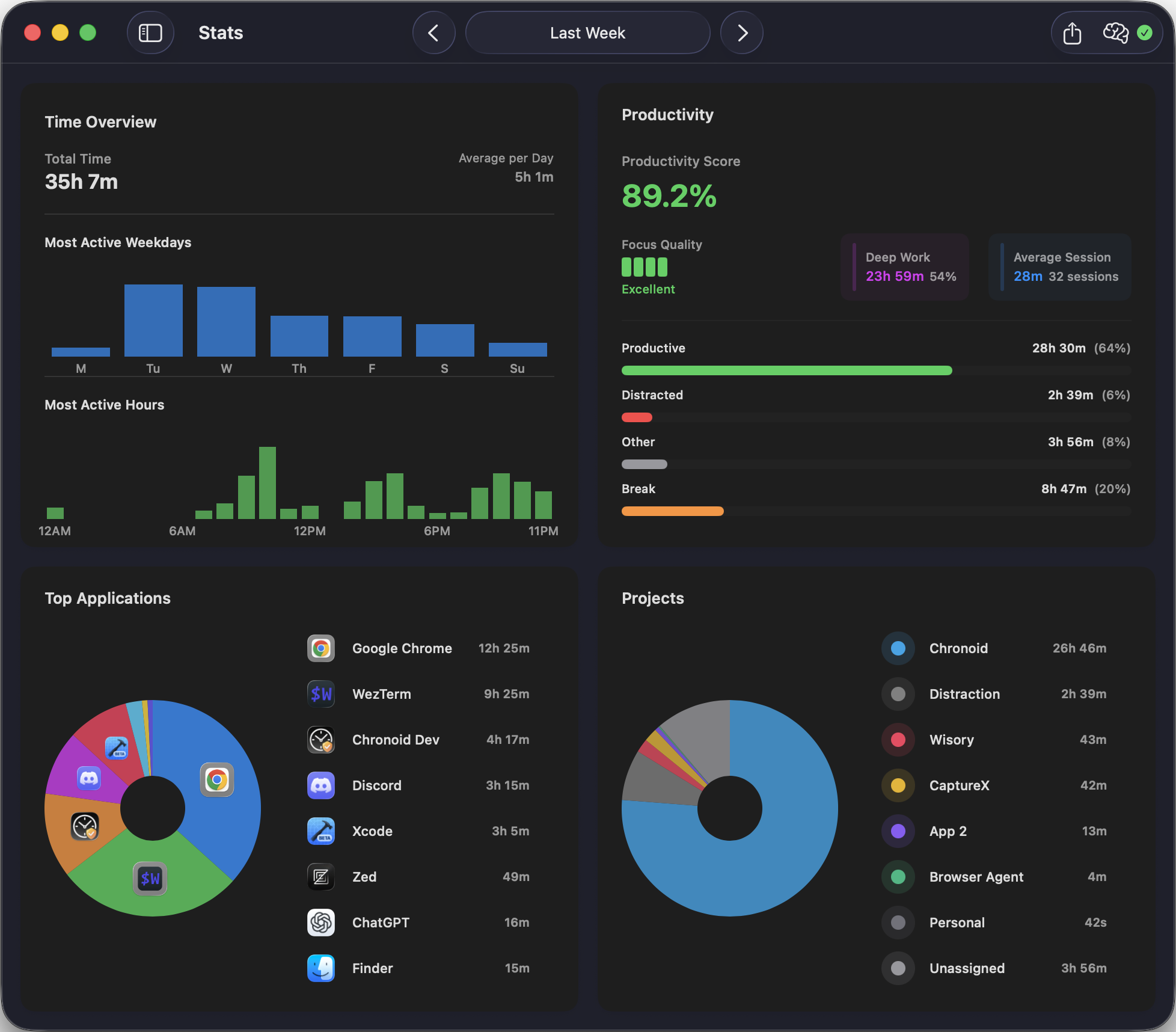
Chronoid is the best automatic time tracking app for students on macOS. Instead of requiring you to start and stop timers manually, it runs in the background, logging every app, website, and document you interact with throughout the day. This zero-effort approach gives you a completely accurate picture of where your study time goes, no discipline or habit-building required.
Its standout feature is the AI-powered chat interface. You can ask natural questions like “How much time did I spend on research papers versus social media last week?” and get instant, actionable answers. This transforms raw data into a practical tool for improving focus and study habits. Combined with built-in focus tools — a website blocker, Pomodoro timer, and scheduled focus sessions — Chronoid is the only app you need to understand and optimize your productivity.
| App | Category | Best For | Price |
|---|---|---|---|
| Chronoid | Time Tracking | Automatic study time insights | 7-day free trial |
| Notion | All-in-One Workspace | Organizing your entire academic life | Free for students |
| Todoist | Task Management | Tracking assignments & deadlines | Free tier; Pro 50% off |
| Obsidian | Knowledge Base | Building a second brain for research | Free; Sync $29/yr |
| Freedom | Distraction Blocker | Blocking social media during study | From $3.33/mo |
Key Features and Use Cases
- Automatic Tracking: Eliminates the guesswork and administrative burden of manual timers, perfect for accurately logging study sessions and breaks without conscious effort.
- AI-Powered Chat: Get instant, specific answers about your time usage. Ask “What were my top distractions during my study block?” to pinpoint exactly what to block next time.
- Integrated Focus Tools: A website blocker, Pomodoro timer, and scheduled focus sessions all in one app. Identify distractions and immediately act on them without switching tools.
- Privacy-First Design: All activity data stays on your Mac by default. Your study habits and browsing history remain completely private — no data leaves your device.
Practical Considerations
Chronoid offers a full-featured 7-day free trial, after which a paid license is required. It is exclusively available for macOS (version 12+ on both Intel and Apple Silicon), so students on Windows or looking for mobile tracking will need a different solution. If you’re exploring budget-friendly options first, see our roundup of free time tracking software. For a deeper look into its capabilities, explore more about time tracking on Mac.
- Website: https://www.chronoid.app
How I Picked These Productivity Apps for Students
I did not treat this as a generic list of popular apps. The filter was simple: would this tool realistically help a student handle classes, assignments, readings, revision, or focus without demanding a full weekend of setup first? When an app felt powerful but impractical for most students, I said so.
The shortlist was based on seven criteria: pricing, student discounts, platform support, learning curve, usefulness for study management, usefulness for organizing notes or materials, and support for focus sessions or Pomodoro-style work. Beginner-friendly tools had to pass a stricter test: they needed a clear free entry point, a fast setup path, and an immediate payoff within the first day or two. In practice, that is why Todoist ranks so well for first-time users and why Obsidian, while excellent, ranks lower for beginners.
Each app should solve a distinct problem instead of duplicating the same role. A student usually does not need three note apps or two task managers. They may, however, need one planning app, one capture app, and one focus tool. Preference is given to low-friction tools, so if an app asks students to build an elaborate system before it helps, it should not receive a top recommendation.
One useful pattern also shows up outside pure productivity apps: beginner tools increasingly teach while they help. A learning-focused recommendation list highlighted Khan Academy, Desmos, StatMagic, and Photomath because they emphasize step-by-step clarity rather than raw power, which is exactly what beginners usually need first CareerVillage discussion. That same beginner-first principle influenced this roundup.
2. Notion — Education Plan
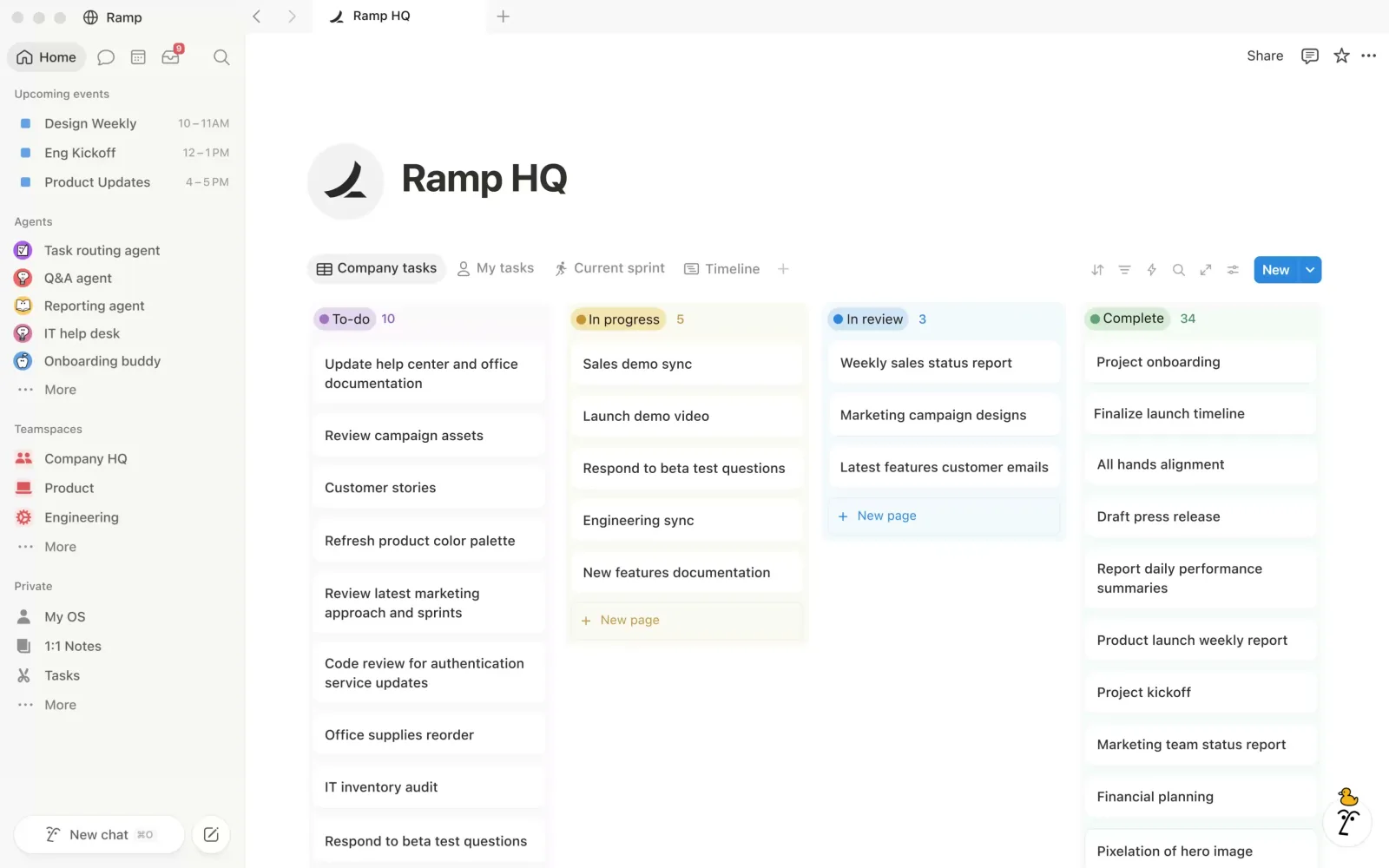 Screenshot: notion.com, July 2026
Notion has become a powerhouse productivity app for students, acting as an all-in-one workspace for notes, tasks, and project management. Its unique strength lies in its incredible flexibility; you can create simple lecture notes, complex databases to track assignments, or entire wikis for your student club. The platform offers its powerful Plus plan completely free to students and educators with a valid school email address.
The user experience is clean and minimalist, but harnessing its full potential requires a learning curve. Its massive template ecosystem is a huge plus, offering pre-built setups for everything from class schedules to grade trackers. The main downside is that its power can be overwhelming for new users, and while the core features are free, advanced AI tools and team features come at an additional cost.
Key Details & Tips
| Feature | Details |
|---|---|
| Best For | Students who want a single, highly customizable app to organize their entire academic life. |
| Pricing | Free Plus plan for students and educators with a school email. |
| Platform | Web, macOS, Windows, iOS, Android |
| Pros | Extremely versatile, free for students, huge community and template library. |
| Cons | Can have a steep learning curve; advanced features and AI add-ons cost extra. |
Pro Tip: Don’t try to build a complex system from scratch. Start by exploring the official Notion Template Gallery and searching for “student” or “university” templates. This will give you a powerful, pre-built dashboard you can customize over time as you learn the ropes.
3. Todoist
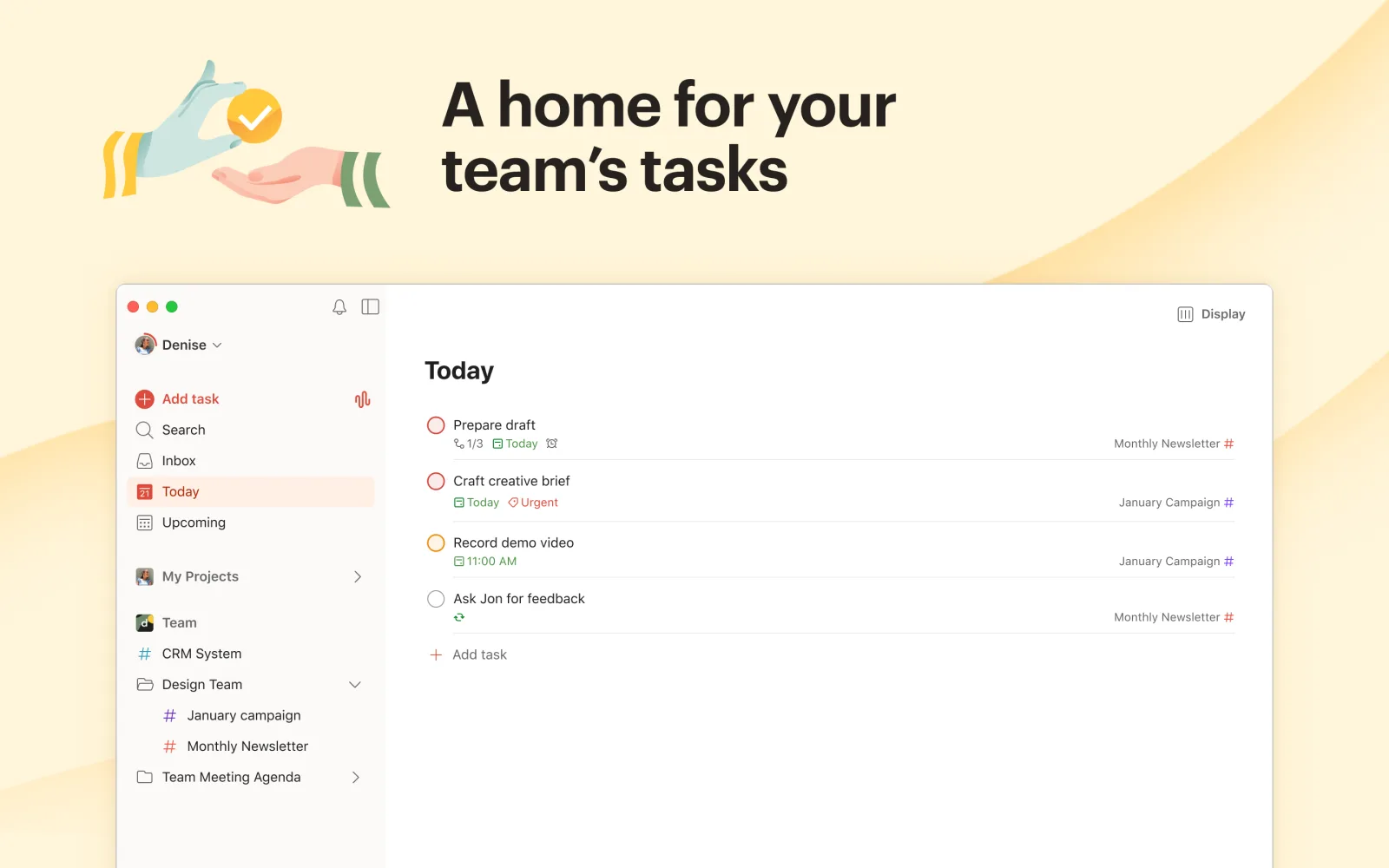 Screenshot: Mac App Store, July 2026
Todoist is one of the most reliable and straightforward task managers available, making it one of the best productivity apps for students who need to organize everything from daily homework to long-term project deadlines. Its strength lies in its clean interface and powerful, cross-platform synchronization, which ensures your to-do list is always up-to-date whether you’re on your phone, laptop, or tablet. The app uses natural language input, allowing you to quickly add tasks like “Submit history essay tomorrow at 5 PM.”
The user experience is intuitive, with features like projects, sub-tasks, labels, and filters helping you organize your coursework effectively. While the free version is quite capable for basic task management, some of its most powerful features, such as custom reminders and advanced filters, are locked behind a Pro subscription. One thing to know before you budget: as of 2026, Todoist’s official help page says it does not offer student discounts, so plan around the free tier or the full Pro price (about $5 per month billed annually).
Key Details & Tips
| Feature | Details |
|---|---|
| Best For | Students who need a reliable, cross-platform task manager to track assignments and deadlines. |
| Pricing | Free plan available; Pro plan from $4/month (billed annually). 50% education discount available. |
| Platform | Web, iOS, Android, macOS, Windows |
| Pros | Excellent cross-platform sync, intuitive natural language input, clean and simple user interface. |
| Cons | Key features like reminders and advanced filters are locked behind the Pro subscription. |
Pro Tip: Use the pre-made templates for projects like “Thesis Planning” or “Semester Overview” to get organized quickly. You can also integrate Todoist with your calendar to see all your deadlines and tasks in one place, helping you manage your time more effectively. Pair it with Chronoid to see exactly how long tasks actually take versus your estimates.
4. Obsidian
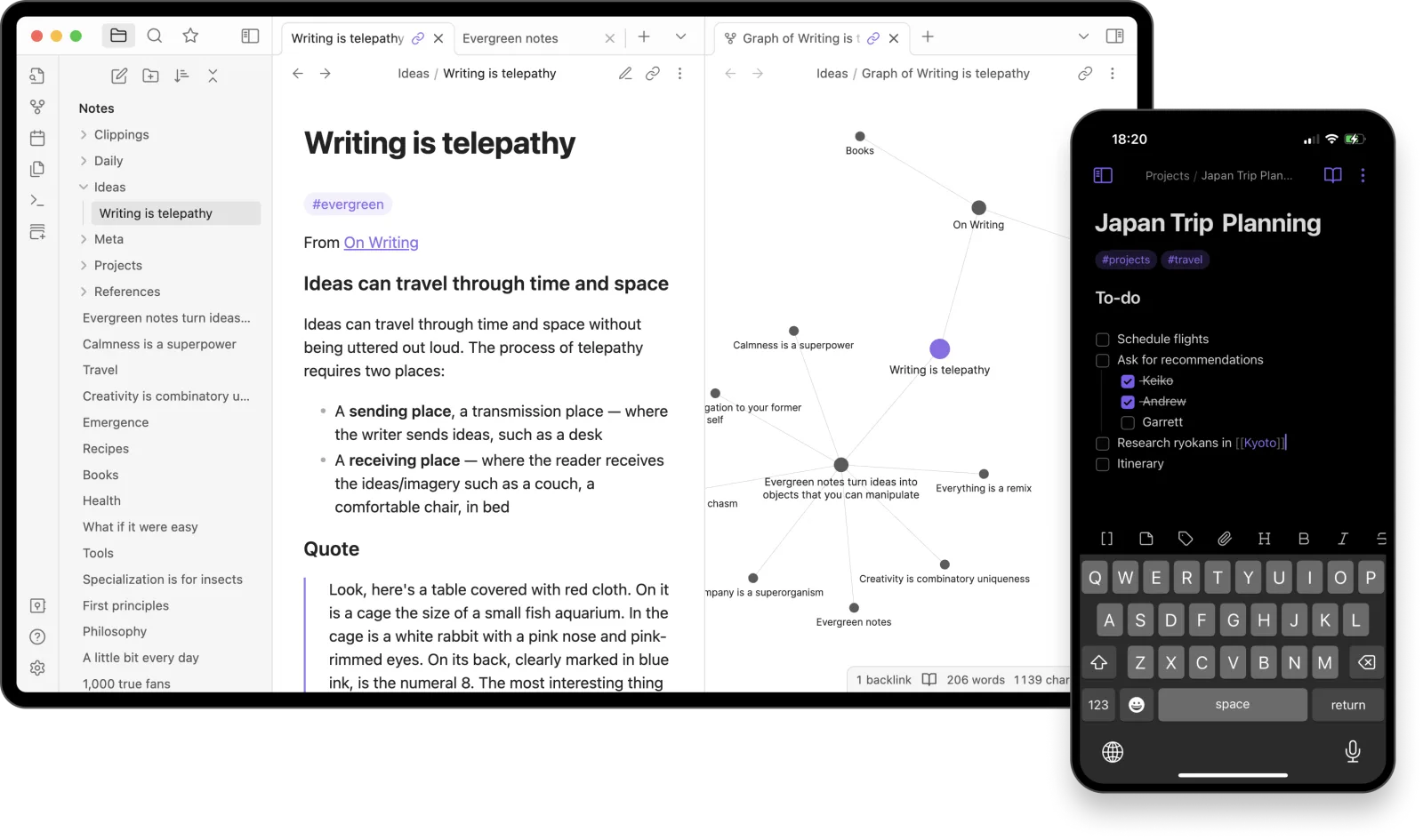 Screenshot: obsidian.md, July 2026
For students who want to build a “second brain,” Obsidian is a powerful local-first knowledge base. Its primary strength is that your notes are stored as plain Markdown files on your device, giving you full ownership and offline access. Unlike cloud-based tools, you are never locked into a subscription to access your own work, making it one of the most sustainable and best productivity apps for students engaged in long-term research.
Obsidian’s graph view visually connects your ideas, helping you see relationships between lecture notes, research papers, and textbook chapters. The user experience is highly customizable with an extensive plugin ecosystem for adding flashcards, Zotero integration, and more. While the core app is free, official multi-device sync and publishing services are paid — though students receive a 40% discount on Sync ($29/year instead of $48).
Key Details & Tips
| Feature | Details |
|---|---|
| Best For | Research-heavy majors and students who want to build a permanent, interconnected knowledge base. |
| Pricing | Core app is free. Sync is $48/year ($29/year with 40% student discount). Publish is also discounted. |
| Platform | Windows, macOS, Linux, iOS, Android |
| Pros | You own your notes forever, works completely offline, highly extensible for specific academic needs. |
| Cons | Can have a steep learning curve; setup and plugin management can be overwhelming for new users. |
Pro Tip: Start simple with daily notes and backlinks. Explore community plugins one at a time, like “Spaced Repetition” to turn your notes into flashcards, which transforms Obsidian into a powerful active recall study tool.
5. Goodnotes
 Screenshot: goodnotes.com, July 2026
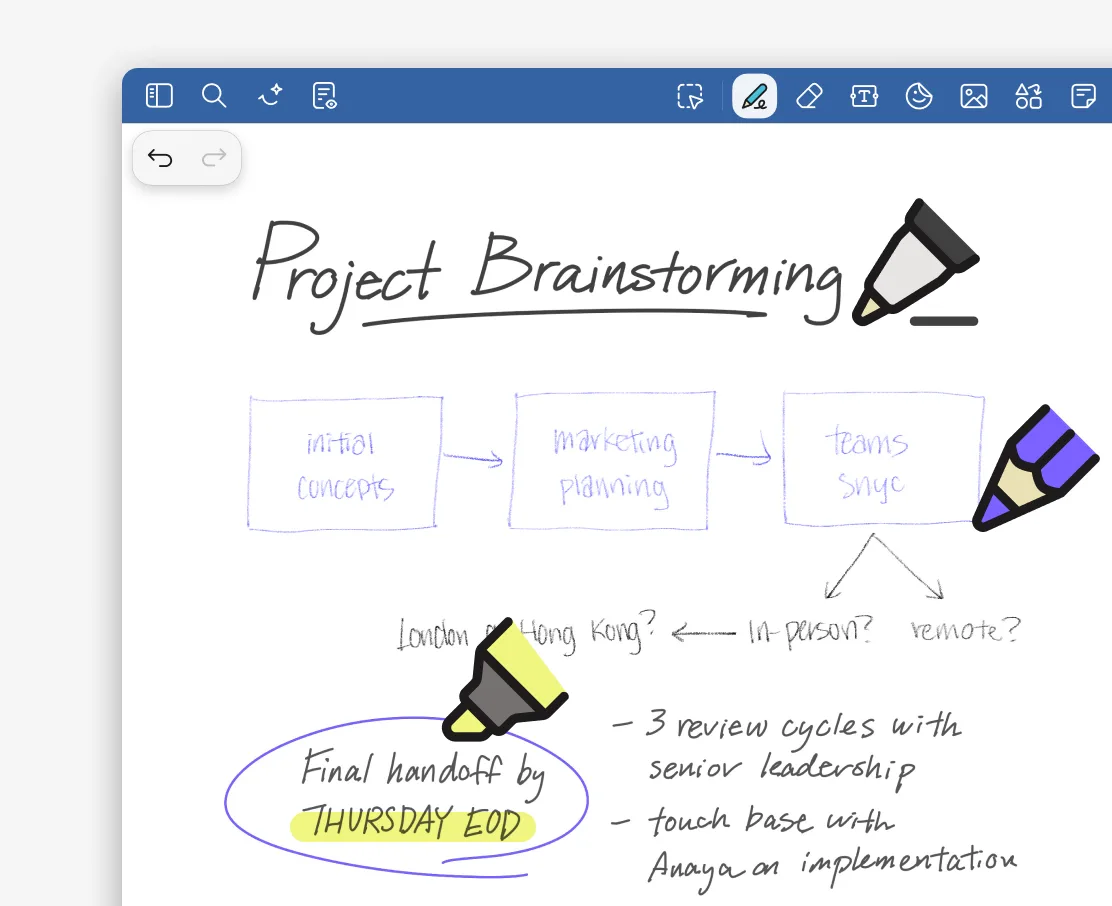
For students who prefer the feel of handwriting, Goodnotes transforms tablets into powerful digital notebooks. It excels at capturing lecture notes with Apple Pencil, allowing you to write, draw diagrams, and annotate PDFs with ease. Its standout feature is the ability to search your handwritten text, making it simple to find key terms from weeks of notes.
The app syncs your notes across devices, ensuring you have access whether you’re on an iPad, Mac, or even a Windows device. Unique tools like audio recording synced to your notes and AI-powered study aids for creating quizzes make it one of the best productivity apps for students who are active learners. In 2026, Goodnotes offers Essential, Pro, and Special Edition tiers with a 7-day free trial to explore features.
Key Details & Tips
| Feature | Details |
|---|---|
| Best For | Students who take handwritten notes, especially on an iPad, and need to annotate PDFs. |
| Pricing | Free version with limited notebooks; yearly subscription from $6.99-$11.99/year depending on platform and tier. |
| Platform | iOS, iPadOS, macOS, Android, Windows, Web |
| Pros | Excellent handwriting experience, searchable handwritten notes, powerful PDF markup tools. |
| Cons | AI features require a Pro subscription, and feature parity varies across different platforms. |
Pro Tip: Use the audio recording feature during lectures. It syncs what you write to the audio, so you can tap a word in your notes to hear exactly what the professor was saying at that moment.
6. Anki
 Screenshot: apps.ankiweb.net, July 2026
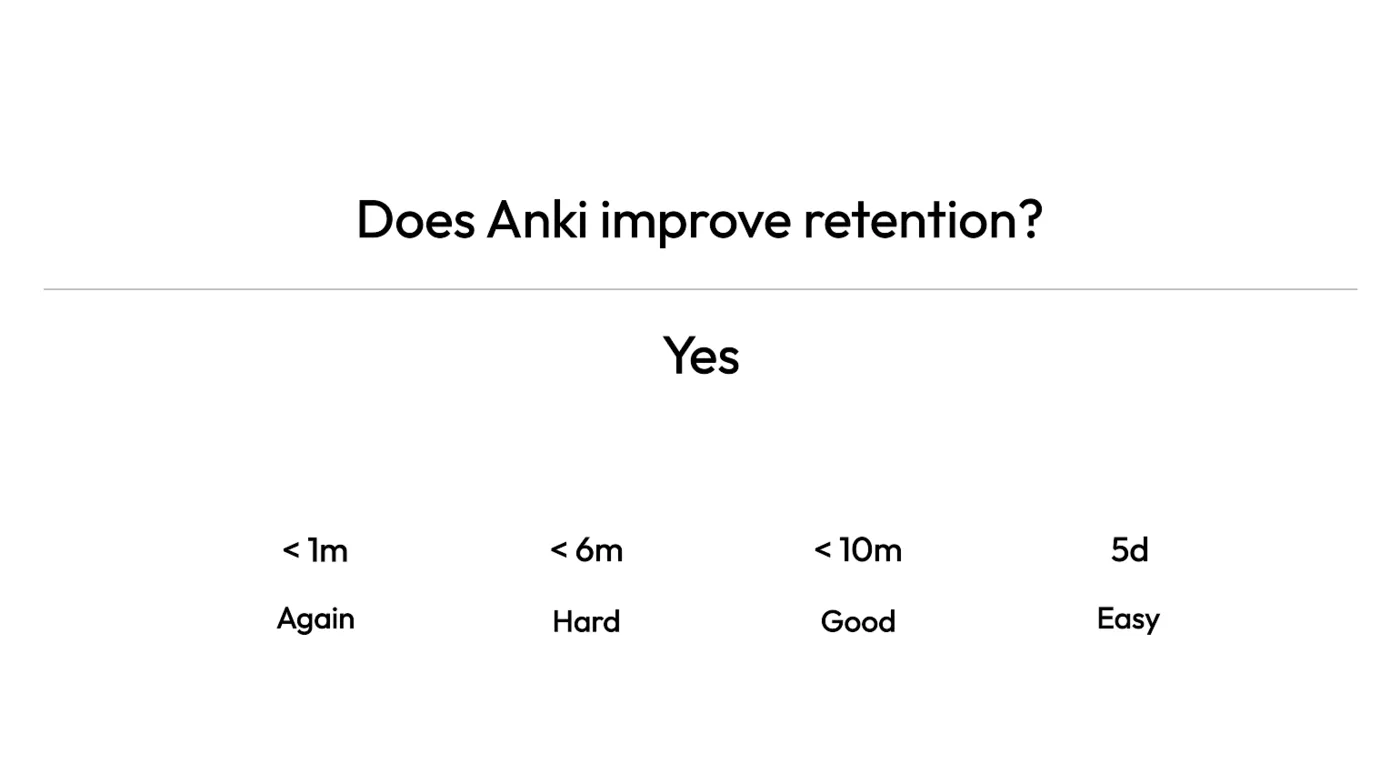
Anki is the gold standard for spaced repetition flashcards, and it is completely free on desktop. Medical students, language learners, and anyone facing heavy memorization loads swear by its scientifically proven algorithm that schedules reviews at optimal intervals. If your courses involve memorizing formulas, vocabulary, dates, or concepts, Anki will help you retain information far more efficiently than re-reading notes.
The interface is deliberately simple and functional rather than flashy. What Anki lacks in visual polish, it makes up for in raw effectiveness and customization. You can create cards with text, images, audio, and even cloze deletions. The community-shared deck library means you can often find pre-made decks for popular courses. The main drawback is the learning curve for creating optimized cards and the $25 one-time cost of the iOS app (Android is free).
Key Details & Tips
| Feature | Details |
|---|---|
| Best For | Students in memorization-heavy courses (medicine, law, languages, sciences). |
| Pricing | Free on desktop and Android. $25 one-time purchase on iOS. |
| Platform | Windows, macOS, Linux, iOS, Android, Web (AnkiWeb) |
| Pros | Scientifically proven spaced repetition, highly customizable, massive shared deck library, open source. |
| Cons | Steep learning curve for card creation, dated interface, iOS app is relatively expensive. |
Pro Tip: Don’t just download shared decks — making your own cards is a powerful study method in itself. Keep cards atomic (one fact per card) and use cloze deletions for maximum retention. Pair Anki with your Obsidian notes to turn research into reviewable flashcards.
7. Readwise
 Screenshot: readwise.io, July 2026
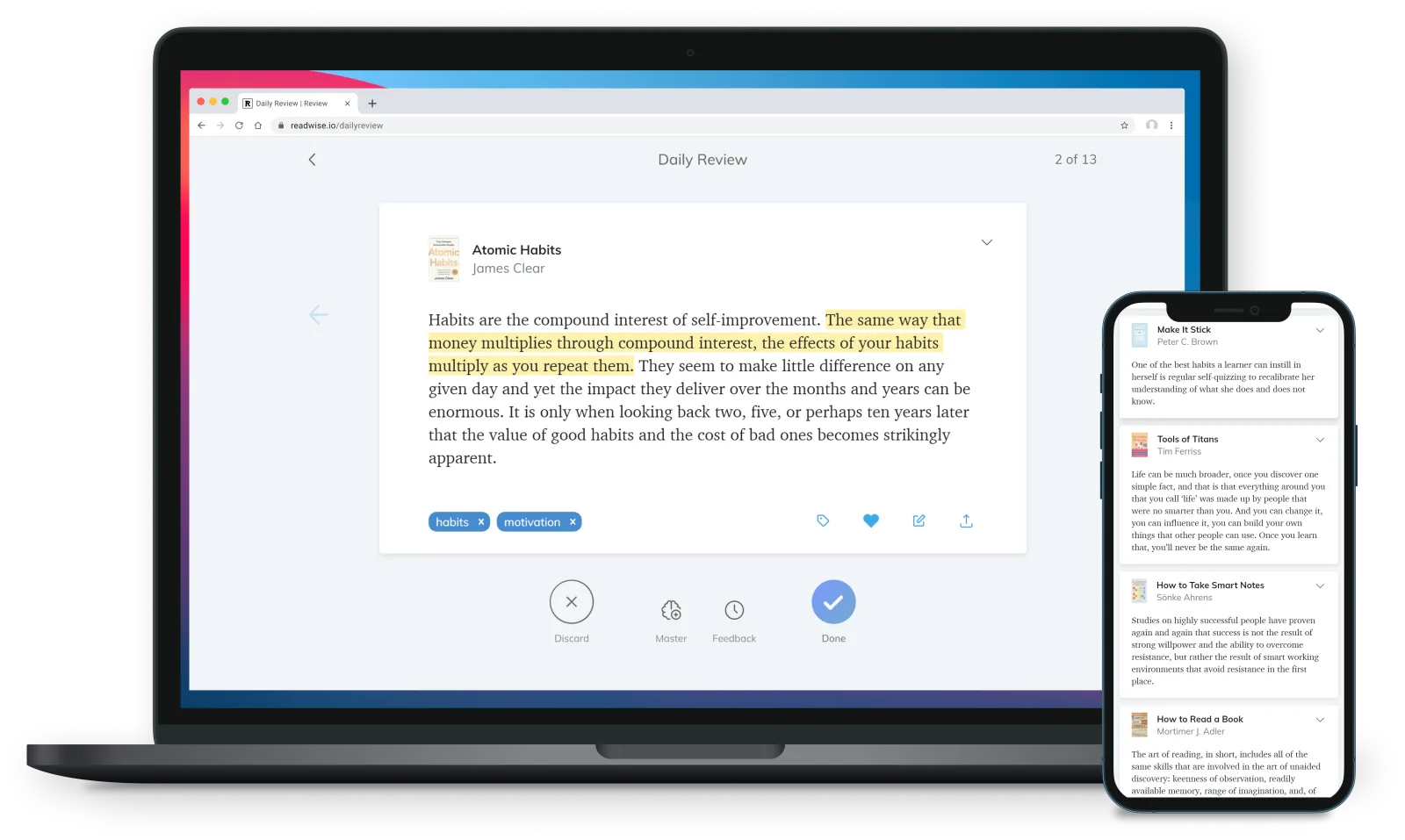
For students who read extensively, Readwise acts as a personal knowledge hub, making it one of the best productivity apps for students focused on retention. It consolidates highlights and notes from Kindle, PDFs, YouTube, and its own Reader app into a single location. Its core strength is its spaced repetition system, which resurfaces your highlights in a daily review, helping you remember key concepts from your study materials long after you’ve read them.
The platform shines with its integrations, allowing you to export your organized notes directly into tools like Notion or Obsidian to build a powerful, interconnected knowledge base for your courses. This makes it invaluable for writing research papers or preparing for cumulative exams. Readwise offers a generous 50% student discount. Just email hello@readwise.io with proof of your academic status before subscribing.
Key Details & Tips
| Feature | Details |
|---|---|
| Best For | Students in literature-heavy courses who need to retain and connect ideas from multiple sources. |
| Pricing | Free trial available; 50% student discount (email hello@readwise.io with proof of academic status). |
| Platform | Web, iOS, Android |
| Pros | Centralizes highlights from many sources, spaced repetition aids memory, excellent Notion/Obsidian integration. |
| Cons | Requires a paid subscription for full functionality; best value for frequent readers. |
Pro Tip: Use the Readwise Reader app to save web articles and PDFs for later. Highlight them on the go, and the notes will automatically sync with your daily review queue, turning your commute into a productive study session.
8. GitHub Student Developer Pack
 Screenshot: education.github.com, July 2026
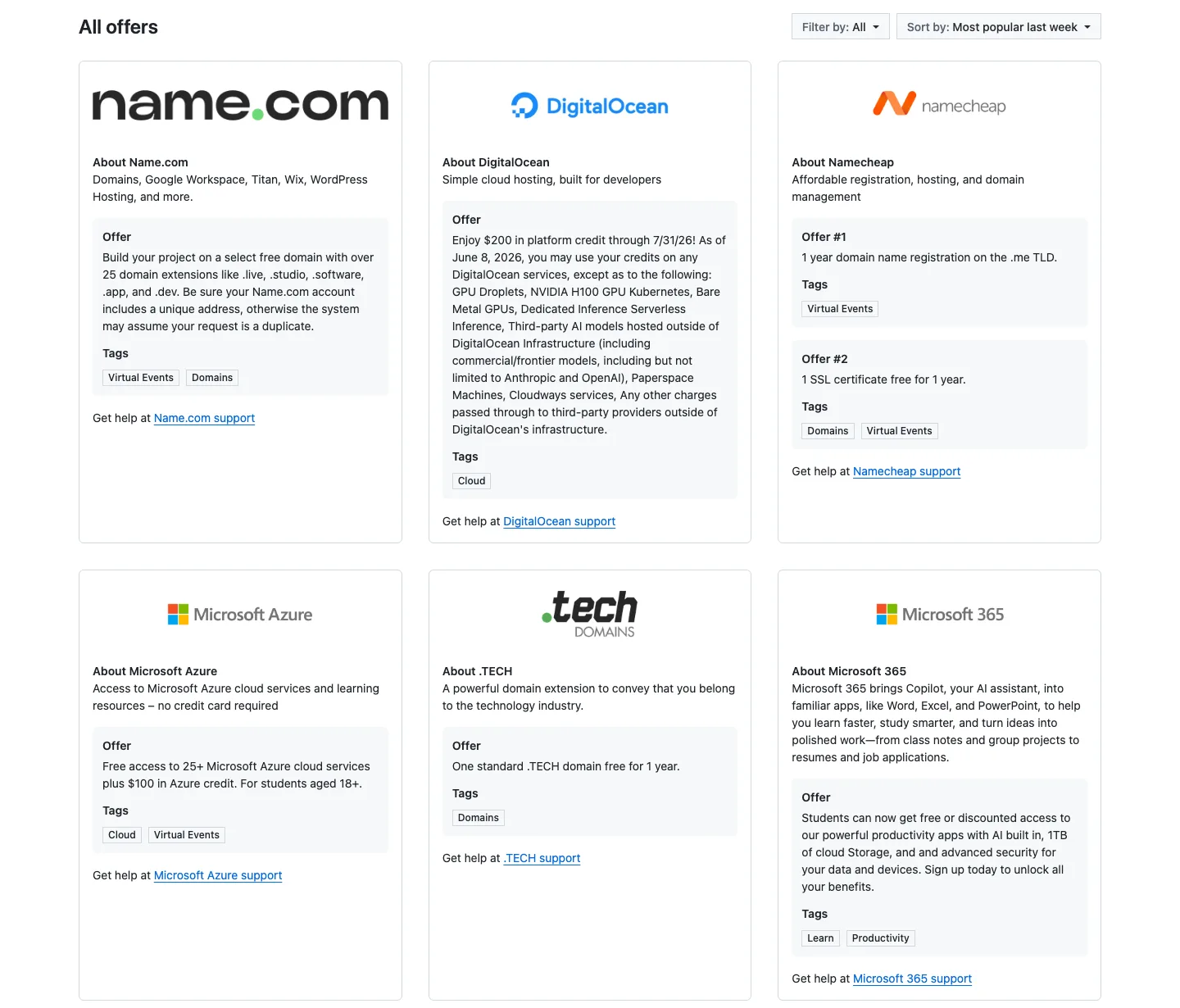
For students in technical fields, the GitHub Student Developer Pack is less a single app and more a treasure chest of the best productivity apps for students. It acts as a verified gateway, aggregating free or heavily discounted premium software and services. Its strength lies in its incredible value; a single student verification unlocks access to powerful developer tools, learning platforms, and cloud credits that would otherwise be very expensive.
Once verified, you can browse and redeem offers from various partners directly through the GitHub Education portal. The collection is geared toward developers but includes many tools useful for general productivity and project management — including a free Notion Plus plan. The benefits renew annually as long as you remain a verified student, providing continuous value throughout your academic career. One 2026 change to know: GitHub restructured the included Copilot benefit into a “Copilot Student” plan with 200 monthly AI credits and automatic model selection, so it is more limited than the full paid Copilot it used to match.
Key Details & Tips
| Feature | Details |
|---|---|
| Best For | Students, especially in STEM fields, who want free access to premium developer and productivity software. |
| Pricing | Free for verified students. |
| Platform | Web-based portal; individual tools have their own platform compatibilities. |
| Pros | Exceptional value with many paid tools for free, one verification unlocks dozens of offers. |
| Cons | Primarily focused on developer tools, activation for some offers can have delays. |
Pro Tip: Don’t just grab the big-name software. Explore the entire list of offers, as you might find niche productivity tools, like task managers or diagramming software, that perfectly fit your workflow for specific courses or projects. Check back each year, as new partners are often added.
Visit the GitHub Student Developer Pack
9. Setapp
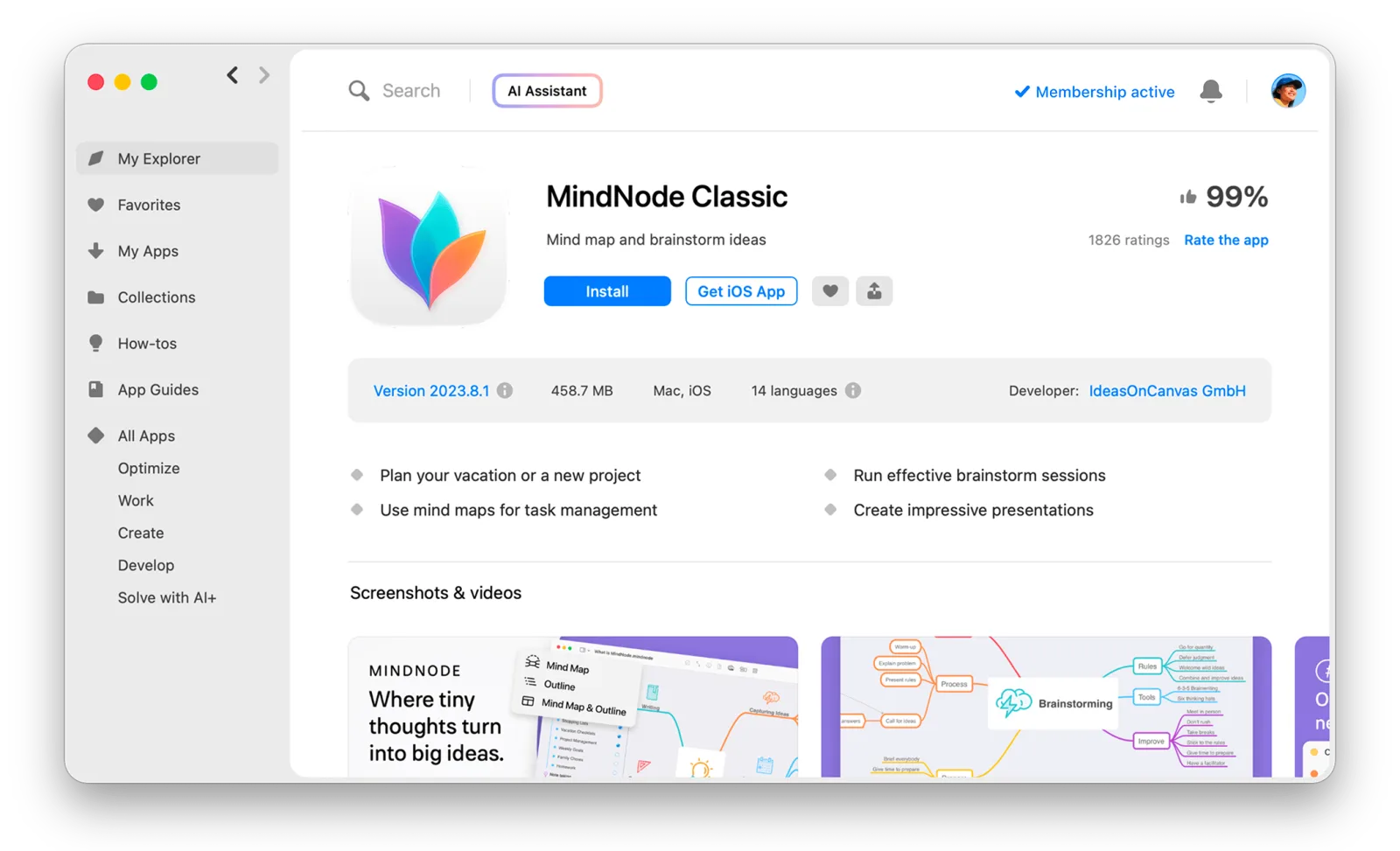 Screenshot: setapp.com, July 2026
For Mac and iOS users, Setapp offers a unique “Netflix for apps” model, providing access to over 240 premium applications for a single monthly fee. This platform stands out by bundling many of the best productivity apps for students into one subscription, eliminating the need to purchase tools like task managers, note-takers, and focus timers individually. It’s a curated ecosystem where every app is vetted, ad-free, and always updated.
The user experience is simple; you download the Setapp client, and from there, you can install any app in the catalog with one click. The main drawback is its exclusivity to the Apple ecosystem, leaving Windows and Android users out. Students get a 20% education discount on the annual Mac + iOS plan when signing up with an .edu email, and third-party student discount platforms sometimes offer up to 50% off.
Key Details & Tips
| Feature | Details |
|---|---|
| Best For | Mac-using students who need multiple premium productivity tools and want to simplify software costs. |
| Pricing | Monthly or annual subscription; 20% education discount with .edu email. |
| Platform | macOS, iOS |
| Pros | High value for the price, curated selection of quality apps, simple one-click installs and updates. |
| Cons | Limited to the Apple ecosystem, can feel expensive if you only use a few apps. |
Pro Tip: Use the 7-day free trial to explore the catalog and identify at least three or four apps you would use regularly. Apps like MindNode (mind mapping), Paste (clipboard manager), and a reliable time tracker can immediately justify the subscription cost for a student workflow. To find other useful tools, you can also explore this guide on the best free time tracking software.
10. Grammarly
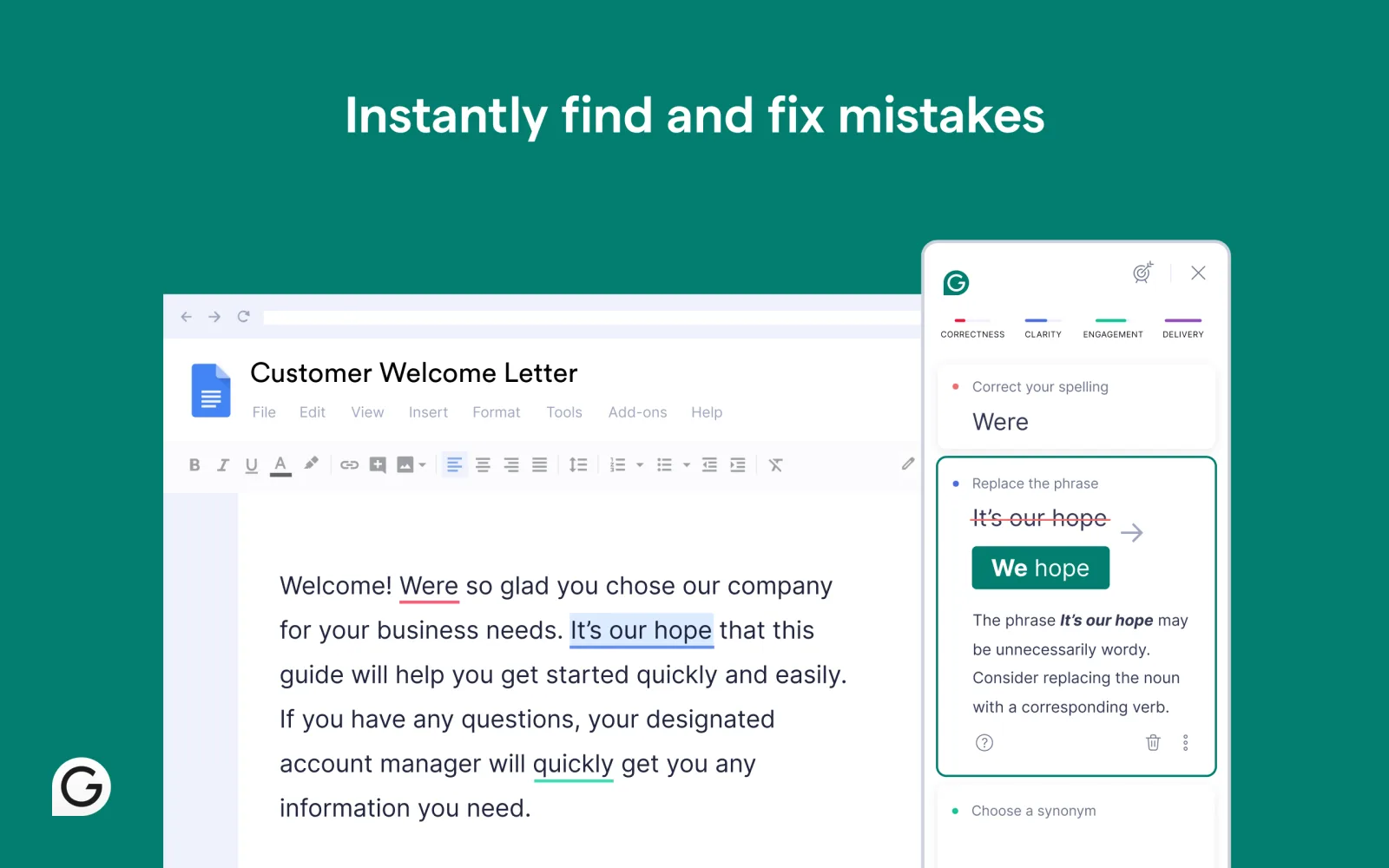 Screenshot: Mac App Store, July 2026
Grammarly (whose parent company rebranded to Superhuman in late 2025, though the writing product keeps its name) is an essential writing assistant for students who want to submit polished essays, research papers, and emails. It goes beyond basic spell check, catching grammar mistakes, unclear sentences, and tone issues in real time as you write. The free tier handles core grammar and spelling, while the premium version offers full-sentence rewrites, plagiarism detection, and tone adjustments — all critical for academic writing.
The app works everywhere you write, including browser extensions, desktop apps, and mobile keyboards, so you can use it across Google Docs, Word, email, and even discussion board posts. For students whose first language isn’t English, Grammarly is especially valuable for catching nuanced errors that standard spell checkers miss.
Key Details & Tips
| Feature | Details |
|---|---|
| Best For | Students who write frequently and want to improve the quality and clarity of their academic work. |
| Pricing | Free tier for basic grammar; Premium from $12/month (billed annually). Student discounts occasionally available. |
| Platform | Web, macOS, Windows, iOS, Android, browser extensions |
| Pros | Works everywhere you write, catches nuanced errors, plagiarism detection on premium. |
| Cons | Premium is pricey for students, AI suggestions can sometimes miss academic context. |
Pro Tip: Even the free tier is extremely useful. Install the browser extension and you’ll catch errors across all your online writing — from Canvas discussion posts to emails to professors. Use Chronoid alongside Grammarly to track how much time you actually spend on writing and editing.
11. Freedom
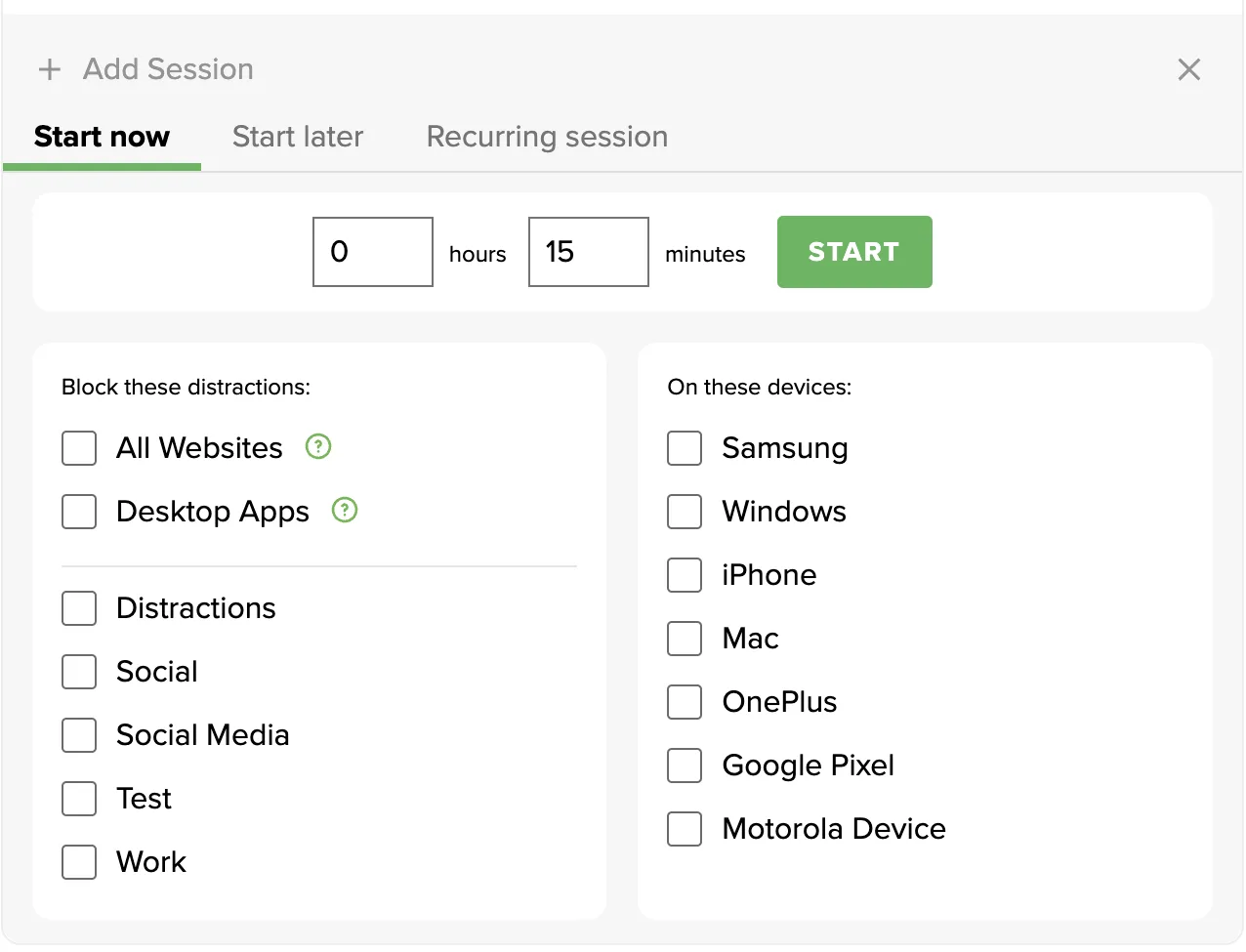 Screenshot: freedom.to, July 2026
Freedom is a cross-platform distraction blocker that helps students stay focused during study sessions. If you’re on a Mac, you might also want to check out our guide to the best website blocker for Mac. Unlike basic browser extensions, Freedom blocks distracting websites and apps at the device level across your Mac, Windows PC, iPhone, and Android phone simultaneously. You can schedule recurring focus sessions — for example, blocking social media every weekday from 9 AM to noon — so discipline becomes automatic.
The app offers pre-made blocklists for common distractions like social media, news, and gaming sites, and you can create custom lists for your specific time-wasters. Freedom’s “Locked Mode” prevents you from disabling a session once started, which is the kind of accountability many students need during exam season.
Key Details & Tips
| Feature | Details |
|---|---|
| Best For | Students who struggle with social media and internet distractions during study time. |
| Pricing | Free trial; from $3.33/month (billed annually at $39.99/year). Limited free sessions available. |
| Platform | macOS, Windows, iOS, Android, Chrome extension |
| Pros | Cross-platform sync, scheduled sessions, Locked Mode prevents cheating, works at device level. |
| Cons | Requires a subscription for full functionality, occasional sync issues between devices. |
Pro Tip: Set up a recurring daily schedule that blocks your biggest distractions during your peak study hours. After a week, check Chronoid’s time reports to see how your focus improved — the data is incredibly motivating.
12. G2 — Your Research Hub for Finding More Tools
For students trying to decide which productivity apps are worth their time and money, G2 serves as an essential research hub. It’s a massive software marketplace built on verified peer reviews, allowing you to see what other students and professionals think about a tool before you commit. Its strength lies in its comparison grids and rankings, which help you objectively evaluate different options side-by-side.
Unlike a standard app store, G2 doesn’t sell software directly. Instead, it provides data-driven insights through detailed category pages for everything from note-taking to project management. You can filter tools by pricing, platform, and target audience to quickly narrow down choices. The main drawback is that some reviews can be influenced by incentives, so it’s wise to read them critically. Still, it’s an invaluable resource for discovering the best productivity apps for students based on real-world use.
Key Details & Tips
| Feature | Details |
|---|---|
| Best For | Students wanting to research and compare productivity tools using real user reviews. |
| Pricing | Free to browse reviews and comparisons. |
| Platform | Web |
| Pros | Verified user reviews, surfaces alternatives, helpful comparison grids and reports. |
| Cons | Not a direct seller; review incentives can sometimes introduce bias. |
Pro Tip: Look beyond the overall star rating. Read a mix of positive and negative reviews to get a balanced perspective on an app’s true strengths and weaknesses. Use the “Compare” feature to see a head-to-head analysis of your top two or three choices.
| Product | Core Function | Price/Value | Platform | Best For |
|---|---|---|---|---|
| Chronoid | Automatic time tracking + AI insights | 7-day free trial, then paid license | macOS | Understanding where study time goes |
| Notion | All-in-one workspace | Free Plus plan for students | Web, Mac, Win, iOS, Android | Organizing entire academic life |
| Todoist | Task management | Free tier; Pro $4/mo (50% student discount) | Web, Mac, Win, iOS, Android | Tracking assignments and deadlines |
| Obsidian | Local-first knowledge base | Free; Sync $29/yr with student discount | Mac, Win, Linux, iOS, Android | Building a second brain |
| Goodnotes | Digital handwriting & PDF annotation | Free tier; from $6.99/yr | iPad, Mac, Win, Android, Web | Handwritten note-takers |
| Anki | Spaced repetition flashcards | Free (desktop/Android); $25 iOS | Mac, Win, Linux, iOS, Android | Memorization-heavy courses |
| Readwise | Highlight consolidation & review | Paid with 50% student discount | Web, iOS, Android | Heavy readers and researchers |
| GitHub Student Dev Pack | Premium dev tools bundle | Free for verified students | Web + various | STEM and CS students |
| Setapp | 240+ Mac apps subscription | Monthly/annual; 20% edu discount | macOS, iOS | Mac users needing multiple tools |
| Grammarly | AI writing assistant | Free tier; Premium from $12/mo | Web, Mac, Win, iOS, Android | Academic writing improvement |
| Freedom | Cross-platform distraction blocker | From $3.33/mo (annual) | Mac, Win, iOS, Android | Staying focused during study time |
| G2 | Software review platform | Free | Web | Researching and comparing tools |
Top 12 Productivity Tools for Students: Quick Comparison
| Product | Main Job | Beginner-Friendly | Learning Curve | Organization / Study-Management Strength | Focus Sessions / Pomodoro Support | Platform | Price / Value |
|---|---|---|---|---|---|---|---|
| Chronoid | Automatic time tracking + AI insights | High | Low | Medium | Yes — built-in Pomodoro, blocker, scheduled focus | macOS | 7-day free trial, then paid license |
| Notion | All-in-one workspace | Medium | Medium | Very high | Limited natively | Web, Mac, Win, iOS, Android | Free Plus plan for students |
| Todoist | Task management | Very high | Low | High for assignments and deadlines | Works well alongside focus tools | Web, Mac, Win, iOS, Android | Free tier; Pro about $5/mo (annual, no student discount) |
| Obsidian | Local-first knowledge base | Low | High | High for research and long-form note systems | Possible via plugins, not core | Mac, Win, Linux, iOS, Android | Free; Sync $29/yr with student discount |
| Goodnotes | Digital handwriting & PDF annotation | High | Low | High for lecture notes and PDFs | No dedicated Pomodoro tools | iPad, Mac, Win, Android, Web | Free tier; from $6.99/yr |
| Anki | Spaced repetition flashcards | Medium | Medium | Medium | No | Mac, Win, Linux, iOS, Android | Free (desktop/Android); $25 iOS |
| Readwise | Highlight capture and review | Medium | Medium | High for reading-heavy courses | No dedicated focus timer | Web, iOS, Android | Paid with 50% student discount |
| GitHub Student Dev Pack | Bundle of student tools | Medium | Low | Varies by included tool | Varies | Web + various | Free for verified students |
| Setapp | Subscription bundle of premium apps | High | Low | Varies by chosen apps | Varies by chosen apps | macOS, iOS | Monthly/annual; 20% edu discount |
| Grammarly | Writing assistance | Very high | Low | Medium | No | Web, Mac, Win, iOS, Android | Free tier; Premium from $12/mo |
| Freedom | Distraction blocking | High | Low | Low | Yes — strong scheduled sessions | Mac, Win, iOS, Android | From $3.33/mo (annual) |
| G2 | Tool research and comparison | High | Low | Indirect only | No | Web | Free |
For overwhelmed beginners, the safest starting point is Todoist or Chronoid. Todoist gives the quickest payoff because you can add tasks in plain English and immediately see what needs attention. Chronoid is similarly low effort on Mac because it starts producing useful time data without asking you to maintain a manual system. In my testing mindset, these are the two apps least likely to be abandoned after three days.
For deadline-heavy students, Todoist and Notion are the strongest pair. Todoist is better for fast task capture and due dates; Notion is better when you want course dashboards, assignment databases, and a single home for class information. If you already miss deadlines because everything lives in different places, Notion usually helps more than another note app.
For research-heavy students, Obsidian and Readwise stand out. Obsidian is the stronger long-term knowledge base, while Readwise is better at collecting highlights from scattered sources and resurfacing them later. Goodnotes belongs in this group too if your materials are mostly PDFs, lecture slides, or handwritten problem-solving.
Building Your Ultimate Student Productivity Stack
Most students do not need a giant toolkit. They need a small system that covers planning, capture, and focus without creating extra admin work. The best apps for productivity work as a stack only when each app has a clear role.
Below are three practical paths based on common student needs. If you are building from scratch, choose one path and keep it for two weeks before adding anything else. I have found that students usually overbuild on day one and underuse by day seven.
Beginner stack: low effort, fast payoff
Use: Todoist + Chronoid
Add later if needed: Freedom
This setup is the best for beginners because it solves the two most common problems first: forgetting tasks and misjudging time. Todoist holds assignments, deadlines, and daily priorities. Chronoid shows how much time goes to lectures, writing, reading, browsing, and breaks. Together, they answer both sides of study management: what you planned to do and what really happened.
This stack works because neither app asks you to build a complicated database. You can add a task in seconds, then let Chronoid track the rest. If social media is the obvious leak after a week of data, Freedom is the next add-on.
Skip if you want the lightest possible setup: Skip Freedom at first. Start with just Todoist and Chronoid until you can consistently use both.
Study-material organization stack: notes, readings, and retrieval
Use: Notion + Goodnotes + Readwise
Swap option: Obsidian instead of Notion for research-heavy majors
This stack is best for organizing study materials in 2026 because each app handles a different layer of information. Goodnotes captures handwritten notes and PDF annotations. Readwise pulls highlights and reading notes into one place. Notion organizes courses, reading lists, assignment pages, and reference material so your semester does not live across random tabs and downloads.
If your work is more research-heavy than class-dashboard-heavy, Obsidian can replace Notion. I would only make that switch if you want backlinks, local Markdown files, and a long-term note system. For many undergraduates, Notion is easier to keep tidy.
Skip if you want the lightest possible setup: Use only Goodnotes plus one organizer. Adding both Notion and Obsidian at the same time is usually overkill.
Focus and Pomodoro stack: fewer distractions, more completed sessions
Use: Chronoid + Freedom
Add later if needed: Todoist
For students comparing the best pomodoro apps for students 2026, Freedom blocks the obvious distractions across devices. Chronoid lets you run focus sessions and then review how much deep work you completed. One blocks temptation; the other measures whether the system is working.
The reason this pairing works is accountability. A timer alone can feel fake if you keep wandering back to distracting sites. A blocker alone can also fail if you never review your habits. Together, you get both enforcement and feedback. If your focus sessions still feel vague, add Todoist so each block has a named task.
Skip if you want the lightest possible setup: Start with Chronoid alone on Mac, since it already combines time tracking, a Pomodoro timer, and blocking features in one place.
How to Choose Your Perfect App Combination
The key takeaway is to start with self-assessment before you start downloading. Don’t just pick an app because it’s popular; choose it because it solves a specific problem you face daily.
- Identify Your Biggest Pain Point: Are you constantly losing track of deadlines? A task manager like Todoist is your starting point. Do you struggle to synthesize information from lectures and readings? A second-brain app like Obsidian or a digital note-taker like Goodnotes might be the solution. Is your biggest issue understanding where your study time goes? That’s a clear signal to begin with an automatic time tracker.
- Start with a Foundation: For any student, especially those on macOS, establishing a baseline of your current habits is invaluable. Before you can optimize your time, you need to know how you’re spending it. Chronoid provides this valuable, non-judgmental data automatically, revealing patterns in your focus, study sessions, and procrastination you might not even be aware of. It requires zero effort to use, which means you can start gathering insights from day one.
- Build and Integrate, Don’t Overload: Once you have your foundational tool, add one new app at a time. See how a dedicated note-taking app works with your time-tracking insights. Does it help you create more focused study blocks? Does a task manager help you schedule deep work sessions that you can then measure for effectiveness? The goal is synergy, where each app enhances the function of the others.
The Best System is the One You Actually Use
Remember, the ultimate measure of a productivity app’s success is your consistency. A feature-rich, complex application that you abandon after a week is far less valuable than a simple, intuitive tool that becomes an integral part of your daily routine.
Give yourself permission to experiment. Take advantage of free trials and student plans, like those offered by Notion or through the GitHub Student Developer Pack. The process is iterative. What works for you during a research-heavy semester might need to be adjusted for a period filled with exams. The goal is to create a flexible, supportive digital environment that helps you learn more effectively, manage stress, and achieve your academic goals without the burnout.
Best Apps for Beginners: Where to Start If You’re New to Productivity Tools
If you are new to productivity tools, the best first app is usually the one that starts helping before you have built any system around it. That is why beginner picks should be judged on setup speed, low learning curve, free access, and immediate payoff — not on how many templates or plugins they offer.
1. Todoist
Todoist is the easiest first recommendation for most students. You can add assignments in plain language, sort them into projects, and start using it within minutes. The free tier is enough for basic coursework, and the payoff is immediate: fewer forgotten deadlines and less mental clutter.
2. Chronoid
Chronoid is my favorite beginner pick for Mac students who know they waste time but cannot see where it goes. It requires almost no habit-building because it tracks automatically. That matters for beginners, because manual systems often fail before they produce useful insight.
3. Goodnotes
Goodnotes is a strong first app if your classes revolve around lecture slides, handwritten notes, and annotated PDFs. It feels natural quickly, especially on iPad, and you do not need to learn a complex structure to benefit from it. For many students, that makes it a better first note app than more advanced knowledge-base tools.
4. Notion
Notion belongs on the beginner shortlist, but lower than Todoist and Goodnotes. It is free for students and can become a full semester dashboard, which makes it one of the best organization apps for students. The catch is that many beginners spend more time customizing pages than managing schoolwork, so it works best if you start from a simple template.
5. Grammarly
Grammarly is one of the easiest wins on this list. Install it once, and it starts improving essays, emails, and discussion posts right away. It will not organize your whole academic life, but it is one of the best apps for students who want a quick improvement with almost no setup.
A useful rule: start with one planning app and one support app. For example, Todoist + Grammarly or Todoist + Chronoid is a much better first setup than trying to master Notion, Obsidian, Anki, and Freedom in the same week.
Also, be careful with powerful tools that are not ideal as a first app. Obsidian is excellent, but its plugin ecosystem and note-structure decisions can slow down new users. Anki is fantastic for memorization, but it works best once you already have a stable study routine. If you want a field-specific tool list after you get the basics in place, Model Diplomat’s guide is a useful example for political science students building a broader academic toolkit.
One broader lesson from beginner software is that accessibility now matters as much as raw power. In a recent beginner-friendly statistics software roundup, JASP and jamovi were highlighted as approachable options because they lower the barrier that older desktop tools used to create YouTube overview. The same principle applies here: first apps should make progress feel easy, not technical.
Apps for Study Management: Building Your System
The best apps for study management work together as an integrated system, not as isolated tools. A strong study management stack starts with understanding your time — an automatic tracker like Chronoid reveals exactly how many hours you dedicate to each subject, highlighting imbalances before they become problems. Layer in a task manager like Todoist to plan what needs to get done, and a knowledge base like Notion or Obsidian to capture and connect what you learn.
The glue that holds this system together is intentional review. Use your time data to adjust your weekly study plan, block distracting sites during your most productive hours, and schedule spaced repetition sessions for material that needs long-term retention. When each tool feeds into the next, you move from reactive cramming to proactive study management. In my experience, the most effective stack is usually the one with the fewest overlaps: one place for tasks, one place for notes, and one place for focus data. For more strategies on staying locked in during study blocks, check out our guide on focus strategies for students. Building this kind of system takes a few weeks of experimentation, but the payoff — less stress, better grades, and more free time — is well worth the effort.
Frequently Asked Questions About Productivity Tools for Students
What are the best free productivity tools for students?
Todoist’s free tier, Notion’s free education plan, Obsidian, Anki on desktop, and the Goodnotes free tier cover planning, notes, and memorization without spending anything. Verified students also get the GitHub Student Developer Pack for free, which bundles dozens of paid developer tools. Most paid apps on this list offer student discounts, so check for an education plan before paying full price.
What productivity tools does a student actually need?
Three jobs need covering: a planner for deadlines, a notes app for lectures and readings, and something that protects focus during study blocks. One tool per job is enough. A setup like Todoist for tasks, Goodnotes or Notion for notes, and a focus tool such as Freedom or Chronoid covers a full semester without extra admin work.
Are there good productivity websites for students, or only apps?
Most tools here run in the browser too. Notion, Todoist, Anki (via AnkiWeb), and Readwise all work as websites, which helps on school computers where you cannot install software. The main exceptions are tools that need system access to do their job, like device-level distraction blockers and automatic time trackers, which only work as installed apps.
Frequently Asked Questions
Do students need more than one productivity app?
Usually, yes — but not many more. Most students do best with two or three tools that cover planning, notes, and focus. If you try to make one app do everything, it often becomes messy; if you use six apps, you spend too much time maintaining the system.
Which apps are best for beginners?
Todoist, Chronoid, Goodnotes, and Grammarly are the strongest beginner-friendly picks here. They all have low setup friction and immediate value, which is what new users need most. Notion can also work for beginners if you start with a simple student template instead of building a dashboard from scratch.
Which apps are best for organizing study materials?
Notion, Goodnotes, Readwise, and Obsidian are the strongest choices depending on your material type. Notion is best for course hubs and mixed resources, Goodnotes is best for handwritten notes and PDFs, Readwise is great for highlights across sources, and Obsidian is best for deep research notes you want to connect over time.
Do Pomodoro apps actually help students focus?
They can, especially when the issue is starting or staying inside a defined study block. A Pomodoro timer works better when paired with some form of distraction control, which is why tools like Freedom or Chronoid tend to be more effective than a timer alone. If you want to further improve focus and concentration, short timed sessions are often a practical place to start.
What is the best free setup for students?
A strong free setup is Todoist + Notion + Grammarly, with Anki added if you need heavy memorization. That gives you task planning, organization, writing help, and flashcards without a big upfront cost. Mac users who want automatic tracking can also test Chronoid during the trial to see if the insights are worth adding.
What if I only want one app?
If you want one app for planning, choose Todoist. If you want one app for a customizable student hub, choose Notion. If you want one app that helps you understand your study habits and run focus sessions on Mac, choose Chronoid.
Ready to understand exactly where your study time is going? The first step to building a better productivity system is knowing your starting point. Try Chronoid free for 7 days — it tracks your time automatically on macOS so you can focus on what matters: your studies.