
Cold Turkey vs FocusMe comes down to one question: do you want blocks you cannot break, or limits you can tune? The short answer: pick Cold Turkey if you need an unbreakable blocker and prefer a $39 one-time purchase. Pick FocusMe if you want daily time limits instead of hard walls, a built-in Pomodoro timer, or blocking on your Android phone.
The rest of this comparison backs that up: how each tool works, what it costs, a side-by-side table, and a few alternatives worth considering if neither fits.
Cold Turkey: The Unbreakable Blocker
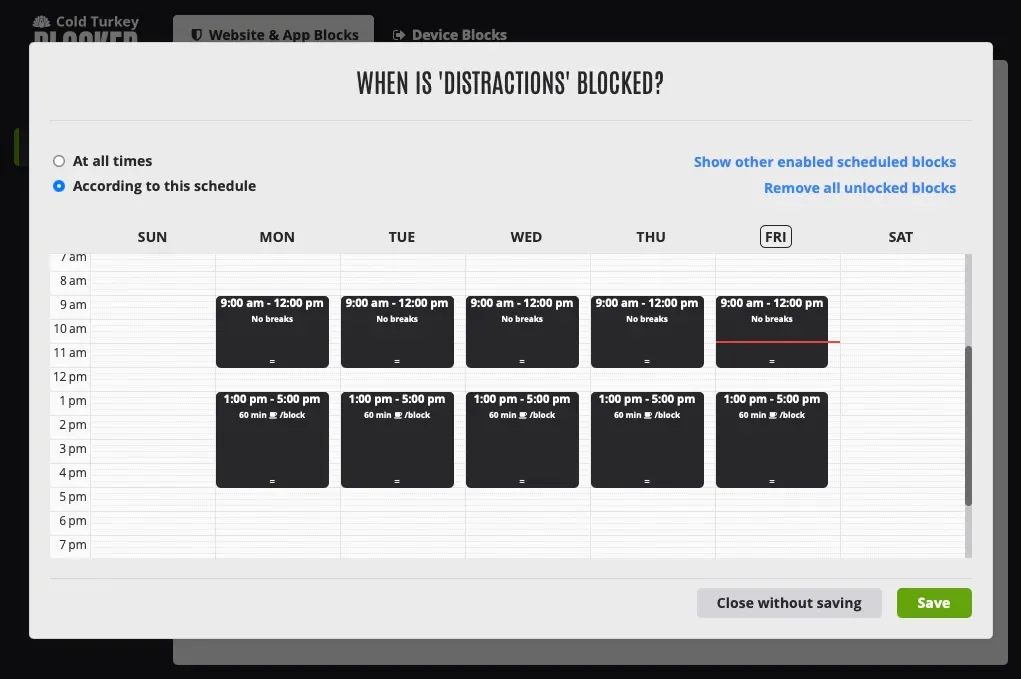 Screenshot: getcoldturkey.com, July 2026
Cold Turkey has built its reputation on one core promise: when you block something, it stays blocked. No workarounds, no “just five more minutes” loopholes, no uninstalling mid-session. This philosophy makes it one of the most aggressive distraction blockers on the market.
The app lets you create blocklists of websites and desktop applications, then schedule them or activate them on demand. Once a block is running, Cold Turkey makes it genuinely difficult to circumvent. On its strictest settings, even restarting your computer or deleting the app won’t lift the block until the timer runs out.
Key Features
- Website and app blocking: Block specific URLs, entire domains, or desktop applications. You can create multiple blocklists for different scenarios (work, study, creative time).
- Scheduled blocks: Set recurring schedules so blocks activate automatically. Great for building consistent routines.
- Frozen Turkey mode: Locks your entire computer except for a whitelist of approved apps. This is the nuclear option for when you absolutely cannot afford distractions.
- Break system: Configure short breaks within longer block sessions so you can step away without disabling everything.
- Statistics dashboard: Basic tracking of how often blocks are triggered and which sites you attempt to visit.
Pricing
Cold Turkey offers a free version with basic website blocking. The Pro version is a one-time purchase of $39, which unlocks app blocking, scheduling, Frozen Turkey mode, and all advanced features. There is no subscription.
Platforms
Cold Turkey is available on Windows and macOS. There is also a Chrome extension called Cold Turkey Blocker for browser-level blocking, but the desktop app provides the most comprehensive coverage.
Pros
- Extremely difficult to bypass once a block is active.
- One-time payment with no recurring fees.
- Frozen Turkey mode is uniquely powerful for full-system lockdowns.
- Lightweight and doesn’t noticeably affect system performance.
- Simple, straightforward interface that doesn’t require a learning curve.
Cons
- No mobile app, so phone distractions remain unaddressed.
- The free version is quite limited compared to competitors.
- Statistics and reporting are basic. You won’t get deep insights into your productivity patterns.
- No Pomodoro timer or focus session features built in.
- The aggressive blocking philosophy can feel extreme for some users.
FocusMe: The Flexible Productivity Suite
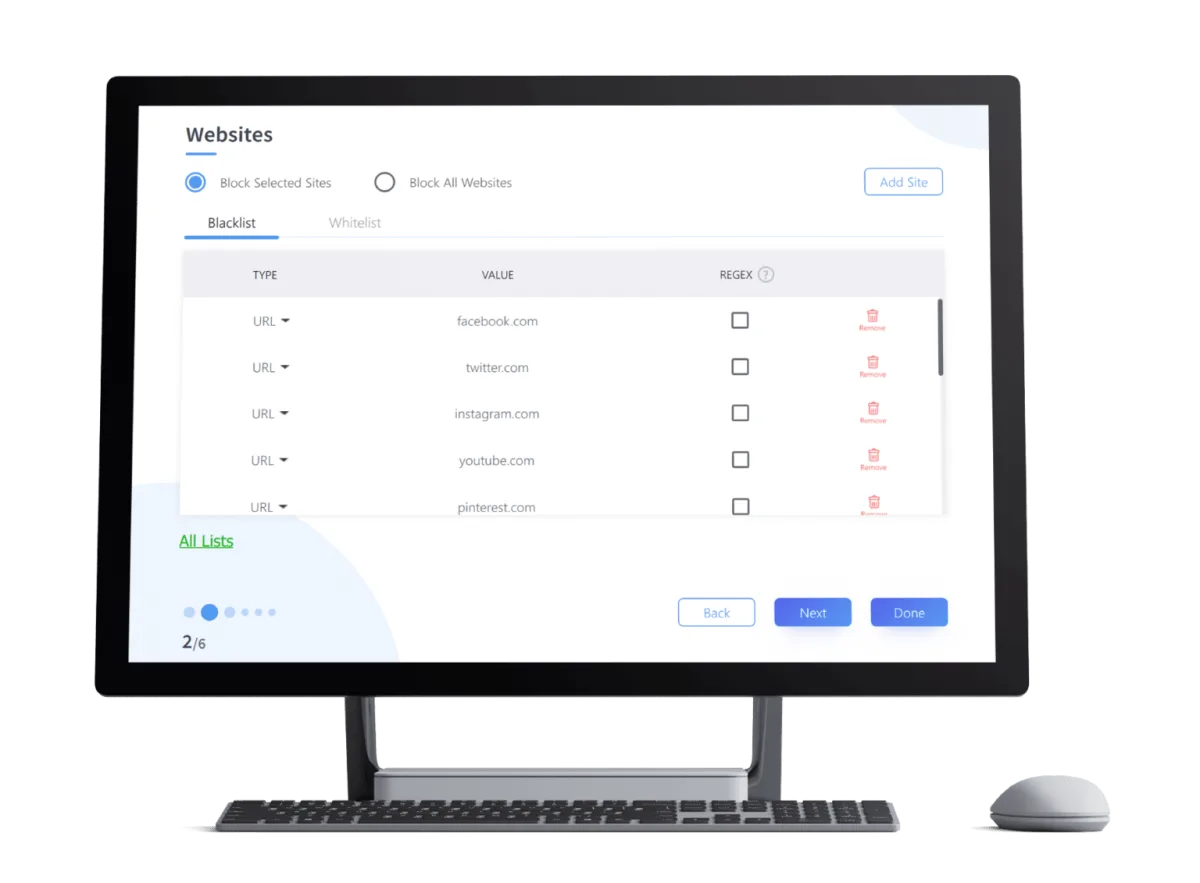 Screenshot: focusme.com, July 2026
FocusMe positions itself as more than just a blocker. It’s a broader productivity tool that combines website and app blocking with a Pomodoro timer, usage tracking, and detailed scheduling. Where Cold Turkey leans into rigidity, FocusMe emphasizes customization.
The app gives you granular control over what gets blocked, when, and for how long. You can set daily time limits on specific sites (like allowing 30 minutes of social media per day), create complex schedules, and use built-in focus timers to structure your work sessions.
Key Features
- Website and app blocking: Block specific sites, apps, or categories. Supports keyword-based blocking to catch sites you haven’t explicitly listed.
- Time limits: Instead of outright blocking, set daily usage caps on distracting sites. Once you’ve used your allotted time, the block kicks in.
- Pomodoro timer: Built-in timer for structured work and break intervals.
- Forced mode: An optional mode that prevents you from disabling blocks, similar to Cold Turkey’s approach.
- Usage analytics: Track how much time you spend on blocked sites and apps, with charts and breakdowns.
- Cross-platform support: Available on Windows, macOS, and Android.
Pricing
FocusMe uses a subscription model. Plans start at approximately $3.60/month (billed annually at around $43/year). There is also a lifetime license option available for a one-time payment of around $120. A free trial is available.
Platforms
FocusMe runs on Windows, macOS, and Android. The Android app is a significant differentiator for users who need blocking across all their devices, not just their computer.
Pros
- Time limit feature is excellent for users who want moderation rather than total restriction.
- Built-in Pomodoro timer reduces the need for a separate focus app.
- Android app extends blocking to your phone.
- Keyword-based blocking catches sites that might slip through a manual blocklist.
- More detailed analytics than Cold Turkey.
Cons
- Subscription pricing adds up over time compared to Cold Turkey’s one-time fee.
- The interface can feel cluttered, especially for new users navigating the many options.
- Forced mode is not as strict as Cold Turkey’s most aggressive settings.
- Setup requires more configuration time to get the most out of it.
- Performance can occasionally lag on older machines with many rules active.
Cold Turkey vs FocusMe: Side-by-Side Comparison
This table summarizes the core differences to help you compare at a glance.
| Feature | Cold Turkey | FocusMe |
|---|---|---|
| Website Blocking | Yes | Yes |
| App Blocking | Pro only | Yes |
| Time Limits | No | Yes |
| Pomodoro Timer | No | Yes |
| Scheduling | Yes | Yes |
| Forced/Strict Mode | Yes (very strict) | Yes (moderate) |
| Full System Lock | Yes (Frozen Turkey) | No |
| Mobile App | No | Android only |
| Usage Analytics | Basic | Detailed |
| Keyword Blocking | No | Yes |
| Pricing Model | One-time $39 | ~$43/year or $120 lifetime |
| Free Version | Yes (limited) | Free trial only |
| Platforms | Windows, macOS | Windows, macOS, Android |
Which One Should You Choose?
The decision comes down to your relationship with distractions and what you need from a blocker.
Choose Cold Turkey if:
- You need an unbreakable blocker and don’t trust yourself to keep blocks active.
- You prefer a one-time purchase over ongoing subscriptions.
- You primarily work on a desktop/laptop and don’t need mobile blocking.
- You want a simple tool that does one thing exceptionally well.
- You’ve tried other blockers and found ways to circumvent them.
Choose FocusMe if:
- You want time limits rather than total blocking (moderation over restriction).
- You need a Pomodoro timer integrated with your blocking workflow.
- Mobile blocking on Android is important to you.
- You prefer granular analytics about your usage patterns.
- You want keyword-based blocking to catch sites you haven’t manually listed.
For many users, the deciding factor is strictness vs. flexibility. Cold Turkey is the better choice when you need an iron wall between you and your distractions. FocusMe works better when you want to manage your habits gradually with more nuanced controls.
Worth Considering: A Different Approach to Focus
Both Cold Turkey and FocusMe treat distraction blocking as the primary goal. But there’s a growing category of tools that flip this on its head: instead of starting with blocking, they start with understanding where your time actually goes.
Chronoid is a good example of this approach. It automatically tracks every app and website you use throughout the day, then lets you ask your data questions using AI (like “What distracted me most this week?”). The website blocker and Pomodoro timer are built in, but they’re informed by real usage data rather than guesswork. Everything runs locally on your Mac, so your activity data never leaves your device.
This matters because the biggest challenge with any blocker isn’t the technology. It’s knowing what to block. If you’ve ever set up a blocklist only to realize you missed your actual time sinks, a tool that diagnoses the problem before prescribing the solution can be more effective long-term. You can explore how this works in our best website blocker for Mac roundup.
That said, if you already know exactly what distracts you and just need a lock on it, Cold Turkey or FocusMe will serve you well. The right tool depends on where you are in your focus journey.
Tips for Getting the Most Out of Any Blocker
Regardless of which tool you choose, a few practices will make your blocking strategy more effective.
Start with observation. Before blocking anything, spend a week tracking your habits. You might be surprised by what actually eats your time. Tools like Chronoid can automate this step entirely.
Block triggers, not just destinations. If YouTube is a problem, also block the sites and apps that lead you there. A news article with an embedded video can be just as derailing as opening YouTube directly.
Use scheduling over manual activation. Blocks that run on a schedule are far more effective than ones you have to remember to turn on. Automation removes the decision point where willpower fails.
Don’t go too aggressive too fast. Blocking everything on day one often leads to frustration and uninstalling the app. Start with your top three distractions and expand from there.
Combine blocking with structured work. A blocker paired with a Pomodoro timer or time-blocking technique is significantly more effective than blocking alone. Both FocusMe and Chronoid include built-in Pomodoro timers, or you can use a standalone Pomodoro app alongside Cold Turkey.
Frequently Asked Questions
Is Cold Turkey really impossible to bypass?
Cold Turkey is one of the hardest blockers to circumvent, especially in Frozen Turkey mode. On its strictest settings, you cannot uninstall the app, kill the process, or restart your computer to lift a block. However, no software is truly 100% unbreakable. A technically savvy user could find workarounds, but Cold Turkey makes it difficult enough that the effort required typically defeats the purpose of bypassing it.
Does FocusMe work on iPhones?
No. FocusMe is available on Windows, macOS, and Android, but there is no iOS app. Apple’s restrictions on third-party app management make it difficult for any blocker to offer the same level of control on iPhones that’s possible on Android. For iOS, you’d need to use Apple’s built-in Screen Time feature.
Can I use Cold Turkey and FocusMe together?
Technically yes, but it’s not recommended. Running two blocking apps simultaneously can cause conflicts, especially if both try to modify network settings or browser configurations at the same time. Pick one and commit to it. If you find one isn’t strict enough, switch to the other rather than layering them.
Are there free alternatives to Cold Turkey and FocusMe?
Yes. SelfControl (macOS) is a popular free option that blocks websites for a set period and cannot be undone. LeechBlock (browser extension) is another solid free choice for website blocking. However, free tools generally lack app blocking, scheduling, and analytics. Cold Turkey’s free tier covers basic website blocking if you want to test the approach before paying.
Which blocker is better for students?
Both work well for students, but FocusMe has a slight edge thanks to its time limit feature and Pomodoro timer. Students often need to access social media and entertainment sites for legitimate purposes, so being able to set a 30-minute daily cap is more practical than a total block. The Android app also helps manage phone distractions during study sessions. If you need stronger enforcement during exam season, Cold Turkey’s Frozen Turkey mode is hard to beat.