If you're billing by the hour, you've probably had this happen today. You opened a client deck, jumped into a research tab, answered a Slack message, edited a draft, then realized an hour later that your timer was never started. The work happened. The invoice record didn't.
That gap is why consultant time tracking software has changed so much. The old job was simple: count hours. The modern job is harder and more useful. Capture work accurately, separate billable from non-billable time, and protect your focus while you're doing the work.
After testing manual timers, spreadsheet logs, browser widgets, and more passive trackers than I care to remember, the pattern is clear. Consultants don't just need better time logs. We need software that fits real consulting work on a real day, where client calls, research, writing, design, admin, and distraction all blur together unless the tool adds context.
Why Manual Time Tracking Fails Consultants
The tipping point for me was simple. When I'm focused, I can't think about anything else. Start and stop timers don't work in that state.
That isn't a discipline problem. It's a workflow problem. Manual tracking asks you to interrupt billable work to perform admin. For consultants, that interruption happens at the worst possible moment, right when you're deep in a model, proposal, audit, discovery doc, or strategy deck.

The start stop model breaks under real work
A timer works if your day is neat. Most consulting days aren't.
You switch between client research, internal notes, follow-up email, calendar changes, quick revisions, and ad hoc requests. Every switch creates a small decision: stop this timer, start that one, or fix it later. Often, the choice is "fix it later." Later usually means reconstructing the day from memory.
Manual tracking doesn't fail because consultants are careless. It fails because focused work and frequent self-interruption don't belong in the same system.
That reconstruction creates two problems. First, billable time slips through. Second, the record gets softer. You stop tracking what really happened and start estimating what probably happened.
Spreadsheets hide the damage
A spreadsheet feels responsible because it's visible. In practice, it's just delayed guesswork unless you're updating it constantly.
Industry benchmarks show the average utilization rate for service-based professionals is only 55% to 60%, while top-performing consulting firms target 70% to 75%. That gap is tied to rigorous time tracking that captures billable hours accurately, and the same benchmark notes consultants can lose about 40% of potential revenue when time isn't tracked precisely (service industry benchmark summary).
The old methods also create a trust problem with yourself. If you don't trust the log, you won't trust the invoice. Then you underbill just to avoid an awkward client conversation.
The Shift to Automatic Time Tracking
A consultant finishes a full day, opens the time log at 6:40 p.m., and sees the usual problem. Three client threads overlapped, two Slack detours ate a half hour, and the calendar only explains part of it. The missing piece is not effort. It is recall.
Automatic tracking fixes that by collecting a timeline while you work. It records apps, sites, documents, and idle periods in the background, then lets you review and classify the day with context instead of guesswork. For consultants, that shift is bigger than convenience. It separates doing the work from documenting it.
Manual vs automatic time tracking
| Feature | Manual Timers (Start/Stop) | Automatic Tracking (Passive) |
|---|---|---|
| Capture method | You remember to start and stop | The app records activity in the background |
| Cognitive overhead | High, because every task switch needs input | Low, because review happens after the work |
| Accuracy | Often depends on memory and cleanup | More complete day-level record |
| Granularity | Usually broad blocks of time | App, website, and document-level detail |
| Idle time handling | Easy to forget or overcount | Better visibility into away time and interruptions |
| Billing confidence | Lower when logs are reconstructed later | Higher when records are tied to actual activity |
| Insight potential | Limited to total hours | Stronger patterns for focus, distraction, and project mix |
A key gain is fewer decisions during the day. Every start-stop timer asks you to break concentration, classify the task, and hope you remember to switch again five minutes later. Passive tracking moves that administrative load to review time, when the work is already done and the evidence is still there.
That change also improves data quality. In its research on time-tracking habits, TimeTackle on consultant time management describes how consultants lose billable time through task switching, calendar gaps, and small unlogged activities that never make it into the final timesheet. That matches what I have seen in practice. The missing hours usually come from fragments, not from one obvious failure.
Why passive data is more useful
A passive tracker gives you a raw timeline. On its own, that is only half the job. The useful part is what happens next: review, labeling, and separating client delivery from internal work.
For modern consultants, time tracking and focus management belong in the same system. If software only tells you where time went after the day is over, it helps with invoicing but not with protecting the next block of billable work. The better tools do both. They capture activity, surface distraction patterns, and make it easier to defend deep work before the day gets chopped into reactive fragments.
If you want a useful overview of the old clock-in model, this breakdown of timer-based time tracking workflows shows where manual timing adds friction and why consultants abandon it under real workload pressure.
Practical rule: If your tracking method depends on remembering what you did after the day is over, it is not a reliable billing system.
Automatic tracking is not perfect on its own, but it gives you a complete starting record. Manual systems rarely do. Once that record exists, you can clean it up quickly, assign it correctly, and use it to spot the focus leaks that subtly erode billable time.
Key Features of Consultant Time Tracking Software
Most consultant time tracking software looks similar on a pricing page. In daily use, the differences are obvious. The good tools remove admin without creating privacy, cleanup, or reporting headaches later.
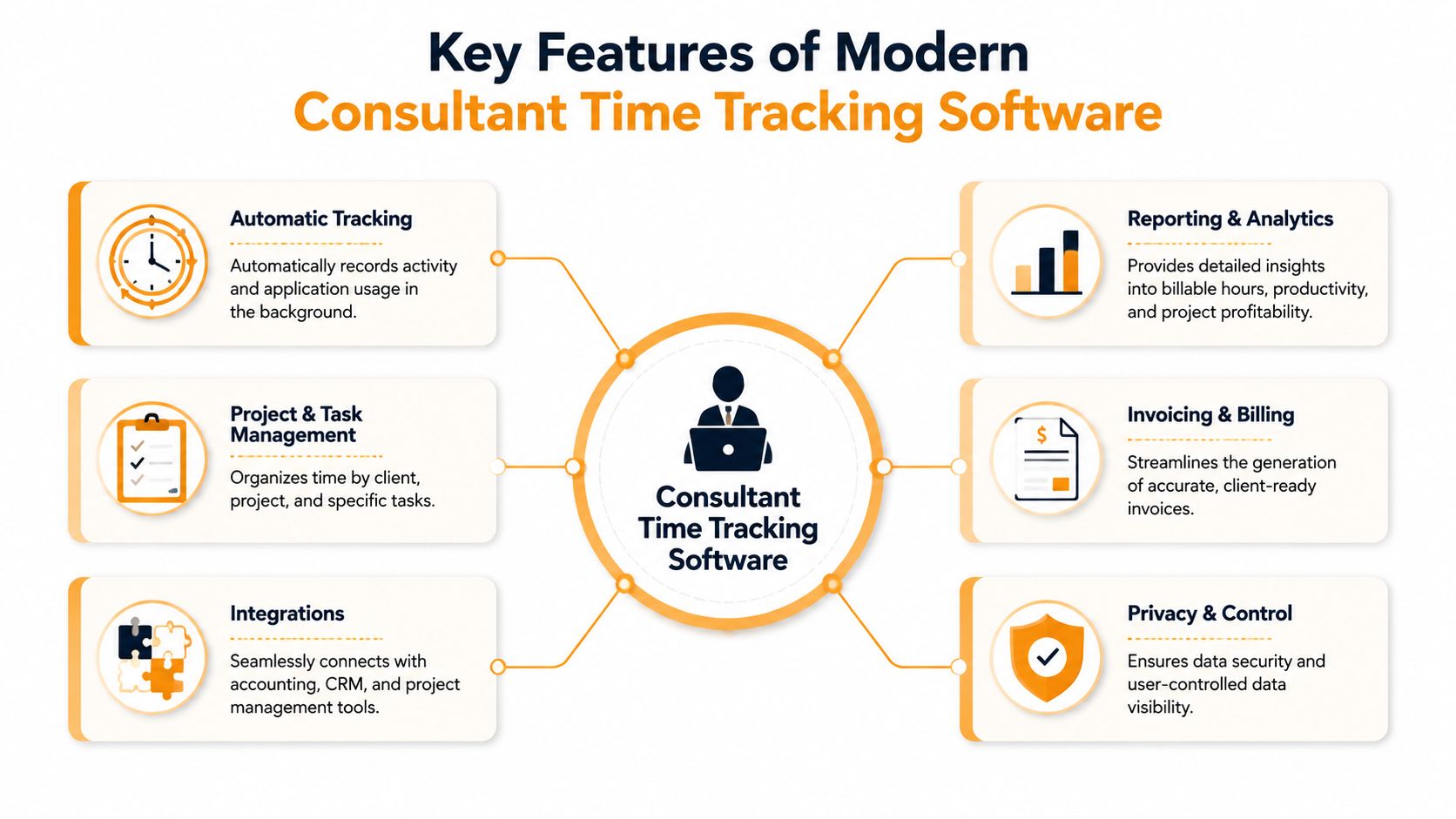
Automatic capture with reviewable context
The first requirement is background tracking across apps, sites, and documents. Not just a running timer.
That record needs to be reviewable in plain language. If you worked in Figma, Jira, Google Docs, Excel, Final Cut Pro, or VS Code, the tool should help you see where time went without forcing you to reconstruct the chain manually.
Just as important, it needs billable and non-billable separation. A consultant's day includes client delivery, internal admin, sales calls, proposal work, and interruptions. If the tool can't separate those cleanly, your reports turn messy fast.
Privacy and local control
Privacy-first architecture isn't a niche concern anymore. It's one of the main buying criteria for consultants handling client IP, legal materials, product roadmaps, or confidential research.
A 2024 survey found that 52% of independent consultants on macOS avoid auto-trackers that require third-party cloud access for activity logs, which is why on-device processing matters so much for this category. When a tracker keeps activity data local by default, it's easier to use it in sensitive client environments without creating new compliance anxiety.
If a tracker needs broad cloud visibility into your daily activity before it becomes useful, many consultants won't deploy it on real client work.
Rules, project mapping, and integrations
A useful tool should let you map repeated patterns to projects. Keyword rules, folder rules, and client-specific logic matter more than flashy dashboards.
For example:
- Keyword matching: If a file, tab, or task includes a repeated client phrase, the tool should let you route that work automatically.
- Folder-based assignment: If you keep project materials in client folders, the tracker should recognize that pattern.
- Calendar and PM sync: Connections to tools like Google Calendar, Outlook, Asana, Trello, or Jira reduce cleanup and make the timeline easier to validate.
That integration layer is one reason many consultants now treat these tools as core infrastructure rather than optional add-ons. If you want a broader view of how consultants think about workflow and time allocation, TimeTackle on consultant time management is a useful reference.
Reporting that can survive scrutiny
Many tools can export hours. Fewer can produce reports you'd feel comfortable sending to a demanding client.
What works is simple:
- Client-ready summaries that show project, category, and date
- Granular activity views when you need to verify how a block was spent
- Custom billing rates by client or project
- Invoice support so tracked time becomes billable output instead of another admin task
The best reporting isn't flashy. It's defensible. If a client asks why a block was billed, you should be able to answer without guessing.
A Modern Workflow for macOS Consultants
A typical Mac consulting day fragments fast. You start in a client deck, jump to Slack for a decision, review a spreadsheet, answer email, then spend an hour in a browser with fifteen tabs open across three projects. If your system depends on remembering when each block started and stopped, billable time slips away in small pieces.
macOS consultants feel that problem more sharply than larger teams do. Many work alone, switch between strategy and execution all day, and keep sensitive client material on their own machine. A lot of enterprise trackers still assume a manager is watching from above. That model does not fit independent consultants who need accurate records, privacy, and less admin.
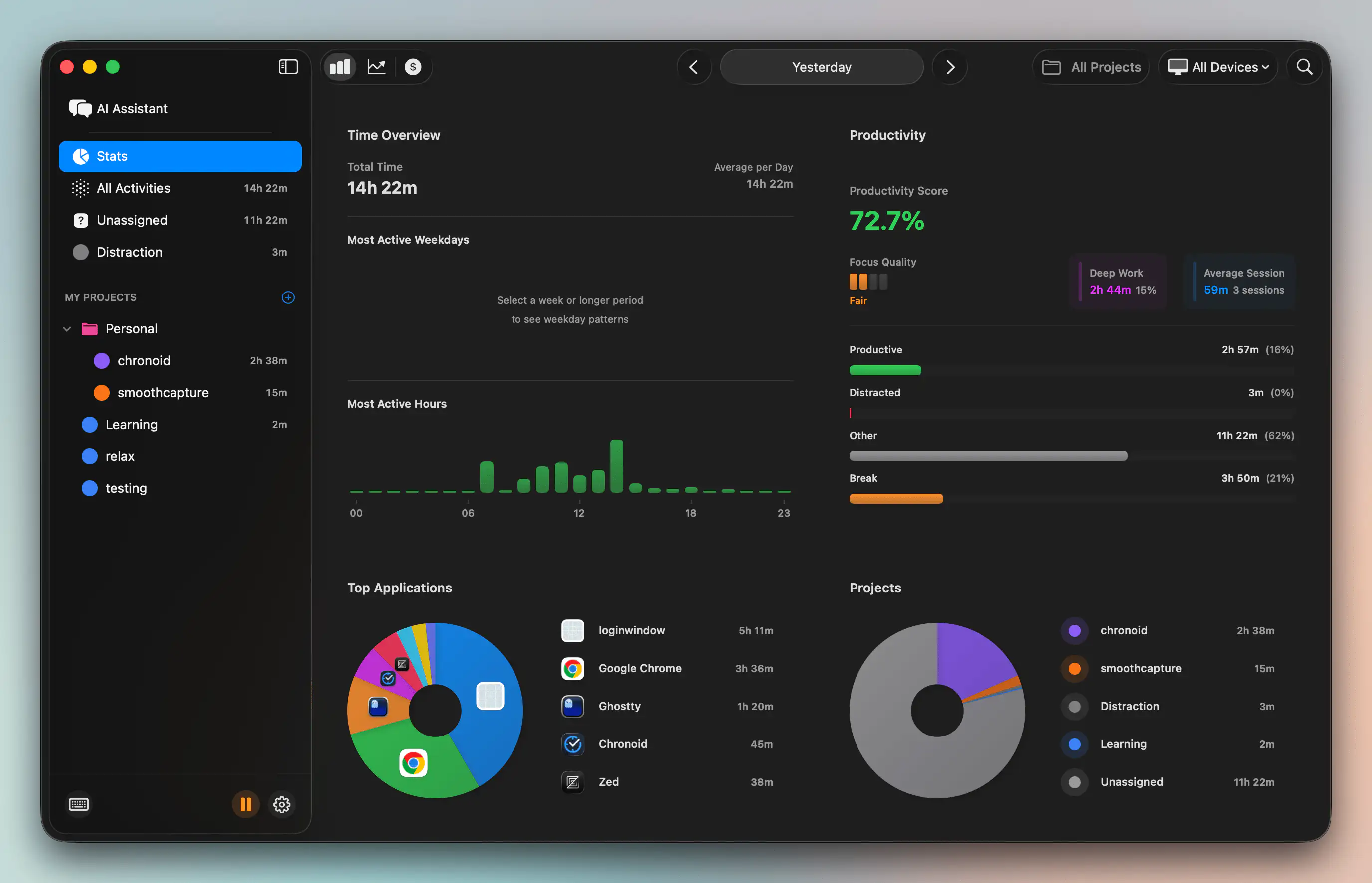
What a useful Mac setup looks like
On macOS, the workflow has to do more than capture hours. It needs to protect them.
A useful setup records activity automatically, flags idle time, keeps data local by default, and makes review fast enough that you will do it every day. It also needs one more thing many legacy trackers miss. Focus controls. For consultants, time tracking and focus management belong in the same workflow because distraction is not separate from billing. Every context switch, stray tab, and social check cuts into work you could have invoiced.
That matters on a Mac because consultant work rarely happens in one app. A normal morning might include Google Docs, Slack, Notion, Excel, Zoom, Finder, and a few browser-based client tools. Timer-based systems break under that kind of switching. Automatic capture holds up better because it follows the work as it happens, then gives you a review layer to sort and label it.
One option built around that approach is Chronoid's Mac time tracking workflow. It tracks apps, websites, and documents on macOS, stores activity locally by default, and combines tracking with focus features so you can cut distractions while the workday is still in progress, not just document the damage later.
Why on-device processing matters on a Mac
On-device processing changes the day-to-day experience in practical ways. Sensitive filenames and document activity do not need to leave the machine just to produce a usable timeline. Review is faster, and privacy is easier to explain to clients who care where their data goes.
I have found that this is a significant upgrade from older trackers. The value is not just automatic logging. It is opening your timeline and seeing a clean record of actual work from the day, plus the interruptions that pulled you off course. That makes billing easier, but it also makes focus problems visible enough to fix.
The trade-off is simple. Passive tracking still needs a review habit. Consultants should expect to spend a few minutes each day merging fragments, correcting edge cases, and assigning project context. That is still a far better workflow than reconstructing six hours from memory, especially on macOS where work tends to bounce across apps and documents all day.
Your First Week From Raw Data to Billable Hours
The first week is where most consultants either "get it" or give up too early. The mistake is trying to perfect the system on day one. Don't. Let the software observe first.
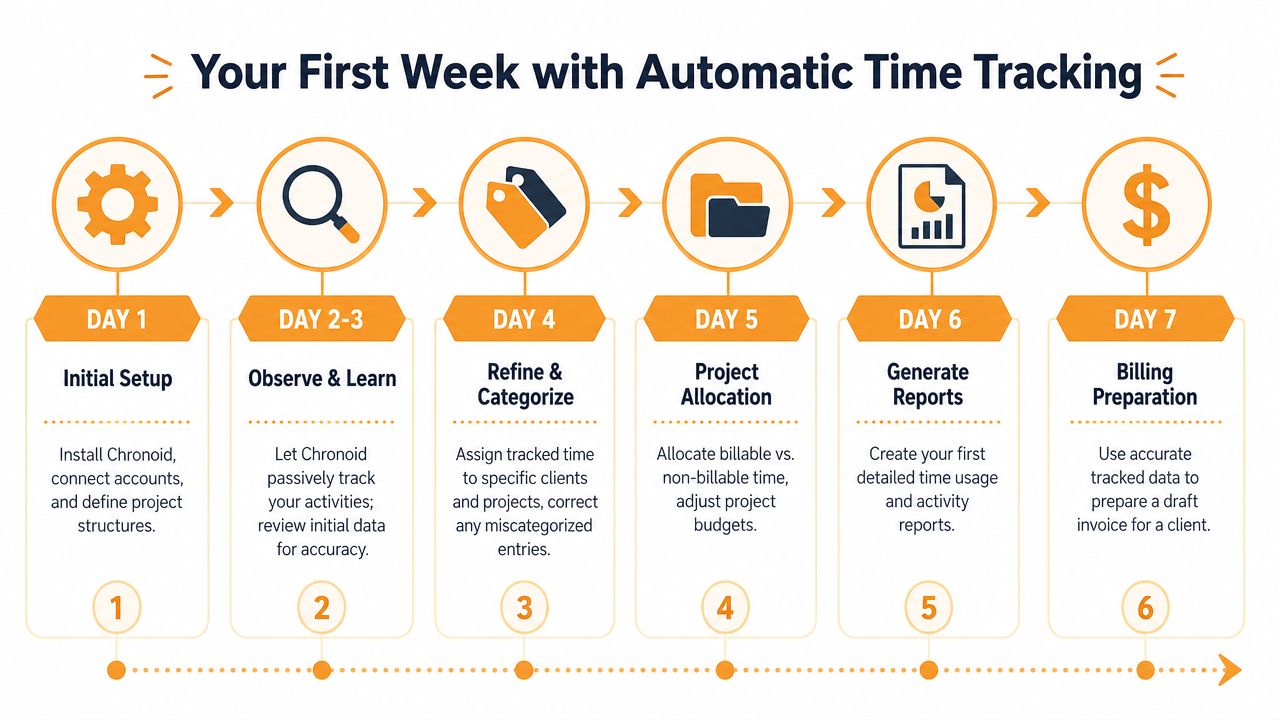
Step one let it run for three days
Run the app continuously for 72 hours before you start tweaking everything. That baseline matters because the system needs enough normal activity to distinguish work patterns, repeated tools, and actual idle time.
The same 72-hour setup window is part of what makes rule-based automation useful for new users. In the benchmark behind this approach, keyword-based automation rules reduced manual categorization time by 68%, increased billing accuracy by 22%, and the three-day baseline allowed the system to distinguish productive work from idle time with 94% accuracy.
Step two review once a day
Don't stare at the dashboard all day. Review once daily.
The surprise for most new users is not where they were productive. It's where they leaked time. The biggest time leak identified by beta testers of automatic tracking software was social media, and Reddit came up repeatedly in first-week reviews. In one study of remote freelancers, 47% said social media consumed an average of 2.5 hours of their workday and reduced billable output by up to 15%.
Most consultants don't need more motivation. They need a clear record of what interrupted them.
This is the moment passive tracking becomes useful. Instead of vaguely feeling distracted, you can point to the actual time blocks and decide what to do next.
If your goal is billing accuracy first, this guide on how to track billable hours cleanly is a practical next read because it focuses on turning raw activity into invoice-ready time.
Step three create rules from repeated patterns
After a few days, patterns become obvious. That's when you create project rules.
A few rule types work well:
- Keyword rules: If "Chronoid" appears in a title, tab, or note, route it to the Chronoid project.
- Folder rules: If files live in a specific client folder, map that folder to the client.
- Browser context rules: If you're researching a client topic and repeated terms appear in tabs, use those terms to support categorization instead of relying on memory later.
The reason this works is simple. Consultants repeat contexts even when tasks change. A project might involve drafts, research, Slack threads, spreadsheets, and browser tabs, but the naming patterns usually stay stable enough to automate.
Beyond Billing Using Data to Optimize Productivity
Billing is the obvious win. The deeper win is using time data to change how you work.
The biggest shift is treating focus management as part of time tracking, not a separate productivity hobby. If your reports show recurring distraction in the same places, the next step isn't just "be more disciplined." It's to remove the trigger.
Use blockers before you need them
Turning on a web blocker at the start of a work session is one of the simplest upgrades you can make. That matters because interruption recovery is expensive. Research from the UC Irvine Digital Distraction Study found people took an average of 23 minutes to fully regain deep focus after a social media interruption, and that disruption led to a 30% drop in cognitive throughput for the rest of the hour. In the same workflow guidance, blocking distracting platforms at the start of a session was linked to an 18% increase in billable hours per day.
That's why I don't treat website blocking as a nice extra anymore. It's part of protecting billable time before it disappears.
Use Pomodoro for recovery not pressure
Many consultants resist timers because they associate them with micromanagement. The Pomodoro method is different when you use it for pacing rather than policing.
The model is simple: 25 minutes of work followed by a 5-minute break. In the cited benchmark, that structure increased sustained productivity by 24% and reduced subjective fatigue by 31%. For consultants who overwork, that break cycle does something manual timers never did. It creates a built-in reminder to pause, move, hydrate, and reset before the quality of work drops.
I can't stress this enough. If you tend to overwork, scheduled breaks are part of professional output, not a break from it.
This is also where billing and operations meet. Once your tracked hours are clean, you can choose better invoicing tools around them. If you're comparing platforms that turn time into revenue, these best billing software comparisons help sort out what belongs in your stack and what doesn't.
The Future of Consultant Time Management
The future of consultant time management isn't more detailed timesheets. It's a tighter loop between capture, context, billing, and focus.
Manual tracking asks consultants to remember. Modern consultant time tracking software observes first, then helps you review, categorize, and protect the work that matters. That's a fundamental change. Time tracking is no longer just record keeping. It's part billing system, part operating system for focused client work.
The business case is already clear. Top-performing consulting firms target 70% to 75% utilization, while the average sits at 55% to 60%. That gap is tied to the ability to capture and categorize billable hours rigorously. Consultants who still rely on memory, scattered timers, or spreadsheet reconstruction are leaving too much room for leakage.
Good software won't make someone disciplined. It will make disciplined work easier to see, easier to invoice, and easier to protect.
If you want a privacy-first way to track apps, websites, and documents on your Mac without manual timers, Chronoid is worth trying. It combines automatic tracking with local-first data handling and built-in focus tools, which makes it a practical fit for consultants who need accurate billing and fewer distractions in the same workflow.