
By the end of the month, a lot of freelancers are doing archaeology. You dig through calendar events, Slack messages, browser history, notes, and half-remembered work sessions trying to rebuild what you did for each client. Then comes the uncomfortable part. Do you bill conservatively and leave money on the table, or bill aggressively and risk a client questioning the invoice?
That cycle is exhausting because the problem isn’t your memory. The problem is the system. If your work happens across apps, documents, meetings, and short bursts of focused effort, manual logging will always miss pieces of it. Good time tracking invoicing software closes that gap. Great software does it without turning your Mac into a surveillance device.
Why Manual Invoicing Leaks Revenue
Manual invoicing usually breaks down in small ways first. A research session doesn’t get logged. A quick revision takes longer than expected. An hour split across email, Figma, and a client call turns into a vague estimate later. None of that feels dramatic in the moment.
At invoice time, those misses pile up. Industry research estimates that professional service firms lose between 15% and 25% of billable hours annually due to poor time tracking practices, and manual methods can cost teams up to 20% of potential revenue through tracking gaps, as noted by TMetric’s overview of time tracking losses. For solo freelancers and consultants, that same pattern hits personal income directly.
What manual reconstruction actually looks like
If you’ve ever built invoices from memory, the workflow probably looked something like this:
- Calendar first: You pull meetings from Google Calendar or Apple Calendar and hope they tell the whole story.
- Messages second: You scan email and chat threads to remember when work started and stopped.
- Files last: You open documents, designs, or code commits to estimate how long each task took.
- Guesswork at the end: You round down because underbilling feels safer than defending a detailed number you didn’t really track.
That’s not a billing process. It’s damage control.
Practical rule: If you create invoices by reconstructing your week after the work is done, you’re probably underbilling for fragmented work.
There’s also a trust problem. Clients want clear invoices. They don’t want line items that feel arbitrary. When your time data is weak, your invoice language gets vague. “Project updates” and “admin” start replacing actual task detail. That makes invoices harder to approve and easier to challenge.
A cleaner system starts with tracking work while it happens, then pushing that data directly into billing. If you want a good baseline for capturing work before invoicing it, this guide on how to track billable hours is a useful place to start. And if you’re also tightening the back office side of the business, it helps to compare accounts payable software options so your billing and payment workflows don’t stay disconnected.
Why freelancers feel this more than larger firms
Larger firms can hide messy time capture behind volume. A solo operator can’t. If you miss time, nobody else makes up the difference. If invoicing drags, cash flow slows down. If your invoice lacks detail, you’re the one answering questions.
What works is simple. Track continuously, review lightly, invoice from approved data. What doesn’t work is relying on end-of-month memory and hoping your records feel complete enough to send.
Understanding Integrated Time and Billing Systems
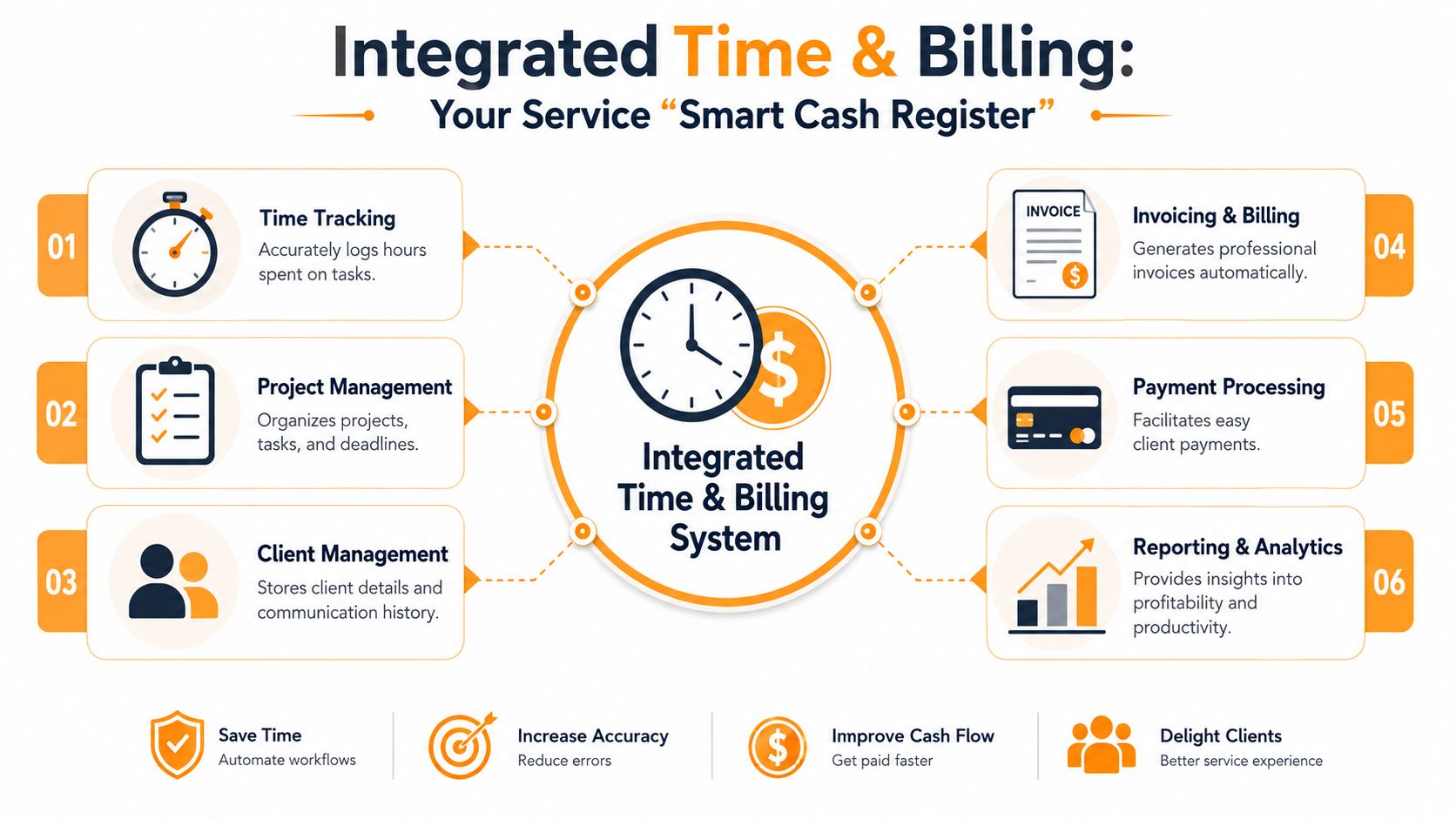
A standalone timer logs hours. A standalone invoicing tool sends bills. An integrated time and billing system does both as one flow. That’s the difference that matters.
This software functions as a smart cash register for services. Instead of manually writing down what you sold and then typing it into a separate billing system later, the software records work as it happens, organizes it by client or project, and turns approved time into invoice-ready line items.
The category is no longer niche. The global time tracking software market reached USD 6.1 billion in 2025 and is projected to reach USD 11.43 billion by 2030, according to Mordor Intelligence’s time tracking software market report. That growth reflects a wider move away from manual logging toward automated systems that protect billable revenue.
Three tool types, three very different outcomes
Here’s the simplest way to evaluate what you’re buying:
| Tool type | What it does well | Where it falls short |
|---|---|---|
| Standalone time tracker | Captures hours | You still have to export, clean up, and invoice elsewhere |
| Standalone invoicing tool | Sends polished invoices | It depends on manual time entry or rough estimates |
| Integrated time and billing system | Connects tracked work directly to billing | Requires better setup around clients, rates, and projects |
The third option usually wins for hourly work because it removes handoff errors. Every handoff creates friction. Exporting a CSV, retyping hours, matching tasks to projects, and rewriting descriptions all create opportunities to miss time or introduce mistakes.
What integration looks like in practice
A solid setup usually includes these connected parts:
- Automatic or real-time tracking: The system records work while you’re doing it.
- Client and project mapping: Time gets attached to the right client without cleanup later.
- Rate handling: Billable rates apply at the project, task, or client level.
- Invoice generation: Approved entries flow into a draft invoice with itemized detail.
- Payment follow-through: The invoice can then move into your accounting or payment stack.
If you want to see how this works inside an app designed around that flow, take a look at Chronoid’s invoicing features.
A time tracker becomes financially useful when it removes one full layer of re-entry between work completed and invoice sent.
That distinction matters more than flashy feature lists. Plenty of apps promise productivity. Fewer actually make billing cleaner.
Essential Features That Boost Your Bottom Line
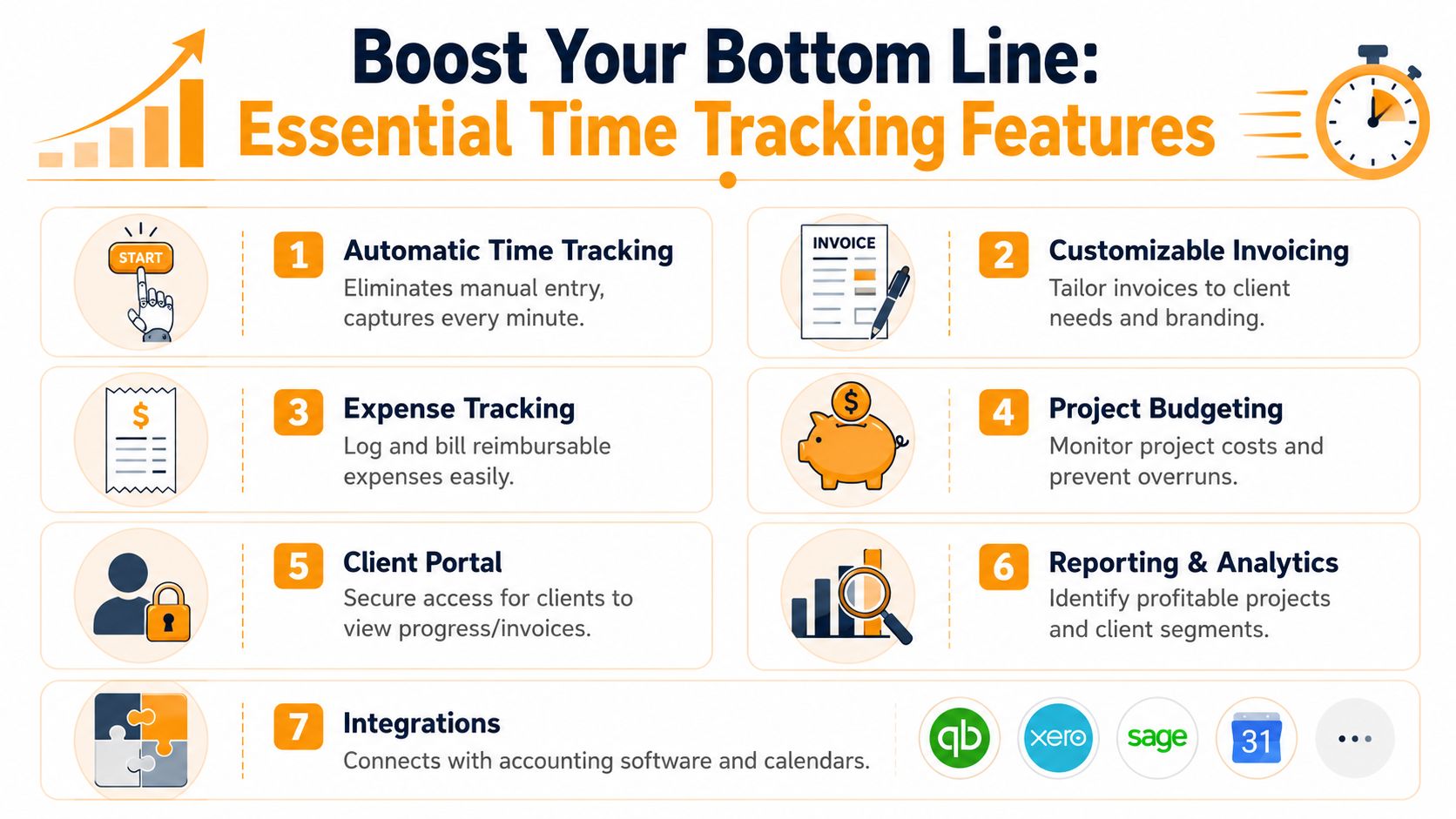
The best time tracking invoicing software doesn’t just track hours. It helps you capture work you would’ve missed, separate chargeable from internal effort, and turn messy activity into clean invoices. That’s where the money is.
The most important feature is automation. Real-time automated time tracking systems capture 95% to 98% of billable hours, while end-of-week manual reconstruction captures only 65% to 75%, according to Magnetic’s analysis of time tracking for professional service firms. That gap exists because people forget fragmented work. Quick edits, review passes, client messages, and research windows disappear when you log time later.
The features that actually affect revenue
Not every checkbox on a pricing page matters. These do.
-
Automatic time capture: This is the core feature for anyone who works in bursts across multiple apps. Manual timers fail when you forget to start them. Automatic capture gives you a draft of what transpired, which you can review instead of recreate.
-
Billable and non-billable categorization: You need to separate client work from admin, proposals, scheduling, and internal planning. If a tool can’t distinguish those clearly, your invoices get muddy and your reporting becomes useless.
-
Project and client structure: Hours need context. A raw timeline isn’t enough. Good systems let you sort work by client, project, and activity so invoices come out itemized instead of generic.
-
Custom invoice generation: The software should turn approved time entries into invoice-ready lines with descriptions that clients can understand. You shouldn’t have to rewrite every entry to make it look professional.
-
Expense support: If you bill reimbursable purchases, travel, or software costs, attaching those to the right project matters. Otherwise they stay in your notes app and never reach the invoice.
Here’s a useful rule. If a feature doesn’t reduce missed time, reduce invoice prep, or improve client clarity, it’s probably secondary for a solo freelancer.
A quick visual overview helps before you compare products:
Features that reduce admin drag
The second group of features doesn’t always look exciting, but they save serious effort over a full month.
| Feature | Why it matters |
|---|---|
| Reporting | Shows which clients and projects are worth your time |
| Budget tracking | Helps catch scope creep before the invoice conversation gets tense |
| Integrations | Cuts copy-paste work with accounting, calendars, and project tools |
| Idle detection | Keeps your logs clean when you step away or get interrupted |
The right software should make review the main task, not reconstruction.
What doesn’t work is overcomplicated setup. Some tools ask you to define every client, task, tag, rate, and template before you can track anything. That kills adoption. The best systems let you start quickly, then refine categories as patterns emerge.
For freelancers, the sweet spot is usually this. Automatic capture in the background. Fast daily review. Invoices built from approved entries, not from scratch.
How These Tools Fit Into Your Workflow
The value of time tracking invoicing software shows up in the handoffs. A billable hour starts as activity, becomes a reviewed entry, then becomes an invoice line. If the software handles those transitions well, your admin load drops fast.
A normal project cycle on a better system
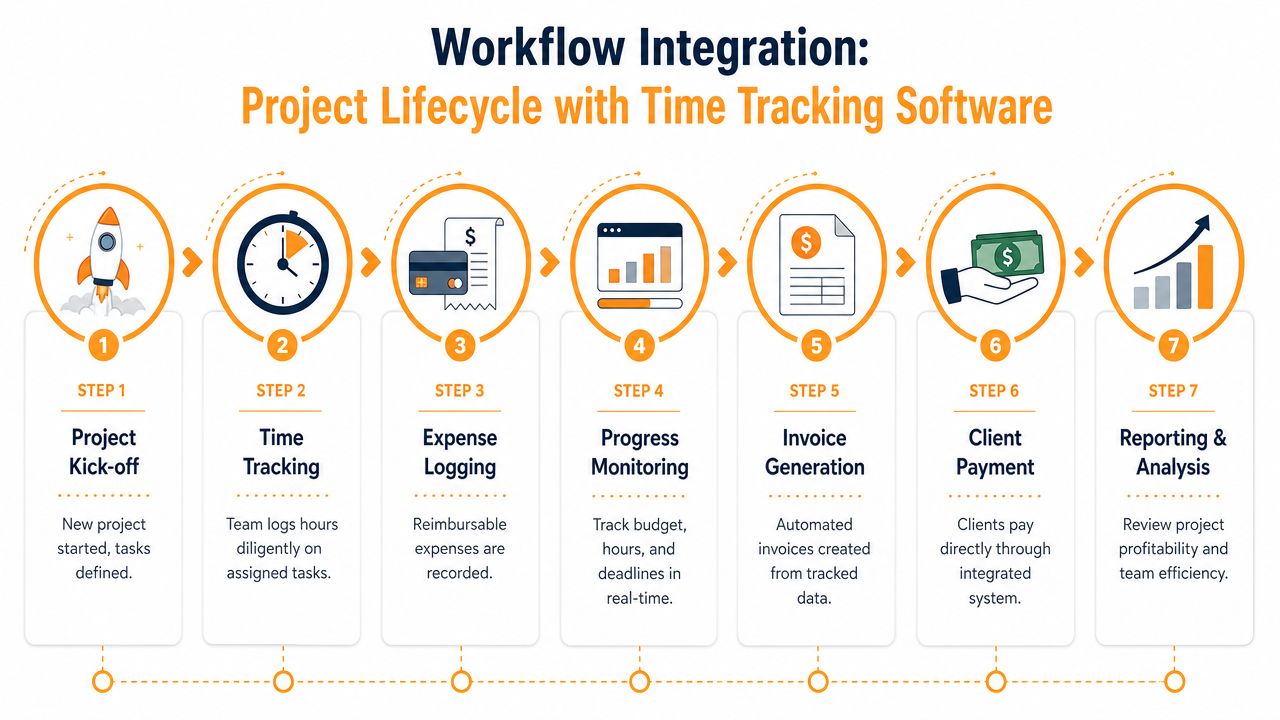
A clean workflow usually looks like this:
- Project starts: You create or select the client and project once.
- Work happens: The app tracks your activity in the background or with lightweight timer support.
- Time gets reviewed: Daily or weekly, you approve entries, merge fragments, and assign billable status.
- Rates apply: The system maps approved entries to the correct pricing.
- Invoice is generated: The app pulls tracked time into a draft invoice.
- Invoice gets sent: You export a PDF or pass it to your accounting stack.
- Payment and reporting follow: You review what was billed, what remains unbilled, and which projects were profitable.
The payoff is speed. Modern time tracking invoicing software uses AI-powered activity capture to generate invoices 60% faster than manual entry methods, and the average billing cycle drops from 14 days to 5.5 days, according to CPACharge’s review of time tracking software for accountants. The same source notes that faster invoice generation can accelerate client payment cycles by 25% to 30%.
Where integrations help and where they don’t
Integrations are useful when they remove duplicate work. They aren’t useful when they create another layer you have to maintain.
Good examples:
- Accounting sync: Sending invoice data into QuickBooks, Xero, or FreshBooks after approval.
- Calendar context: Pulling meetings into your review screen so calls don’t get missed.
- Project management alignment: Matching tasks from tools like Asana or similar systems to the right client work.
- Payment processing: Letting clients pay from the invoice without a separate manual follow-up.
Less helpful examples are integrations that flood your tracker with noise. If every app event becomes a task or every calendar hold turns into billable time, you’ll spend more time cleaning data than using it.
A strong workflow doesn’t automate everything. It automates the handoffs that humans handle poorly.
For most solo professionals, the ideal process is boring in the best way. Work gets captured. You review it in batches. The invoice is almost done before you open it. That’s when the software has become infrastructure instead of another app demanding attention.
Choosing Smart on macOS A Focus on Privacy
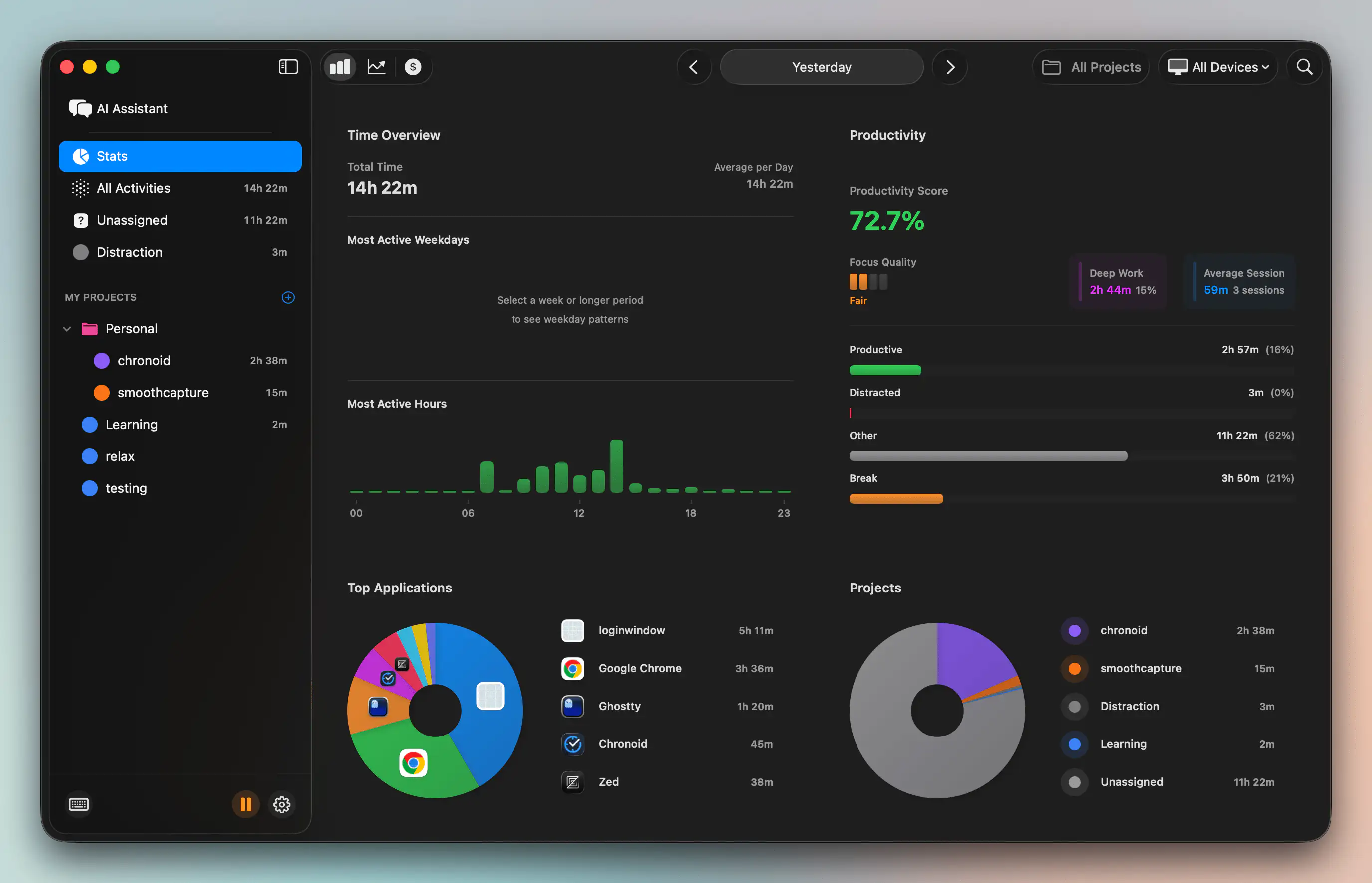
Privacy matters more with automatic tracking than with manual timers because the software sees more. It can detect app usage, websites, documents, idle time, and work patterns. That context is exactly what makes modern tracking useful. It’s also what makes the storage model important.
A lot of cloud-first products treat that data as normal operational exhaust. For freelancers handling client strategy, legal documents, financial records, or product work, it isn’t normal. It’s sensitive. Existing coverage still misses the growing demand for local-only data storage in invoicing systems, especially among macOS users who want on-device AI and cloud-optional architecture, as discussed in Ebillity’s comparison of legal billing software and generic tracking tools.
The real trade-off
Cloud-based tools are convenient. You can sign in anywhere, share data across teams, and avoid local setup complexity. For agencies and larger teams, that can be the right choice.
For many solo Mac users, the trade-off looks different:
- Cloud-first model: Easier syncing, but sensitive work history leaves your device.
- Privacy-first on-device model: More control over client data, but you need software built well enough to keep local workflows smooth.
- Hybrid model: Local by default with optional sync when you choose it.
That last approach is getting more appealing. It gives you automatic tracking and useful categorization without forcing all activity data into third-party servers by default.
Questions worth asking before you install anything
If you’re choosing a tracker for macOS, ask these questions early:
- Where is my activity data stored? Local, cloud, or both.
- Can I use invoicing features without mandatory cloud sync?
- Does the app support idle and away detection so inactive time doesn’t pollute my records?
- Can I control what gets tracked and what gets ignored?
- Does the app feel native on macOS, or does it feel like a web app wrapped in a desktop shell?
If you’re tightening privacy across your business stack, File Studio’s guide for secure workflows is worth reading alongside your software evaluation.
The broader point is simple. Time tracking is no longer just an operations decision. It’s a data handling decision too. On a Mac, you can finally choose tools that treat both sides seriously.
Chronoid The Modern Tracker for Mac Users
Most time tracking tools force you to choose which problem to solve. You can reduce manual logging. Or you can keep data private. Or you can make invoicing easier. Mac users don’t need to accept that trade-off anymore.
Chronoid is a macOS app that automatically tracks apps, websites, and documents without manual timers, uses on-device AI categorization, detects idle and away time, and keeps activity data local by default with optional cloud support. That combination matters if you bill by the hour and don’t want sensitive client work histories sent elsewhere just to get better time data.
Why this model fits freelance work better
One gap in most buying guides is unbilled time. Administrative work, internal planning, file organization, and email triage often disappear because they don’t fit neatly into a timer habit. A better approach is to let the software capture the day first, then classify what should be billable and what should stay non-billable.
That matters because most guides still don’t explain how to bill for unbilled time or handle administrative overhead cleanly. Software needs to distinguish billable from non-billable work, and automatic tools that detect idle time can be configured to categorize those tasks without manual timers, as noted in Bill4Time’s guide to time tracking legal software with invoicing.
What works for modern solo professionals
For a Mac-based freelancer, the practical setup looks like this:
- Automatic capture in the background: No timer babysitting during real work.
- On-device analysis: Useful categorization and pattern recognition without default cloud exposure.
- Idle detection: Better cleanup when you step away mid-session.
- Built-in invoicing flow: Tracked work can move into billing without a separate reconstruction pass.
- Focus tools in the same app: Website blocking, scheduled focus sessions, and Pomodoro support reduce the need to juggle separate utilities.
This is why privacy-first automation feels different from older trackers. You’re not just recording hours. You’re building a clearer map of how work happens on your Mac, while keeping control over the underlying data.
If your current process still depends on memory, exported spreadsheets, or a cloud app that knows too much about your client work, it’s time to replace the system, not just tweak the habit.
If you want a Mac-native way to track work automatically, review billable versus non-billable time, and generate invoices without sending sensitive activity data all over the web, try Chronoid. The free trial is enough to see whether privacy-first automatic tracking fits the way you work.