
If you’ve been searching for how to multitask, most advice will steer you in the wrong direction. It usually tells you to juggle better, move faster, and stack more into the same hour.
That sounds useful when your day is full of client messages, meetings, admin, and actual work. But for most knowledge work, the main benefit isn’t doing more things at once. It’s learning which tasks can safely coexist, which ones need separation, and how to switch with less damage.
The Alluring Myth of Multitasking
Multitasking feels responsible. It feels like what capable people do when work gets messy.
You answer Slack while reviewing a draft. You clear email during a call. You tweak a design while a training video plays in the background. From the outside, it looks efficient. From the inside, it feels like survival.
The problem is that this habit often creates the exact overload you’re trying to escape. You don’t finish the report cleanly. You miss part of the call. You reread the same paragraph three times. By the end of the day, you’ve been active the whole time but haven’t moved your most important work very far.
Busy is not the same as effective
A lot of multitasking advice confuses motion with progress. That’s why people keep trying to optimize a broken system instead of replacing it.
When people ask how to multitask, they’re often asking a different question underneath it:
- How do I handle competing demands
- How do I stop dropping balls
- How do I make progress without feeling constantly behind
Those are real problems. But “do two demanding things at once” isn’t a real solution.
Practical rule: If two tasks both need language, judgment, or close visual attention, don’t pair them. Sequence them.
A better goal than multitasking
The smarter target is managed focus. That means three things.
First, protect deep work when the task is cognitively heavy. Second, batch similar work so your brain stays in one mode longer. Third, pair tasks only when one is largely automatic and doesn’t compete for the same mental channel.
That shift matters for freelancers, consultants, developers, and creative professionals because your work quality depends on context. If you constantly fracture that context, you don’t just feel scattered. Your output gets thinner, slower, and more error-prone.
So yes, learn how to multitask. Just not in the way the internet usually means it.
Why Multitasking Is Secretly Slowing You Down
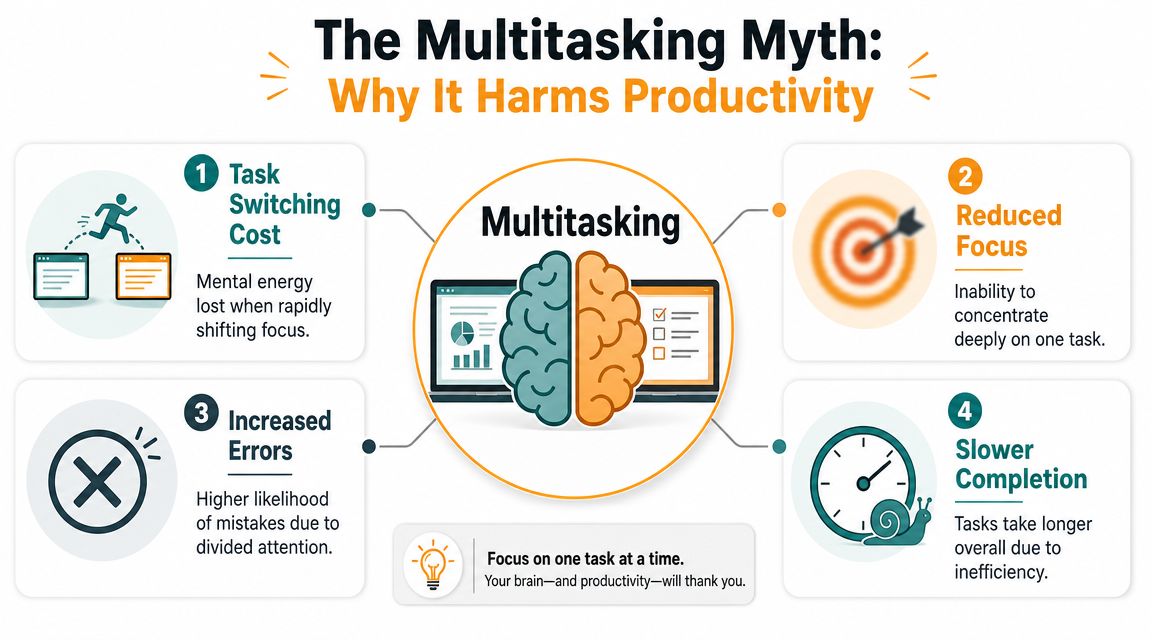
What is often called multitasking is usually task switching. You’re not doing two demanding things in parallel. You’re bouncing between them fast enough that it feels simultaneous.
That bounce is expensive. Research cited by the American Psychological Association says brief mental blocks from shifting between tasks can consume as much as 40% of productive time. The same summary notes that even when the delay per switch is only fractions of a second, people still lose time and make more errors, so the total job takes longer (APA on multitasking and task switching).
What task switching looks like in real work
This isn’t just about checking your phone. It shows up in ordinary professional behavior:
- Email during meetings means your attention leaves the conversation, then has to rebuild context.
- Coding while monitoring chat breaks problem-solving momentum every time a message arrives.
- Writing with constant tab hopping forces you to reconstruct your sentence, argument, or structure over and over.
That reconstruction is the hidden tax. You don’t see it on a calendar, but you feel it in slower completion, more edits, and mental fatigue.
What actually can be paired
Not all simultaneous activity is equally harmful. The useful distinction is resource conflict.
Research on multiple-resource interference shows that performance depends on whether two tasks compete for the same cognitive channel. Two visually demanding tasks can interfere heavily even if they seem different on the surface. Safer pairings usually combine a low-demand, automatic task with something in a different modality (multiple-resource interference and task pairing).
A simple perspective is:
| Pairing | Likely result | Why |
|---|---|---|
| Folding laundry + listening to an interview | Often workable | One task is mostly automatic |
| Walking + thinking through a problem out loud | Often workable | Low visual load, different channels |
| Writing an email + listening to a meeting | Poor pairing | Both need language processing |
| Reviewing a spreadsheet + reading Slack threads | Poor pairing | Both demand visual attention |
If both tasks need words from you, or both need your eyes, they usually collide.
So the answer to how to multitask isn’t “stack more.” It’s “separate collisions from combinations.”
How to Actually Manage Multiple Tasks Effectively
The practical version of multitasking is not simultaneous strain. It’s smart sequencing, task batching, and selective pairing.
That means you stop asking, “How can I keep more balls in the air?” and start asking, “Which mode should I be in right now?” Admin mode, communication mode, creative mode, analysis mode, or delivery mode.
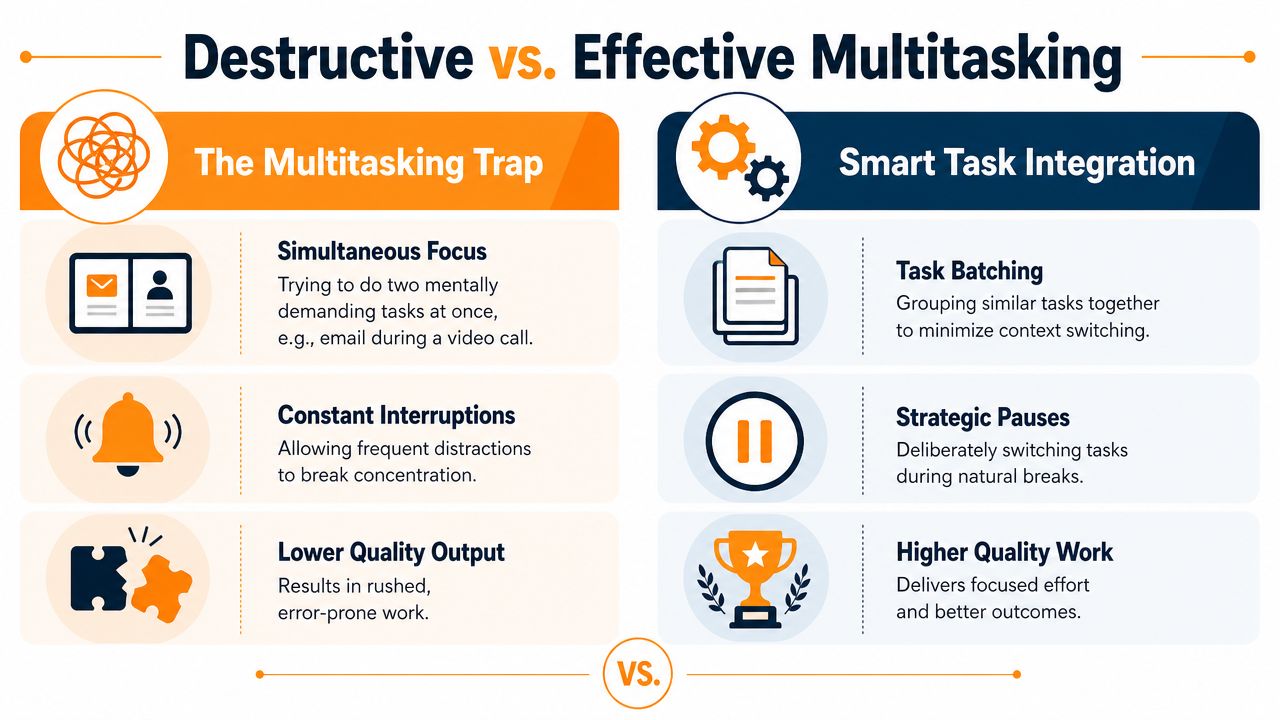
Separate destructive multitasking from useful integration
Destructive multitasking usually has one of these signatures:
- Dual thinking tasks such as writing while listening closely to a call
- Interrupt-driven work where notifications keep deciding your priorities
- Frequent mode changes between client work, admin, and communication
Useful integration looks different:
- Routine movement plus light listening
- Batching similar tasks together
- Switching at planned stopping points instead of random interruptions
That same logic shows up outside desk work too. If you’re interested in examples where movement can pair with low-demand activity better than screen-heavy work can, this guide on gamer health and fitness is a useful contrast. It highlights a point many people miss. Physical activity can sometimes combine with simple input more safely than two screen-based cognitive tasks can.
Use batching to reduce re-entry cost
Batching works because similar tasks share context. When you answer six emails in one block, your brain stays in communication mode. When you knock out invoicing, scheduling, and follow-ups together, you avoid repeatedly rebuilding that admin mindset.
Try sorting your day into categories like these:
-
Deep work
Writing, coding, design, strategy, analysis. Protect these from interruptions. -
Shallow admin
Email, calendar cleanup, file organization, expense logging. -
Communication
Calls, team chat, client check-ins, approvals. -
Maintenance
Review notes, update task boards, prep tomorrow’s priorities.
A simple schedule might place deep work first, communication later, and admin in a compact block. That’s more effective than weaving all three through every hour.
Protect focus with short structured sprints
When people struggle to start or stay with one task, short focus intervals help. The Pomodoro method is the classic example. Work for a set interval, take a short break, then either continue or switch deliberately.
If you want a clean walkthrough, Chronoid’s article on the Pomodoro Technique explains how to use focused intervals without turning the timer itself into another distraction.
Smart task management isn’t about refusing to switch. It’s about switching on purpose.
A simple decision filter
Before pairing or switching, ask:
- Does one task run mostly on autopilot
- Do these tasks use different mental channels
- Will switching now break valuable context
- Am I changing tasks because it’s strategic, or because I’m uncomfortable
That last question catches a lot. People often call it multitasking when it’s really avoidance.
Mastering Focus with Timeboxing and Pomodoro
A freelancer’s day usually doesn’t fall apart in one dramatic moment. It leaks away in fragments. A revision request interrupts writing. Then email opens. Then a message pings. Then a small admin task somehow becomes a half hour.
A diary study found that on days when employees multitasked more, they experienced significantly less flow, which then led to lower performance. The reported indirect effect was −0.82 with a 95% CI [−1.38, −0.34], which points to a meaningful productivity penalty when multitasking breaks the conditions needed for focused work (organizational diary study on multitasking, flow, and performance).

A realistic day with focus blocks
Take a freelance designer managing three clients.
The morning starts with the highest-value creative task. Not inbox. Not chat. One focused block goes to the homepage revision for Client A, because that task needs visual judgment and continuity. Client messages stay closed unless there’s a true emergency.
Late morning, the designer shifts into communication mode. That includes feedback replies, project updates, and scheduling. Because the work type is similar, the switch is cleaner and the pace feels lighter.
Afternoon can split again. One block for production work, one block for admin and loose ends. That’s not rigid. It’s protective.
How to use timeboxing without making it complicated
Timeboxing means giving a task a defined container on your calendar. It works because it turns vague intention into a real boundary.
A practical setup looks like this:
- Reserve one block for deep work when your mind is sharpest
- Group reactive work later so incoming messages don’t hijack your best hours
- Leave a buffer block for spillover, review, or unexpected client needs
If you want a deeper walkthrough of the method itself, this guide on how to timeblock is a helpful reference.
Where Pomodoro fits
Pomodoro is especially useful when the task feels heavy, boring, or hard to start. The classic structure is 25 minutes of focused work followed by a 5-minute break. It lowers resistance because you don’t have to commit to an entire afternoon. You only have to commit to one interval.
For many people, Pomodoro is best for starting. Timeboxing is best for shaping the day. Used together, they create both structure and momentum.
A short visual explanation helps if you want to see how this rhythm works in practice:
Protecting focus isn’t about becoming unreachable. It’s about deciding when your attention is available and when it isn’t.
A Freelancer’s Workflow for Managing Multiple Projects
Most freelancers don’t need more advice about working harder. They need a workflow that stops one client’s urgency from infecting the whole day.
The old multitasking model says: keep every project open, answer everything quickly, and switch whenever something new appears. That creates shallow attention and fuzzy billing. The better model is simpler. Open fewer loops, finish cleaner chunks, and measure where your time goes.
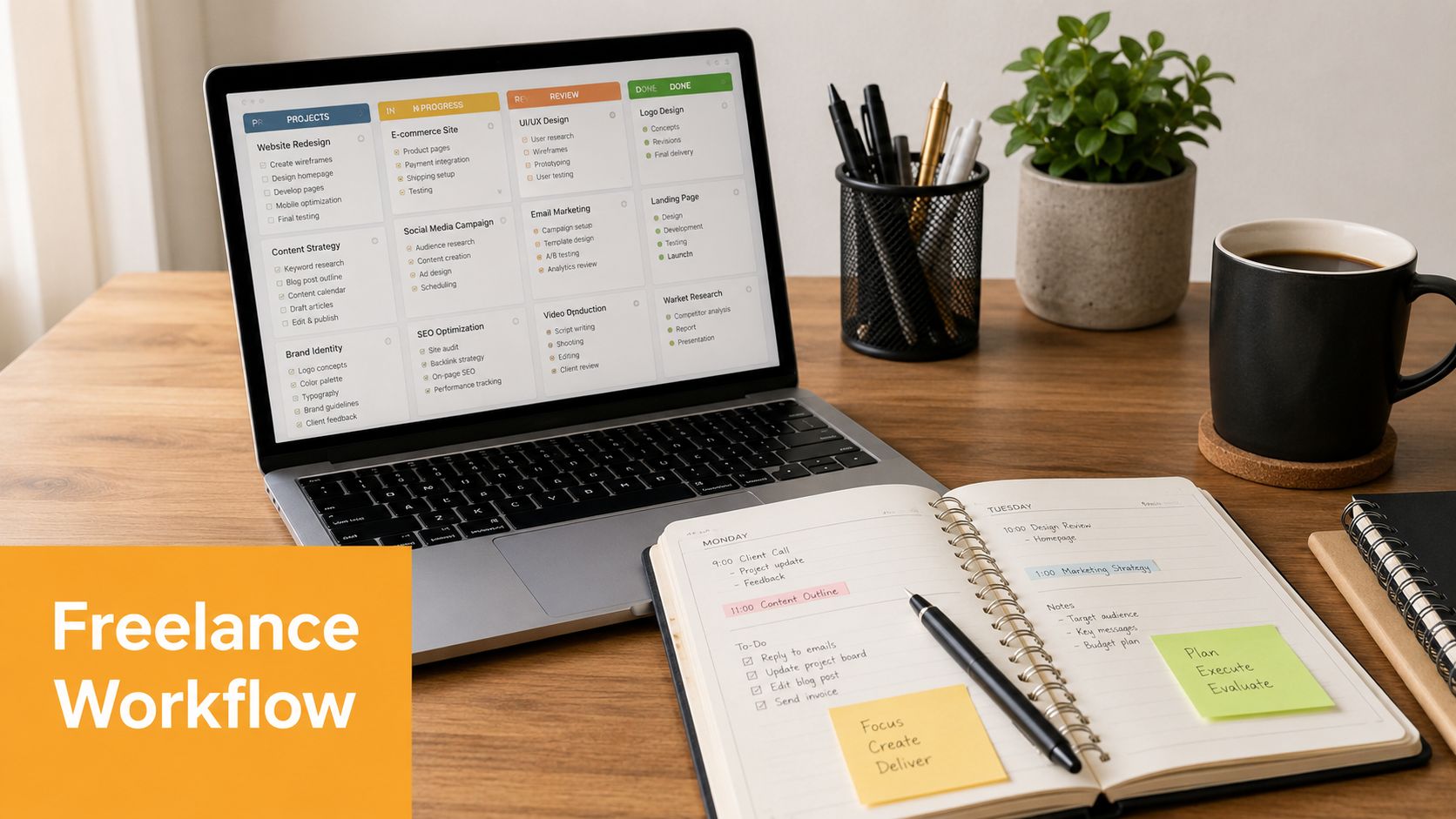
A weekly structure that holds up
Here is a practical pattern for someone juggling multiple clients:
| Day structure | Main use |
|---|---|
| Morning focus block | Client deliverables that need depth |
| Midday communication block | Email, Slack, calls, approvals |
| Afternoon production block | Edits, implementation, revisions |
| End-of-day review | Log progress, prep next task, close loops |
At the weekly level, assign themes where possible. One day may lean toward client delivery, another toward meetings and pipeline work, another toward admin and planning. You don’t need a perfectly rigid week. You need enough structure that your brain isn’t renegotiating priorities every hour.
Use your data, not your feelings
A major gap in most multitasking advice is measurement. People rely on memory and intuition, but those are weak tools for diagnosing attention problems. With automatic time tracking tools, people can build evidence-based rules by reviewing task transitions, app usage, and distraction patterns over time (video discussion on measuring multitasking and time patterns).
That matters because your personal bottleneck may not be what you think it is.
Maybe meetings aren’t the main issue. Maybe it’s the ten-minute drift after each meeting. Maybe email isn’t stealing your whole day, but every inbox check triggers a chain of tab switching. You won’t see that clearly without some record of what occurred.
One option for Mac users is Chronoid, which automatically tracks apps, websites, and documents, then shows patterns in your time so you can inspect distraction clusters, project switching, and focus sessions without running manual timers.
Build rules from patterns
Once you have a week of real behavior, create rules like these:
- If writing quality drops after chat interruptions, close chat during draft blocks
- If project switching spikes in the afternoon, reserve that time for lighter admin
- If one client keeps fragmenting the day, move their communication into a fixed response window
These rules are more useful than generic advice because they come from your own workflow.
For a broader stack of tools around planning, invoicing, and daily execution, this roundup of best productivity apps for freelancers is worth scanning alongside Chronoid’s own guide to productivity tools for freelancers.
A simple daily operating system
Use this as a starting template:
-
Start with one defined outcome
Not “work on Client B.” Write “finish draft intro” or “review final cut.” -
Keep communication in windows
Open inbox and chat at set times instead of living inside them. -
End each block with a re-entry note
Leave one sentence about the next step so tomorrow’s restart is easier.
The goal isn’t to touch every project every hour. The goal is to move each project forward without tearing your attention apart.
This is the answer to how to multitask as a freelancer. You don’t juggle better. You reduce unnecessary juggling.
Stop Juggling and Start Achieving
If multitasking feels necessary, that doesn’t mean it’s working. It usually means your workload, tools, and boundaries need a better system.
The bigger lesson is simple. Productivity doesn’t come from stuffing more simultaneous activity into the day. It comes from protecting attention, pairing tasks carefully, and switching with intent instead of impulse.
That shift matters beyond personal stress. One widely cited estimate placed the annual cost of interruptions and task switching to the American economy at nearly $650 billion in lost productivity (summary discussing the economic cost of interruptions). Even if you ignore the macro number, the local cost is easy to recognize. Slower work. More mistakes. Less clarity by the close of the day.
Start with one change
Don’t rebuild your entire workflow tomorrow. Pick one move:
- Batch your email
- Run one Pomodoro before opening chat
- Protect one morning block for deep work
- Track your switching patterns for a few days
If you’re trying to reduce keyboard friction during low-stakes admin tasks, tools like this guide to Chrome voice typing can also help you reserve more mental energy for work that needs it.
The best version of multitasking is smaller than people think. It’s not doing everything at once. It’s knowing what deserves full attention, what can be paired safely, and when to stop switching.
If you want a clearer view of where your time goes, Chronoid gives you automatic tracking for apps, websites, and documents on macOS, plus focus tools like Pomodoro sessions and distraction blocking so you can turn multitasking from a guess into a measurable workflow.