
You start the day with a reasonable plan. Finish a proposal. Reply to clients. Review a draft. Handle invoicing. Then the day gets chopped into pieces. A Slack message turns into a call. Email pulls you into admin work. You switch tabs so often that by late afternoon you feel busy, but you can’t point to the one thing that moved forward.
That’s the problem timeblocking solves when you use it properly.
Not as a pretty calendar. Not as a rigid system for ideal days. As a way to decide in advance what your time is for, protect the work that matters, and recover quickly when the day goes sideways. If you want to learn how to timeblock in a way that works for freelancers, creatives, students, and people who struggle with distraction, start with the schedule you live in, not the one you wish you had.
Why Your To-Do List Is Failing You
A to-do list can capture work. It can’t defend time.
That’s why people end up with pages of tasks and a full day that still feels directionless. A list tells you what exists. It doesn’t tell you what gets your attention at 10:30 a.m. when a client emails, your phone buzzes, and you still haven’t touched the task that mattered most.
A typical reactive day looks like this. You check your list in the morning, pick something important, get interrupted, answer two “quick” messages, remember an overdue admin task, then spend the rest of the day making micro-decisions. Each decision feels small. Together, they drain the day.
If your current system is mostly capture without scheduling, a simple guide for generating to-do lists can help you clean up the chaos first. But the shift happens when you stop treating tasks as reminders and start treating time as a limited budget.
Timeblocking makes that shift concrete. Instead of saying “write proposal,” you reserve 9:00 to 10:30 for proposal work. Instead of hoping you’ll “get to email later,” you create a contained admin block. Your calendar becomes a set of commitments, not a record of appointments plus wishful thinking.
A task list is inventory. A schedule is a decision.
That difference matters even more if your work changes by the hour. Consultants, freelancers, and anyone juggling projects across clients usually need a stronger filter for urgency versus importance. The time management quadrant is useful here because it forces you to separate real priorities from noise before the noise consumes the day.
The mistake isn’t using a to-do list. The mistake is asking it to do a calendar’s job.
The Foundational Weekly Planning Ritual
Many tend to open their calendar too early.
Good timeblocking starts before the blocks. The weekly ritual is where you decide what deserves space, what can wait, and how much capacity you have. Foundational guides recommend listing tasks, prioritizing them, and assigning fixed calendar blocks before the week begins, often on Friday afternoon or Monday morning, so planning shifts from reactive task lists to pre-committed reservations on the calendar, as described in Todoist’s guide to time blocking.
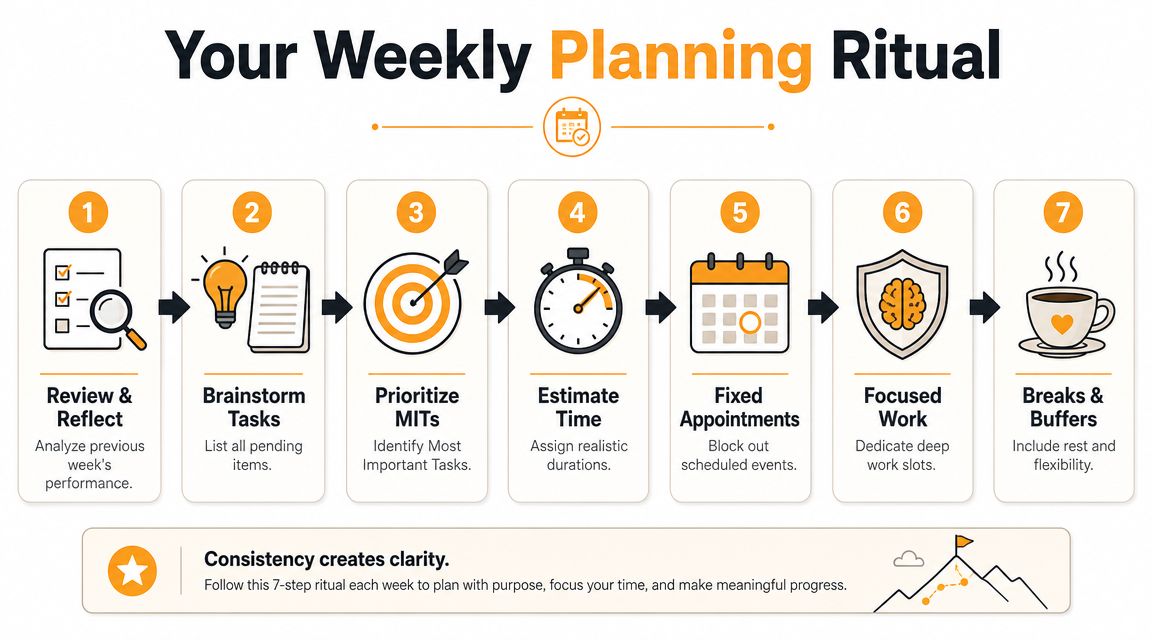
Start with a full task dump
Get everything out of your head first. Client work, follow-ups, errands, revisions, invoices, reading, prep, personal commitments. If it competes for your attention this week, it belongs in the capture list.
This step matters because people often schedule the obvious work and forget the hidden work. Admin, travel, lunch, recovery time, file cleanup, and prep work still consume time whether you acknowledge them or not.
Prioritize before you estimate
Once the list is visible, sort it. A simple urgency-versus-importance filter works well. Some tasks are due soon and matter. Some feel urgent but don’t move anything meaningful. Some are important but easy to postpone, which is exactly why they need protected time.
If you struggle here, this practical piece on how to stop juggling time and prioritize is a useful companion because it helps narrow what belongs in the week at all.
Practical rule: Don’t schedule everything you could do. Schedule what the week must deliver.
Estimate like a realist
Optimistic estimates break more timeblocking systems than bad intentions do.
A technically sound workflow starts with workload triage, then duration estimates based on reality rather than best case. Guides summarized by MeisterTask warn about the planning fallacy and recommend time-tracking for at least a week if you don’t have historical data, while also including non-work time and keeping one source of truth for the schedule in their explanation of time-blocking workflow.
Use this simple weekly checklist:
- Review last week and spot where blocks ran long.
- List every task for the planning horizon.
- Mark your top outcomes for the week.
- Estimate duration realistically, not ideally.
- Place fixed commitments first such as meetings and appointments.
- Add focused work blocks for your highest-value tasks.
- Reserve breaks and breathing room so the plan survives contact with reality.
That last step is more important than it appears. A packed calendar looks efficient. It usually isn’t.
Designing Your Ideal Schedule Block by Block
Once the weekly plan is clear, build the calendar like a workload map, not a patchwork of random appointments. Different work needs different block types. If you treat every task the same, your schedule will fight your attention all day.

Use four kinds of blocks
The cleanest calendars usually rely on a small set of repeatable categories:
- Deep work blocks for writing, strategy, coding, design, analysis, or any task that falls apart when interrupted.
- Shallow work blocks for email, scheduling, invoicing, updates, and low-cognitive admin.
- Buffer blocks for spillover, transitions, and unexpected work.
- Life blocks for lunch, commuting, exercise, school pickup, or anything else that affects your real capacity.
Here, many people overcomplicate things. You don’t need a color for every possible task. You need enough structure to stop mixing incompatible work in the same hour.
A useful way to think about it is the difference between focused production and maintenance work. If you want a clearer definition of that split, this explanation of deep work vs shallow work helps.
Build around transitions, not just tasks
Expert guidance from Monday.com recommends adding 15 to 30 minute buffers between major sessions, reserving flexible blocks for unexpected work, and batching short tasks into themed blocks that are generally no shorter than 30 minutes to reduce context switching, as outlined in their guide to time blocking and productivity.
That advice is practical because the handoff between tasks is work too. Finishing a client call often means capturing notes, assigning follow-ups, updating a file, or resetting your attention before the next task.
A simple weekday layout might look like this:
| Time | Block type | Purpose |
|---|---|---|
| Early morning | Planning block | Review the day and prepare materials |
| Morning | Deep work | Highest-value project task |
| Midday | Admin batch | Email, messages, approvals |
| Early afternoon | Meeting or collaboration | Calls, reviews, team coordination |
| Late afternoon | Deep or flex block | Finish priority work or absorb overruns |
| End of day | Shutdown block | Notes, task rollover, next-day prep |
Match block size to task shape
Don’t force every task into identical windows. A proposal draft may need a longer uninterrupted block. Email usually doesn’t. Creative review may need open space with less pressure. Admin can often be grouped into a single themed session.
Leave empty space on purpose. A calendar at full capacity is a brittle calendar.
If you’re new to how to timeblock, start with a lighter schedule than you think you need. Protect one meaningful focus block each day. Batch reactive work. Add buffers. Then let the system earn complexity later.
Timeblocking Templates for Every Work Style
Generic advice breaks fast because different people lose time in different ways. A freelancer with billable work has different constraints from a student with classes, a designer doing concept work, or someone with ADHD who needs more frequent resets.
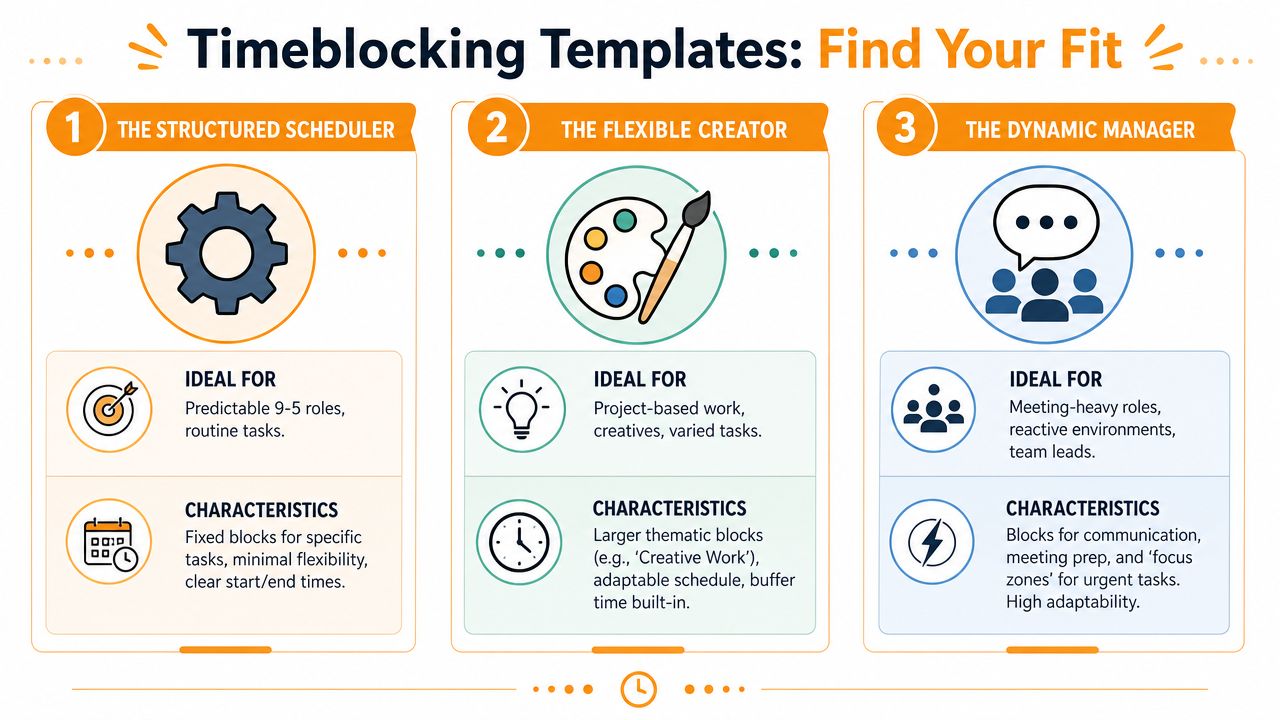
Freelancer and consultant template
Freelancers often make one mistake early. They block client work and forget the work that gets the next client, sends the invoice, or cleans up the project.
A stronger weekly pattern separates these categories:
- Client delivery blocks for paid project execution
- Client communication blocks for calls, updates, and revisions
- Business development blocks for outreach, proposals, and pipeline work
- Operations blocks for invoicing, file management, and planning
If your income depends on hours that can be billed or justified, don’t let admin leak into your prime hours. Put your best attention where the value is highest.
Creative template
Creatives usually need fewer switches and more runway. A writer, designer, editor, or video producer often does better with themed blocks than tightly segmented calendars.
Use larger blocks labeled by mode instead of tiny task labels. “Concept work,” “drafting,” “editing,” or “asset review” works better than over-specifying every move. Creative work is rarely linear, so the block should hold the mode of work, not every sub-step.
A good creative schedule also protects recovery. If a concept session runs hard, the next block should be lighter. That’s not laziness. It’s pacing.
Student template
Students need calendars that acknowledge energy, deadlines, and class anchors. Start with classes and fixed obligations. Then add study blocks by subject difficulty, not just by due date.
Try this comparison:
| Persona | Best block style | Watch out for |
|---|---|---|
| Freelancer | Project and client category blocks | Forgetting pipeline and admin work |
| Creative | Larger thematic blocks | Overscheduling ideation |
| Student | Class-anchored study blocks | Treating all subjects equally |
| ADHD-prone worker | Shorter cycles with visible cues | Building a schedule that’s too rigid |
ADHD-friendly template
People with ADHD often need more external structure and less friction, not more guilt. Shorter work cycles, visible timers, simpler categories, and frequent reset points tend to work better than a full day of long abstract blocks.
For some, that means using a Pomodoro-style rhythm inside a broader time block. This guide on the pomodoro technique for ADHD founders is helpful because it focuses on making structured focus more usable when attention is inconsistent.
A practical ADHD-friendly setup often includes:
- Shorter focus windows inside a planned block
- Clear start rituals such as one tab, one file, one objective
- Visible breaks that prevent all-or-nothing fatigue
- Low-friction re-entry after distraction, using notes or a next action
The goal isn’t to imitate someone else’s ideal calendar. The goal is to create a schedule you can return to.
Common Pitfalls and How to Stay Flexible
Timeblocking fails when people treat it like a proof of discipline instead of a tool for making better decisions.
The most common version looks neat on Sunday night. Every hour is assigned. There’s no room for delays, admin overflow, or surprise requests. By Tuesday, one late meeting blows up the plan, and the whole method feels fake.
That’s not a personal failure. It’s a design failure.
The perfect-day myth
Idealized advice often assumes long uninterrupted stretches of focus. Real work rarely behaves that way. A UC Irvine study found it takes an average of 23 minutes and 15 seconds to return to the original task after an interruption, which is why any realistic schedule has to account for disruption, as discussed in this summary of the interruption problem.
That single fact should change how you build your day. If interruptions are expensive, your schedule needs recovery space, not just ambition.
If your calendar assumes zero interruptions, it already failed before the day started.
What to do when the day breaks
When something urgent lands, don’t pretend you can absorb it without cost. Re-plan on purpose.
Use this triage:
- Decide if it’s urgent. Many interruptions feel immediate but can wait for the next admin block.
- Use buffer space first. That’s what it exists for.
- Shrink or move lower-value work. Don’t sacrifice your highest-value block by default.
- Leave yourself a re-entry note. One sentence is enough: what you were doing, what’s next, and where the file lives.
That last step matters more than people realize. Re-entry friction is often what kills a block after interruption.
Flexibility is part of the method
A strong timeblocking system bends. It doesn’t collapse.
If a block consistently fails, don’t keep defending it. Change the placement, shorten it, batch the task differently, or move it to a time of day that matches your real attention. If meetings always create follow-up work, add processing space after them. If afternoons are chaotic, stop putting your most delicate focus block there.
The best timeblockers aren’t people with flawless days. They’re people who know how to recover by lunchtime.
Refine Your Blocks with Automatic Time Tracking
Most timeblocking advice stops at planning. That leaves out the part that makes the system better. You need evidence about what happened after the calendar was set.
Microsoft’s 2024 Work Trend Index reported that 68% of employees feel they don’t have enough uninterrupted focus time, which makes planning alone an incomplete answer. You also need a way to audit whether your blocks matched reality, as noted in this discussion of calendar layers and focus time.
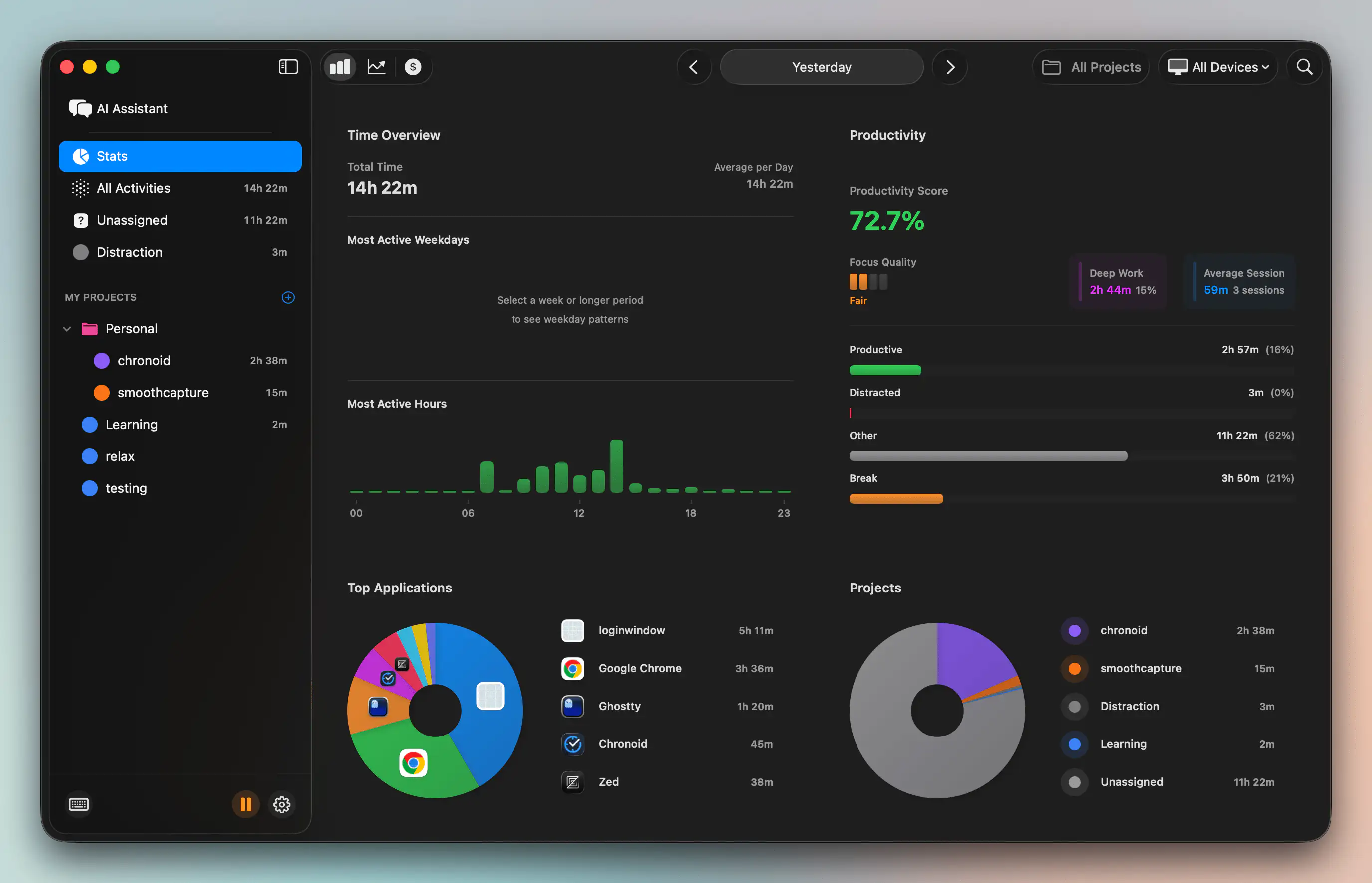
Compare planned time with actual time
Automatic tracking alters the quality of your decisions. If you planned a writing block but spent half of it in email, meetings, and browser tabs, the lesson isn’t “try harder.” The lesson is that the block was either placed badly, protected badly, or sized badly.
Automatic tracking tools can show:
- Which apps and sites consumed the block
- What hours produce focused output
- Where admin or communication leaks into project time
- Which categories repeatedly overrun
For Mac users, one option is automatic time tracking software that records app, website, and document activity without requiring manual timers. Used well, that kind of data turns timeblocking into a feedback loop instead of a guessing game.
Run a weekly block audit
A short weekly review is enough if the data is clear. Ask practical questions.
- Which block types held up well?
- Which ones got hijacked?
- Did my best work happen when I expected?
- What distracted me most often?
- Which tasks always needed more space?
If you use Chronoid, the value is factual rather than motivational. It automatically tracks apps, websites, and documents on macOS, which makes it easier to compare your planned blocks against what happened, spot distraction patterns, and adjust future blocks based on evidence rather than memory.
This short demo shows the idea in motion.
Turn insight into enforcement
The final step is protecting the blocks you already know matter. If your audit shows that certain websites, apps, or message loops consistently break focus, reduce the need for willpower. Use blockers, scheduled focus sessions, or a Pomodoro timer during the block itself.
The plan tells you what matters. The data tells you what actually happened.
That’s the closed loop often overlooked when learning how to timeblock. Plan the week. Run the blocks. Review what happened. Adjust the next version. Repeat until your calendar reflects your real work instead of your idealized intentions.
If you want that feedback loop on your Mac, Chronoid gives you automatic activity tracking, local-first insights, and focus tools that help you see where your time went and tighten the blocks that matter most.