
By late afternoon, many lawyers are still doing legal work while creating a billing problem for themselves. You answer a client email, review a draft in Word, jump into a quick call, compare two document versions, then switch to research in the browser. By day’s end, the work is real, but the record is fuzzy.
That’s where legal time recording software stops being a nice-to-have and starts being operating infrastructure. For a solo lawyer or small firm, especially on a Mac, the real question isn’t just which app has a timer. It’s which system can capture fragmented work accurately, produce billing records you can defend, and do it without creating unnecessary confidentiality risk.
Small firms often get underserved here. Most reviews focus on enterprise billing suites, big-team approval chains, or broad practice management platforms. Mac users who care about local data, low-friction tracking, and privacy-first workflow design usually need a more practical lens.
Here’s a quick comparison framework before we go deeper.
| Decision area | What to look for | What usually fails in practice |
|---|---|---|
| Time capture method | Automatic or contemporaneous capture that fits interrupted legal work | Reconstructing entries from memory at day’s end |
| Billing defensibility | Matter, client, and task-based records that can move into invoices | Generic timers with vague labels like “admin” or “research” |
| Privacy model | Metadata-focused capture, strong access controls, minimal content collection | Screenshot-heavy monitoring and keystroke capture |
| Mac workflow fit | Native macOS support, document and app awareness, low setup burden | Browser-only tools that miss desktop work |
| Reporting | Clear separation of billable and non-billable work, usable review screens | Raw activity logs with no billing review layer |
| Deployment model | Cloud if you need shared access, local-first if confidentiality is the priority | Choosing storage architecture without thinking through risk |
The Hidden Costs of Inaccurate Timekeeping
The familiar failure point is the evening reconstruction session. You open your calendar, skim your inbox, scan recent files, and try to piece together what happened between lunch and the call that ran long. Some entries come back. Others don’t. A few get rounded. A few get skipped because they feel too small to bother with.
That’s not just annoying admin. It changes what gets billed, what gets written off, and how confident you feel when a client asks what they’re paying for.

Where time disappears
In small practices, lost time usually doesn’t vanish in dramatic blocks. It disappears in transitions.
- Short client communications: A quick reply, a voicemail review, or a short follow-up call often never makes it into the timesheet.
- Document work: Draft edits, markup review, and version comparison can be substantial legal work. If document-heavy matters are part of your day, a solid legal document comparison software guide is useful because comparison work often belongs in the same billing chain as drafting and review.
- Context switching: You move from one matter to another before you’ve stopped one timer or started the next.
The broader legal market has already moved away from relying on end-of-day recall. Lawmatics notes that legal time tracking has fundamentally shifted from manual “billable hours” logging to software that captures time passively, which matters because contemporaneous activity capture is now part of modern revenue management rather than a convenience feature.
What actually changes with software
Good legal time recording software doesn’t just count minutes. It reduces guesswork. It creates a record closer to the work itself. It also narrows the gap between doing the task and billing for it.
The biggest improvement usually isn’t speed. It’s that you stop asking your memory to do accounting work.
For solo and small-firm lawyers, that shift is practical. If your system captures work while it happens, you spend less time rebuilding the day and more time reviewing, editing, and approving entries. That’s a better use of legal judgment.
Your Ethical Duty for Accurate Time Records
Lawyers often discuss timekeeping as a profitability issue. It is one. But that frame is too narrow.
Billing records are also part of how you show clients that your fees are grounded in actual work, not estimates assembled after the fact. When time entries are delayed, vague, or reconstructed from memory, the problem isn’t just lost revenue. It’s reduced transparency.
Why contemporaneous records matter
A time entry should answer basic questions without forcing the client to guess. What was done. For which matter. For whose benefit. In what amount of time. If your record can’t do that, the invoice becomes harder to explain and easier to challenge.
That’s why automated capture matters beyond convenience. LawBillity describes automated time tracking software as a key financial control system because it minimizes human error and captures smaller billable segments often lost in manual logging. The same guidance ties accurate tracking to revenue, efficiency, and client satisfaction because invoices are based on data rather than memory.
Trust is built line by line
Clients rarely object to being billed for real legal work that is clearly described and reasonably recorded. They do object to vague blocks, suspiciously rounded entries, and bills that look reconstructed.
A defensible time record helps with:
- Client communication: Detailed entries make invoices easier to understand and discuss.
- Internal review: Even if you work alone, you still need a record you can revisit and justify.
- Fee disputes: Specific records are easier to defend than reconstructed summaries.
- Consistency: Similar work should be recorded in a similar way across matters.
Practical rule: If you’d hesitate to explain an entry on a call with the client, the entry probably needs better underlying capture.
Ethical discipline is easier when the tool fits the work
Many firms make a bad buying decision. They pick a system that looks compliant on paper but is awkward in daily use. Lawyers then bypass it, delay entries, or use partial workarounds. The result is still weak timekeeping, just with more software attached.
For small firms, the better approach is simpler. Use a system that supports the way lawyers work, then apply review discipline before bills go out. The software should lower the effort required to keep accurate records. It shouldn’t depend on perfect behavior every day.
How to Evaluate Legal Time Recording Software
Most demos make legal time recording software look interchangeable. Start timer. Stop timer. Generate invoice. That’s not enough for real selection.
The better test is whether the product can support defensible billing under the conditions of an ordinary legal day. TimeLive describes that benchmark as logging work as it happens, defining it by case and client, and flowing that data into invoices with approval workflows and management reporting.
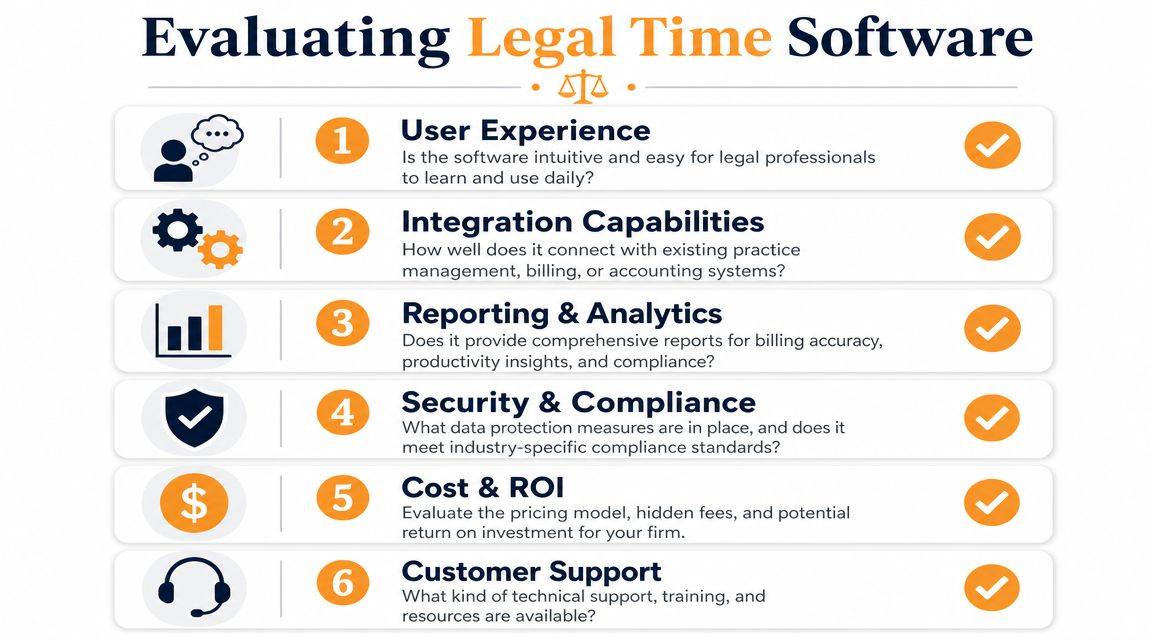
Start with billing structure
If the software can’t tie time to the way your practice bills, skip it.
Look for:
- Matter-based entry design: You should be able to assign time by client and matter without awkward workarounds.
- Task detail: The tool should support meaningful descriptions, not just duration.
- Invoice flow: Time should move into billing cleanly, with review before release.
- Role controls: If you have staff, approvals and permissions matter.
A lot of broader legal operations advice overlaps here. If you’re comparing full practice systems, TheLawGPT’s insights on legal tech are worth reading alongside a timekeeping evaluation because billing quality depends heavily on the surrounding matter-management workflow.
Then test daily usability
A system can be feature-rich and still fail because nobody wants to use it. For solos and small firms, low-friction use is not a bonus. It’s adoption insurance.
Here’s a simple scorecard:
| Evaluation point | Strong sign | Warning sign |
|---|---|---|
| Entry review | You can clean up auto-captured activity quickly | Review takes longer than manual entry |
| Matter assignment | Fast reassignment across clients and tasks | Too many clicks to classify work |
| Mac support | Native app behavior or reliable desktop capture | Heavy browser dependence |
| Reporting | Clear billable and non-billable views | Pretty dashboards, weak billing detail |
Security questions should be specific
Don’t ask whether a product is “secure” in the abstract. Ask what data it collects, who can access it, and where it sits.
- What data is captured: Metadata only, or content as well?
- How access is limited: Permissions, access controls, and authentication matter.
- How review works: Can you edit, exclude, or delete entries before they become billing records?
A strong legal timekeeping tool creates a short path from activity to review to invoice. A weak one creates a large pile of untrusted data that someone must clean up later.
Manual Timers vs Automatic Activity Tracking
This is the decision that shapes everything else. Most lawyers don’t really need “time tracking software” in the abstract. They need a way to record work that survives interruptions.
Manual timers and automatic activity tracking solve the same problem in very different ways.
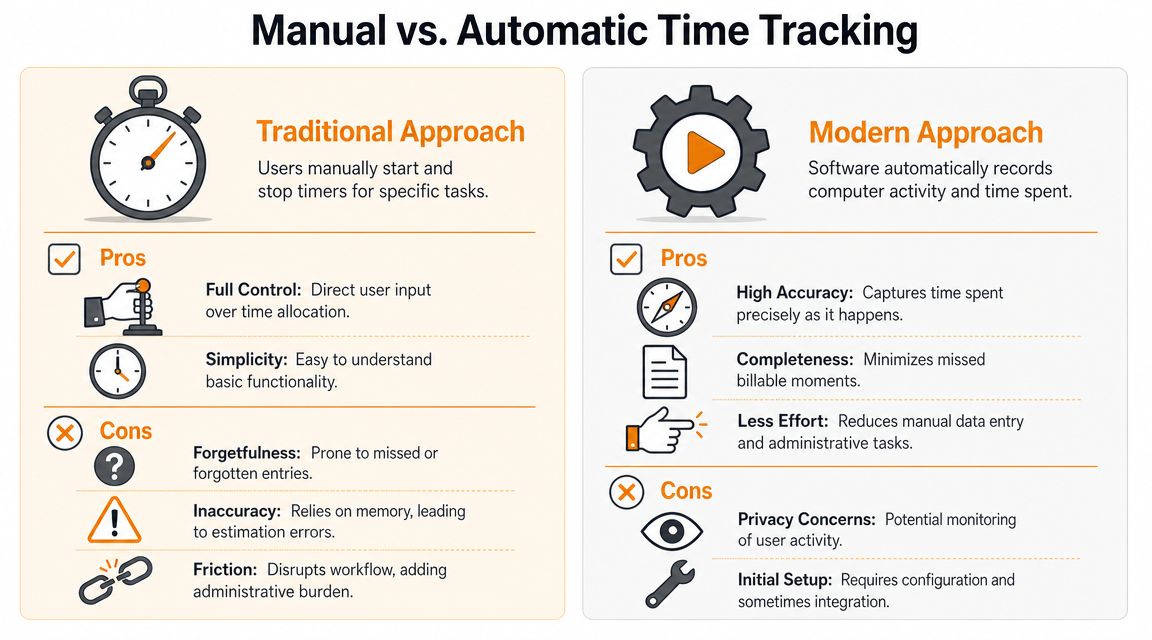
Manual timers
Manual timers are familiar. You start one when work begins, stop it when work ends, and label the entry.
That works well when your day is made of long, clean blocks. It works less well when your day includes opposing counsel emails, redlines, court filings, Slack-style client messages, and repeated task switching.
Pros of manual timers
- Control: You decide exactly when billable time starts and stops.
- Simplicity: The concept is easy to understand.
- Clean records for focused work: A long drafting session can be tracked clearly.
Cons of manual timers
- Forgetting: Lawyers forget to start them, stop them, or switch them.
- Interruptions: A call can break a research block and leave the timer running under the wrong matter.
- Administrative drag: The act of managing timers can interrupt concentration.
Automatic activity tracking
Automatic tools capture app, website, and document activity in the background, then let you review and classify what happened.
This model is much better suited to fragmented workflows, which is why it has become so attractive to solo lawyers and small firms that don’t have billing staff cleaning everything up later.
If your day involves constant switching between email, research, documents, calls, and matter review, timer discipline usually breaks before billing discipline does.
This is also why many Mac users start looking at automatic time tracking software for modern workflows. The core benefit isn’t novelty. It’s that background capture gives you a timeline to review instead of a blank page to reconstruct.
A useful demo can help make the distinction concrete:
Which model fits legal work better
For pure control, manual timers still have a place. For real-world accuracy in small-firm practice, automatic tracking is usually stronger if the review layer is good.
Use manual timers if your work is mostly scheduled and uninterrupted.
Use automatic activity tracking if your workday looks like this:
- Frequent matter switching: Estate planning in the morning, litigation emails by noon, billing review before close.
- Document-heavy tasks: You move among Word, PDF review, browser research, and email.
- Small billable fragments: The day contains many short but legitimate chunks of legal work.
The trade-off is obvious. Automatic tracking improves completeness, but it also raises sharper privacy questions. That’s where storage model and data minimization matter.
Cloud Convenience vs Local Data Control
Once software begins capturing your work activity, the next question is where that record lives and what exactly the record contains.
For lawyers, this isn’t just an IT preference. It’s a confidentiality decision.
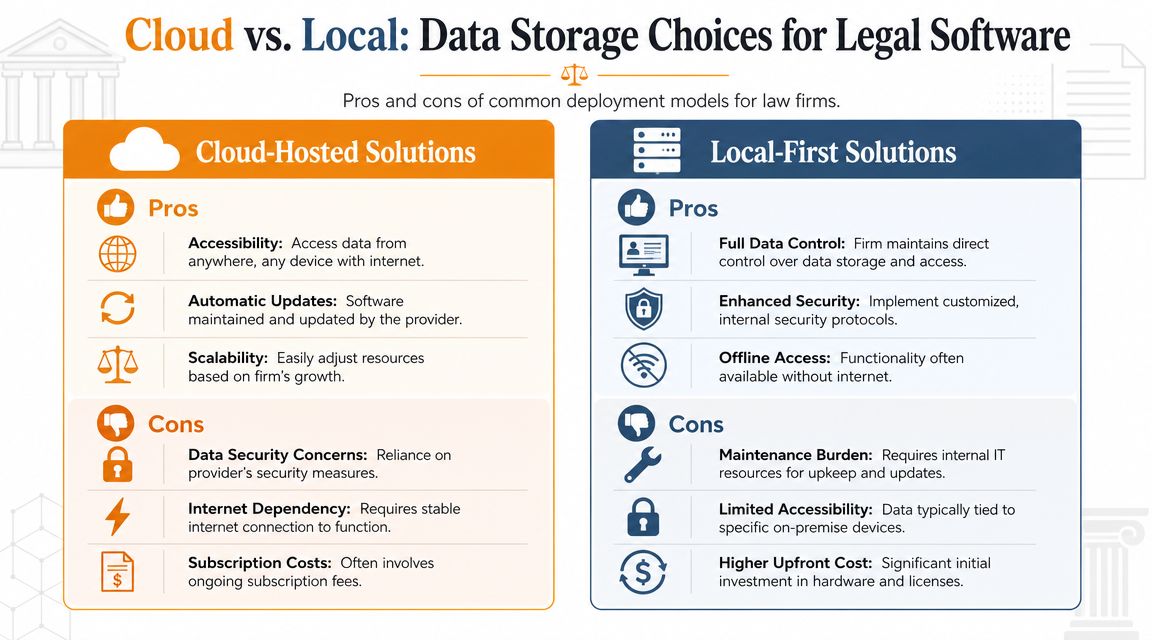
Cloud-hosted systems
Cloud products are popular because they’re easy to deploy and accessible across devices. If your firm wants shared dashboards, centralized admin, and remote availability, cloud software is often the straightforward option.
But lawyers should ask a more precise question than “Is it encrypted?” Ask what leaves the device, what’s visible to the provider, and whether the product captures content or only activity metadata.
Local-first systems
Local-first tools keep the underlying activity data on the device by default, which can be attractive for solo and small-firm lawyers who want tighter control over sensitive work patterns.
That model can reduce exposure, but it doesn’t remove the need for sound internal security. Device security, backups, and access discipline still matter. A short essential data security checklist is useful here because legal confidentiality failures often start with basic operational gaps, not exotic attacks.
Metadata versus content capture
This distinction matters more than many buyers realize. WorkTime states that it measures lawyer time through active periods, application categories, attendance, and performance data without capturing screenshots, keystroke content, or screen recordings. For law firms, that’s a meaningful technical difference because metadata-focused tools lower privilege and confidentiality risk compared with systems that collect content-bearing evidence.
That’s the lens I’d use for product review:
| Privacy question | Lower-risk answer | Higher-risk answer |
|---|---|---|
| What is captured | App, website, document, and active-time metadata | Screenshots, typed content, or full recordings |
| Where data lives | Local-first or tightly controlled storage | Broad default sync without clear limits |
| Who can see it | Restricted access by role or user | Provider or manager visibility into unnecessary detail |
If privacy is a core requirement, review products through a data minimization lens. Collect what you need to build a billing record, and no more. A privacy-focused implementation guide like Chronoid’s privacy approach for local activity data is helpful because it frames time tracking around least-privilege collection rather than surveillance.
The safest legal time recording software usually isn’t the one that captures the most. It’s the one that captures enough to support billing without collecting unnecessary client-sensitive content.
Recommended Software for macOS-Based Lawyers
Mac-using lawyers often end up choosing between two imperfect categories. One is the full legal suite that handles billing, matter management, and invoicing but feels heavy for a solo practice. The other is a generic timer app that feels simple but doesn’t respect how legal work fragments across documents, email, research, and review.
If you need a full legal operations stack
If your firm wants integrated billing, case management, invoicing, and administrative controls in one platform, legal-specific suites are the right starting point. Products mentioned in current market coverage include Lawmatics, Rocket Matter, Bill4Time, Smokeball, LeanLaw, and Time Tracker by eBillity. These platforms make the most sense when your priority is shared billing workflow, centralized reporting, or broader practice management.
For small firms with staff, that integrated model is often worth the added complexity because timekeeping is only one piece of a larger operations system.
If you mainly need accurate automatic capture on a Mac
Some lawyers don’t need a full suite first. They need a reliable way to capture work done on macOS, review it quickly, and keep sensitive activity data under tighter control.
In that use case, Chronoid is one option to consider. It’s a macOS app that automatically tracks apps, websites, and documents in the background, detects idle and away time, and keeps activity data local by default with optional cloud support. For Mac users comparing native options, this overview of a Mac app time tracker built for automatic capture is relevant because the key differentiator isn’t just passive tracking. It’s combining automatic capture with local-first privacy and a reviewable timeline.
Matching software to practice style
A simple way to narrow the field:
- Solo lawyer with fragmented desktop work: Look for automatic capture, strong review controls, and local or privacy-forward storage.
- Small firm with shared billing operations: Prioritize matter-centric billing, approval workflows, and invoice generation.
- Lawyer who dislikes monitoring-style tools: Avoid products that lean on screenshots or keystroke capture.
- Firm with strict client confidentiality concerns: Favor metadata-based systems and ask hard questions about storage architecture.
The wrong choice is usually obvious after a week. If the tool makes you work for the time record, you’ll stop trusting it. If it automatically captures the day and lets you review with judgment, it becomes part of the practice instead of another task.
Frequently Asked Questions About Legal Timekeeping
Can a generic time tracker work for a law practice
Sometimes, but only if your needs are simple. Generic tools may track duration, but they often lack matter-based workflow, billing review, and legal-specific structure. For many lawyers, that becomes a problem when it’s time to produce invoices that are clear and defensible.
Is automatic tracking ethical for client billing
It can be, if you review entries before billing and the software captures activity in a way that supports accurate descriptions. The key is not to bill raw activity logs blindly. Lawyers still need to exercise judgment.
Should small firms choose cloud or local-first software
That depends on your risk tolerance and workflow. Cloud products are easier for shared access. Local-first tools can make more sense if confidentiality and data minimization are the main concern.
What should I test during a trial
Test one real workweek. Review whether the software handled interruptions, matter switching, idle time, and document-heavy tasks accurately enough to support billing without excessive cleanup.
If you’re a Mac-based lawyer who wants automatic time capture without defaulting to surveillance-style monitoring, Chronoid is worth a look. It tracks apps, websites, and documents on macOS, keeps data local by default, detects idle time, and gives you a reviewable timeline that fits interrupted legal work better than manual timers alone.