
You sit down at home with a decent plan. A few messages come in. Someone wants a quick call. You answer email between tasks because it feels efficient. By late afternoon, you’re tired, busy, and slightly annoyed. You worked all day, but the important thing still isn’t done.
That’s the remote work trap. Freedom feels productive right up until it turns into drift.
Good time management for remote workers isn’t about squeezing every minute. It’s about building enough structure that your day stops running you. A significant upgrade comes when planning and measurement work together. You choose a system, then you verify where your time went. This part is often skipped, and it’s why a lot of productivity advice sounds good but doesn’t stick.
The Remote Work Paradox Why More Freedom Requires More Structure
Remote work removes a lot of friction. It also removes a lot of support rails.
In an office, the day has built-in cues. People arrive. Meetings start in rooms. Lunch happens. Coworkers create a visible pace. At home, that structure disappears. You gain control, but you also inherit every decision about when to start, what to tackle first, when to switch, and when to stop.
That’s why so many remote workers end the day with a strange mix of fatigue and doubt. They weren’t lazy. They were available all day. But availability isn’t the same as progress.
Autonomy works better with rules
The fix isn’t rigid scheduling for its own sake. The fix is intentional structure.
A remote schedule needs a few anchors. Start time. priority window. communication window. shutdown ritual. Without them, your brain keeps renegotiating the day. That mental switching costs more than people think. It creates procrastination disguised as responsiveness.
Flexible work is also no longer a niche setup. A remote work statistics summary reported that 27% of full-time employees worked remotely and another 52% were in hybrid roles in a 2026 industry summary. That matters because flexible work now describes how modern work is done, not a temporary exception.
The freedom of remote work becomes useful only after you decide what your day is allowed to interrupt.
For people who travel while working, the challenge gets even sharper. Location freedom can improve life, but only if work boundaries are deliberate. This practical guide to work-life balance for digital nomads is useful because it treats flexibility as something you manage, not something you automatically benefit from.
If your workday feels shapeless, a dedicated setup built for remote workers on Chronoid can help frame the problem clearly. Not with vague productivity talk, but with visibility into how your day behaves.
What structure actually looks like
A workable remote day usually includes:
- A fixed start trigger like coffee at the desk, a planning pass, or opening one core project first.
- Protected focus windows where chat and inbox don’t get equal status with actual work.
- Defined admin time for email, follow-ups, and scheduling.
- A visible stop point so work doesn’t leak into the evening.
That’s not restrictive. It’s what turns remote work from endless partial attention into a day you can control.
Choose Your Time Management Framework
Failure in time management for remote workers often stems from picking tactics before picking a system. They try timers, to-do lists, and calendar tricks without deciding how they want the day to operate.
The better move is to choose a framework that fits your work.
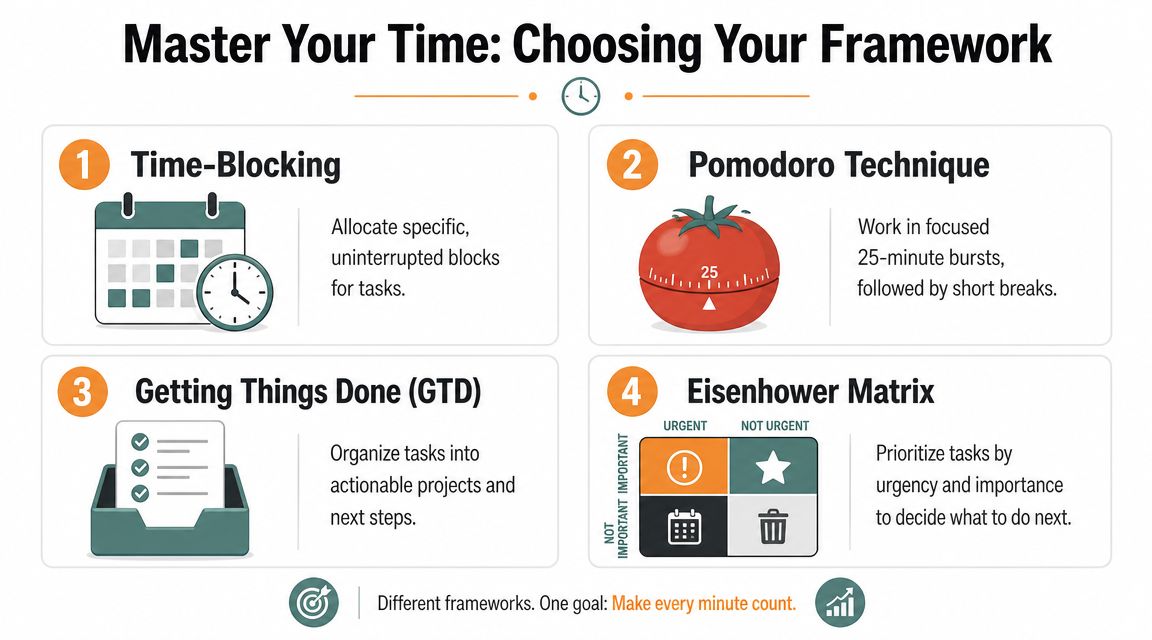
Four frameworks that hold up in remote work
Time-blocking is like a TV guide for your day. Each block has a job before the day starts. You don’t decide what to do every hour in real time. You follow the plan, then adjust as needed.
Best for people with varied responsibilities, client work, or frequent context switching. The benefit is clarity. The downside is that it can feel brittle if your day gets interrupted often. If you want a practical starting point, this guide on how to time-block your day is a useful reference.
Pomodoro works like interval training. You do focused sprints, then step away briefly. It’s helpful when starting is the hard part, or when your attention slips after short stretches.
It suits students, ADHD-prone workers, junior professionals, and anyone facing resistance on mentally heavy tasks. The main benefit is momentum. The downside is that fixed short intervals can interrupt flow when you’re doing complex work.
The framework for hard thinking
Deep Work is the opposite of fragmented productivity. You reserve long, uninterrupted blocks for demanding work such as coding, writing, analysis, design, or strategy. During that block, the only acceptable activity is the task itself.
This is often the right fit for developers, writers, researchers, and senior individual contributors. The benefit is quality and speed on hard tasks. The downside is that it requires stronger boundaries than teams commonly provide.
Practical rule: If your job depends on original thinking, don’t leave your best task for the leftover parts of the day.
Task batching groups similar low-intensity work together. Instead of checking inbox, Slack, approvals, and admin all day, you process them in one or two deliberate batches. It’s like running errands in one trip instead of driving across town six times.
This works well for managers, operators, freelancers, and anyone buried in small requests. The benefit is reduced switching. The downside is that some people use batching to avoid their real work by polishing admin.
Time Management Frameworks at a Glance
| Framework | Core Principle | Best For | Flexibility |
|---|---|---|---|
| Time-Blocking | Assign specific blocks to planned work | General remote professionals with mixed responsibilities | Medium |
| Pomodoro | Work in short focused sprints with breaks | Students, ADHD-prone workers, people who struggle to start | High |
| Deep Work | Protect long uninterrupted sessions for demanding tasks | Developers, writers, analysts, creatives | Low to medium |
| Task Batching | Group similar shallow tasks into dedicated windows | Freelancers, managers, admin-heavy roles | High |
How to choose without overthinking it
Use one simple filter:
- Pick time-blocking if your main problem is drift.
- Pick Pomodoro if your main problem is avoidance.
- Pick Deep Work if your main problem is fragmentation.
- Pick task batching if your main problem is constant small interruptions.
You can combine them. A developer might use deep work in the morning and batch communications after lunch. A consultant might time-block the whole day and use Pomodoro inside difficult blocks. The mistake is trying all of them at once before any of them becomes a habit.
Practical Tactics to Defeat Digital Distractions
A good framework falls apart fast if every ping gets a vote.
Remote workers can get more real focus than office workers, but only if they defend it. Hubstaff benchmark data found that remote workers average 273 minutes of focus time per day and about 4.15 more focused hours per week than in-office workers, a roughly 22% gain in focused work time. The same analysis makes the catch clear. That advantage holds when interruptions are actively managed, as shown in this Hubstaff focus time study.
Start with your environment.
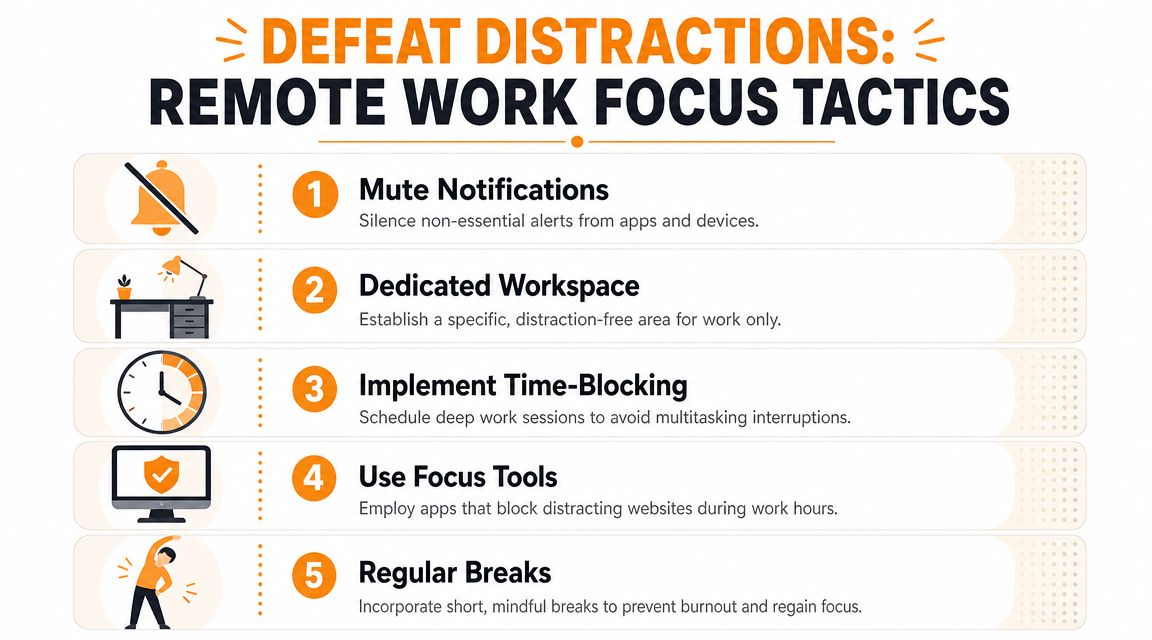
Defend your physical space
Your workspace should reduce decisions, not create them.
- Use one work zone even if it’s small. A specific chair, desk, or corner helps your brain switch modes faster.
- Keep friction low for real work. Open the document, app, or project you need before your focus block starts.
- Make distractions harder. Put the phone out of reach. Close personal tabs. Don’t trust willpower when distance works better.
A dedicated setup matters because distraction often starts before the first notification. It starts with visual cues, easy escapes, and no clear beginning.
Clean up your digital habits
Most remote distraction is self-inflicted. Not because people are careless, but because every tool is configured to demand attention.
- Mute non-essential alerts so only urgent communication breaks through.
- Check email on purpose instead of grazing all day.
- Use do not disturb during focus sessions and tell your team what that means.
- Write down the urge to switch tasks instead of acting on it immediately.
If inbox sprawl keeps pulling you off course, this guide on how to organize your email inbox is worth using as a cleanup plan rather than another thing to read and ignore.
This short video gives a useful reset on reducing interruption loops during the day.
Set harder calendar rules
A remote calendar can become a landfill for everyone else’s priorities.
Try these rules:
- Require a purpose before accepting a meeting.
- Default to shorter meetings when a full block isn’t necessary.
- Use agendas so calls produce decisions, not drift.
- Decline or defer meetings that could be solved in writing.
A meeting without a clear outcome steals time three times. Before the call, during it, and after it when nobody knows what changed.
If you don’t protect your calendar, no framework will save your focus.
Measure What Matters Differentiating Focus from Busywork
A full day can still be a low-value day.
That’s the core problem with vague productivity advice. It tells people to “work smarter” without helping them separate meaningful work from activity that only looks productive. For remote workers, that distinction matters more because fewer people can see the difference from the outside.
Three categories that look similar on a busy day
Deep work is demanding, high-value output. Writing the proposal. Shipping the code. Editing the final draft. Solving the hard problem that moves the project forward.
Shallow work is necessary but lighter. Email, documentation, status updates, admin, scheduling, expense handling, routine reviews. This work supports the system, but it usually doesn’t create the main result.
Busywork is different. It feels active, but it mostly burns attention. Rechecking Slack. Rearranging task lists. Reading messages the second they arrive. Opening tabs you don’t need. Attending calls that didn’t need to exist.
Why hours worked is a weak metric
If you only track total hours, you miss the most important question. What kind of hours were they?
A remote worker can log a full day and still avoid the one task that matters. Another can work fewer hours and finish the highest-value piece before lunch. Without measurement, both days can feel equally “busy.”
That’s one reason structured remote work can produce real gains. A Bureau of Labor Statistics analysis found that each 1 percentage-point increase in the share of remote workers was linked to a 0.08 percentage-point increase in total factor productivity growth, according to this remote productivity analysis. The implication is straightforward. Remote work performs well when it’s managed deliberately, not when it’s left to chance.
If you can’t tell the difference between focused output and digital motion, you can’t improve your day. You can only relive it.
Why manual tracking usually fails
Manual time logs sound simple. In practice, they break for the same reason diets based on perfect self-reporting break. People forget, estimate, round off, and backfill later.
That creates flattering data. It also creates blind spots. The exact moments that pull your day apart, quick context switches, impulse checks, long stretches of shallow work, are the least likely to be recorded accurately by hand.
For time management for remote workers, measurement only helps when it’s objective enough to show what happened without relying on memory.
Automate Your Awareness with Chronoid
If manual tracking depends on discipline, individuals won’t keep it up for long. They’ll use it for a few days, miss entries, and go back to guessing.
Automatic tracking fixes that specific problem. It closes the gap between what you planned to do and what the day contained.
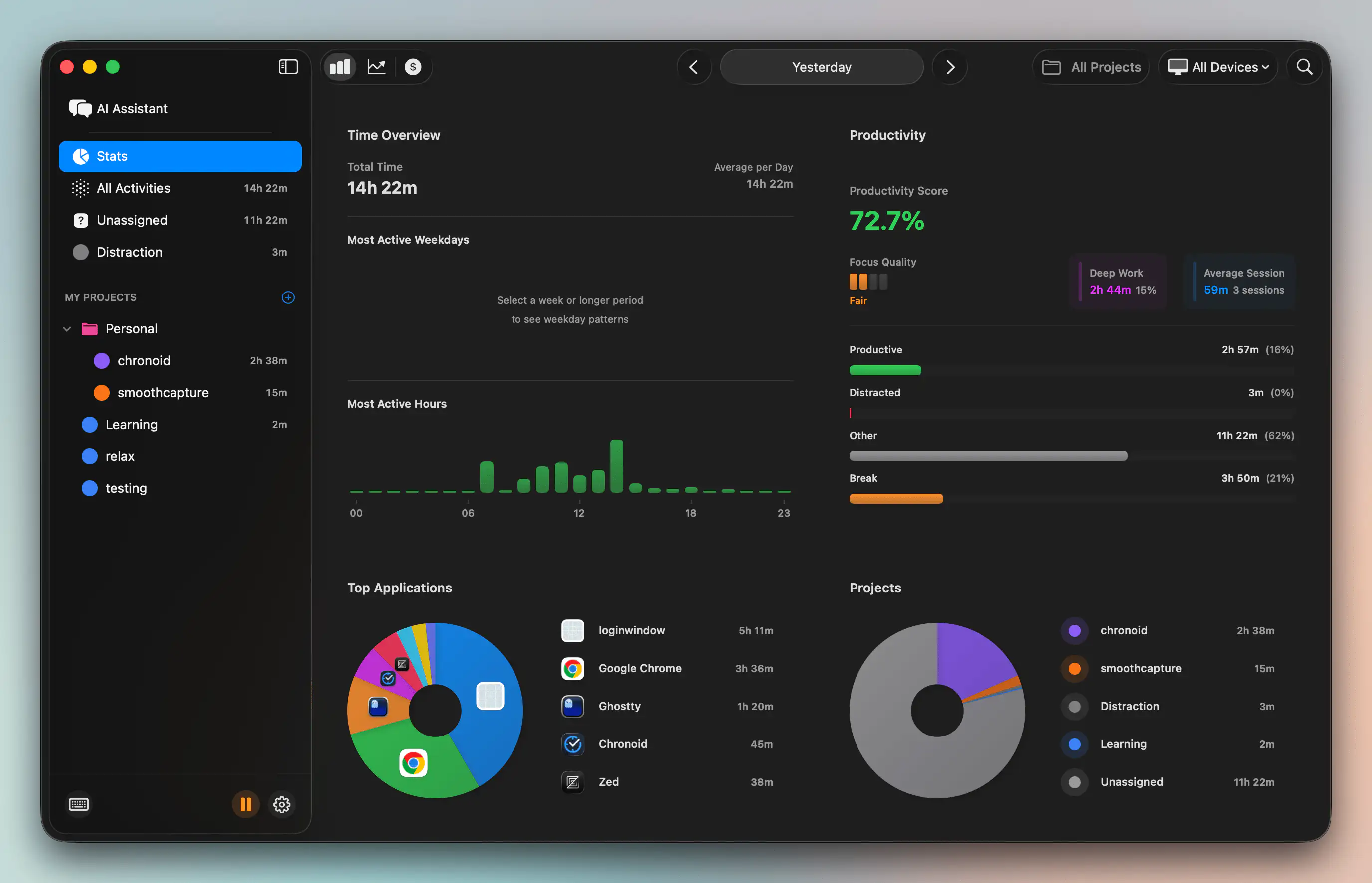
What automatic measurement changes
Chronoid is a macOS app that automatically tracks apps, websites, and documents so you can see where work time went without running manual timers. That matters because remote work usually doesn’t fail at planning. It fails at visibility.
Instead of asking “Why did today disappear?” you get a record of the day. Which apps dominated. Which sites kept pulling you away. When your productive hours happened. Which projects received real time versus assumed time.
That kind of awareness changes behavior faster than generic motivation does.
A useful workflow for weekly review
The point of tracking isn’t surveillance. It’s pattern recognition.
A practical weekly review looks like this:
- Check your top categories and compare them with your actual priorities.
- Look for hidden switch costs such as frequent jumps between chat, inbox, browser, and project files.
- Identify your strongest hours so deep work lands where your attention is naturally better.
- Notice repeat distractions instead of blaming yourself in general terms.
Chronoid also includes AI-powered categorization and an on-device chat interface, so you can ask direct questions such as which distractions took the most time this week. That lowers the effort required to interpret your data. The app also includes focus tools like a website blocker, scheduled focus sessions, and a Pomodoro timer, which makes it possible to act on what you learn in the same workflow.
Why measurement improves every framework
This is the missing link in most productivity systems.
Time-blocking gets better when you know how long tasks really take. Pomodoro gets better when you can see whether your short sprints lead to output or just repeated restarts. Deep work gets better when you can verify that your “focus block” wasn’t half messaging and tab switching. Task batching gets better when you can see whether admin stayed contained or spread through the whole day.
Measurement doesn’t replace judgment. It sharpens it.
Sample Schedules for Different Remote Workers
One schedule won’t fit everyone. The right setup depends on the kind of work you do, how much collaboration your role requires, and whether your attention improves with long blocks or shorter cycles.
Remote workers often overcorrect. They either copy a strict routine that doesn’t fit their job, or they avoid structure entirely. A better approach is to build around your actual work patterns.
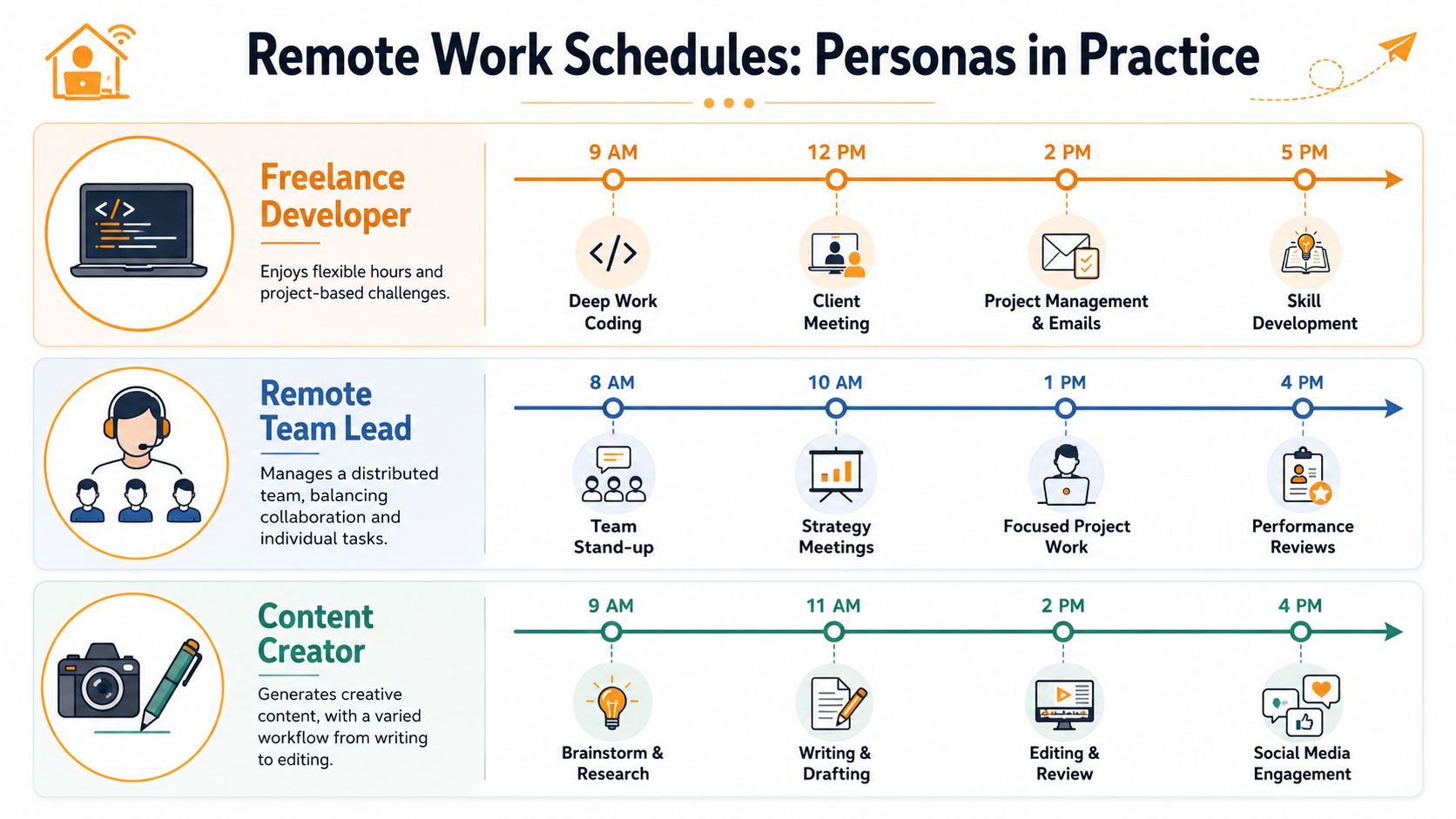
Freelance developer
A freelance developer usually needs long cognitive blocks and clear client communication windows. Mixing those two all day ruins both.
Sample day:
- Morning for deep coding on the hardest feature or bug
- Midday for client replies and project updates
- Afternoon for a second build block, testing, or documentation
- Late day for admin, estimates, and tomorrow’s setup
For cross-time-zone work, don’t default to live calls. Harvard Business School notes that the better question for global teams is not just how to protect focus time, but which work should be synchronous at all. That matters because remote workers often stretch their schedules to collaborate live on tasks that could have moved asynchronously.
A developer’s best schedule often protects code time first, then handles communication in batches.
Creative professional
Designers, writers, editors, and content leads need structure, but not every creative block looks the same. Some hours are for production. Others are for thinking, collecting references, sketching, and revising.
A workable schedule might look like this:
| Time of day | Main activity |
|---|---|
| Start of day | Brief planning and asset review |
| Early focus window | Drafting, design, writing, or editing |
| Midday | Meetings, feedback, messages |
| Second focus window | Revision and production |
| End of day | File cleanup, handoff notes, next-step prep |
Creative workers usually benefit from time-blocking with looser edges. The block has a purpose, but not every minute needs a script.
Student with ADHD tendencies
For ADHD-prone learners, starting can be harder than continuing. Large study goals can feel abstract, which makes procrastination look like a motivation problem when it’s often a structure problem.
A better schedule uses short entry points:
- First session with a small Pomodoro to break resistance
- Short reset away from the desk
- Second session on a single defined task, not a whole subject
- Admin batch for notes, messages, and materials
- Final study block for review or practice
This kind of student usually does better with visible timers, low-friction task definitions, and fewer open tabs. If you want a broader stack of useful software for this kind of setup, this roundup of productivity tools for remote workers is a practical place to compare options.
The common thread across all three examples is simple. Good schedules don’t just assign time. They assign the right kind of time to the right kind of work.
Your Action Checklist to Reclaim Your Time
Motivation fades fast. A short plan works better.
Your 7-day plan to reclaim your time
-
Day 1: Audit one full day without judgment
Write down what you did, when you switched tasks, and what felt draining. -
Day 2: Choose one framework
Don’t stack systems yet. Pick the one that matches your biggest problem. -
Day 3: Fix your environment
Clean the desk, silence non-essential alerts, and remove the easiest distractions. -
Day 4: Start automatic tracking
Use a tool that captures the day without needing manual timers or memory. -
Day 5: Schedule one real focus block Put your highest-value task in a protected window and defend it.
-
Day 6: Review what happened Look for one pattern. Not ten. One. Maybe meetings swallowed your afternoon. Maybe email kept splitting your morning.
-
Day 7: Plan next week from evidence
Keep what worked. Cut one friction point. Repeat.
Small changes matter more when they’re based on proof instead of mood.
Time management for remote workers gets easier once you stop treating productivity as a personality trait. It’s a system. Build the structure, protect the focus, and measure the result.
If you want a simple way to see where your day goes on macOS, Chronoid is worth trying. It automatically tracks apps, websites, and documents, then helps you spot distraction patterns and productive hours without manual timers. That makes it easier to connect your plan to reality, which is where better remote work habits usually start.