
Most advice about a sprint review template is too shallow. It tells you what order to put agenda items in, then acts like the meeting will somehow become useful on its own.
It won’t.
A bad sprint review isn’t caused by a missing checkbox. It fails because the team treats it like a demo theater. Stakeholders watch passively, developers talk too long, the Product Owner nods at feedback, and everyone leaves with the same backlog they walked in with. That’s not inspection and adaptation. That’s a status meeting with better branding.
A useful sprint review template has to do more than organize time. It has to force the right conversation. It should connect the sprint goal to business movement, show real product progress, surface constraints transparently, and end with concrete backlog decisions.
Why Most Sprint Reviews Fail and How Yours Can Succeed
Most sprint reviews fail because teams think the job is to show what got built. That’s only part of the job. Its purpose is to help stakeholders decide what they’ve learned from the increment and what should change next.
That sounds obvious, but most templates still push teams toward a one-way demo. The result is predictable. Stakeholders check out because they can’t see why the work matters. A 2024 YouTube analysis highlighted the problem clearly: 71% of stakeholders attend poorly because they don’t see the story of how the sprint advances the product vision (YouTube discussion).
The review is not a showroom
When a team opens with feature list after feature list, attention collapses fast. Nobody outside the team cares that three tickets moved to done if they can’t understand what changed for users, operations, revenue, risk, or delivery confidence.
That’s why I push teams to frame the review around a simple arc:
- What problem were we trying to move this sprint
- What changed in the product
- What did we learn from that change
- What should we do next
A sprint review becomes valuable when stakeholders can answer, “Why did this sprint matter?” without reading Jira after the meeting.
If your team needs a broader refresher on product thinking inside Agile, the Uxia blog on agile product development is worth reading because it centers the work on outcomes instead of ceremony.
Attention is part of the design
Most review problems are really focus problems. Teams overload the meeting, bury the point, and leave no room for discussion. If your sessions feel scattered, the same habits that damage daily work usually damage reviews too. The principles in this guide on improving focus at work apply directly to sprint reviews: cut noise, reduce context switching, and make the important thing obvious.
A good sprint review template solves that by making the meeting tighter and more intentional. It doesn’t just say “demo completed work.” It tells the team how to present work as a coherent story, how to pull useful feedback out of stakeholders, and how to leave with decisions instead of vague reactions.
The Ready-to-Use Sprint Review Template
Here’s the sprint review template I recommend when a team wants a meeting that stays practical and doesn’t drift into a retrospective or status call.
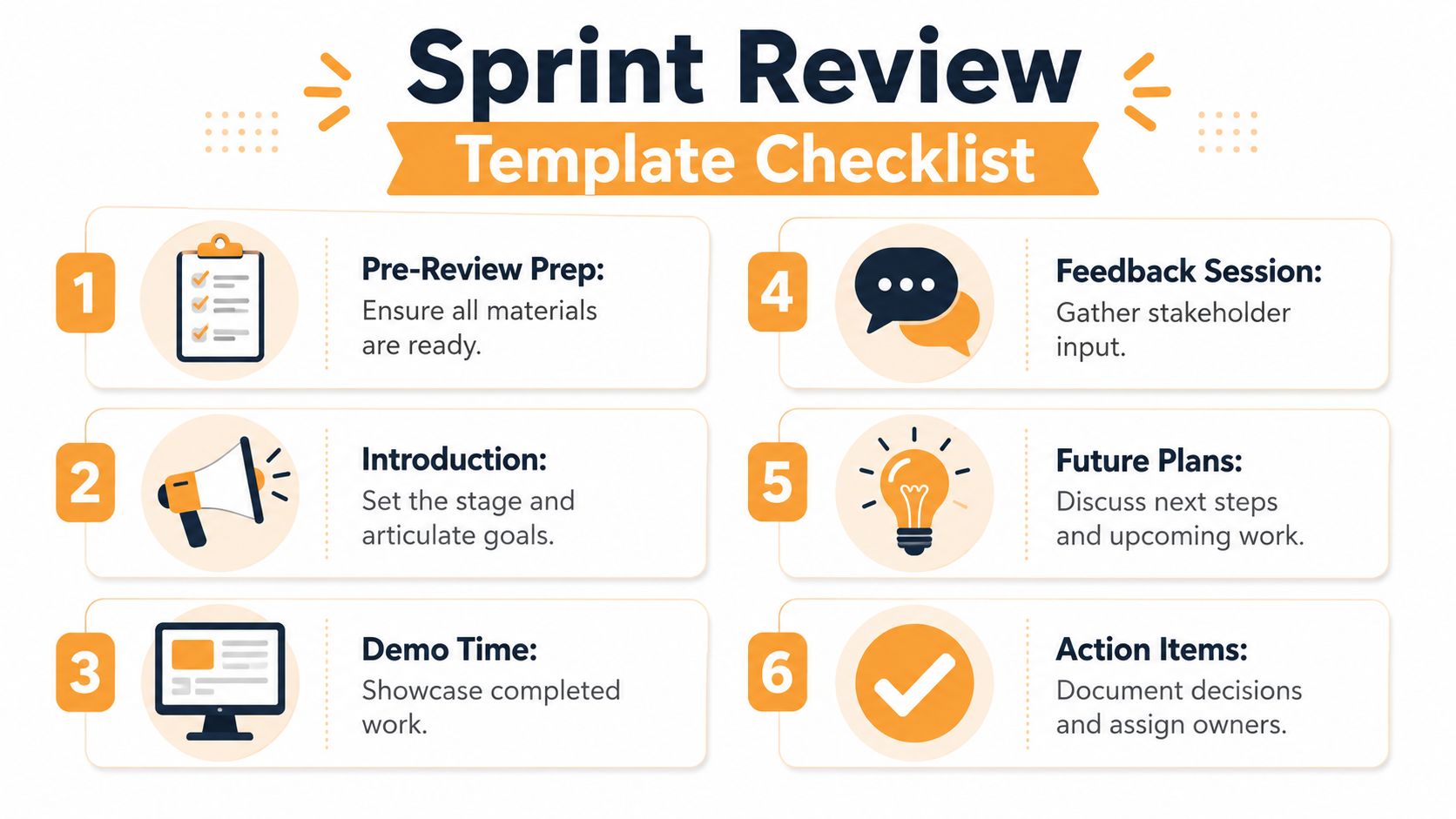
Use this template as a working script, not a script to read aloud.
Sprint Review Template
Sprint Name or number
Sprint goal One plain-language sentence about the outcome the team aimed to create.
Attendees Scrum Team, business stakeholders, operational partners, and anyone who can give product-relevant feedback.
1. Opening context Recap the sprint goal, the product area in focus, and why this work mattered now.
Desired outcome: Everyone starts with the same frame of reference.
2. Product story Explain the user or business journey before showing screens. Name the pain point, friction, or opportunity this increment addresses.
Desired outcome: Stakeholders understand the “why” before the “what.”
3. Demo arc Show working product in a realistic flow. Don’t organize the demo by developer or ticket order. Organize it by user task, business process, or decision path.
Desired outcome: People can judge usefulness, not just completion.
4. What changed during the sprint Call out anything important that shaped delivery, such as dependency shifts, unexpected complexity, or priority changes.
Desired outcome: Stakeholders get transparent context without turning the meeting into problem-solving.
5. Structured feedback Ask focused questions:
- What looks valuable here?
- What looks risky or incomplete?
- What would block adoption?
- What should change before release or next sprint?
Desired outcome: Feedback becomes backlog input, not vague commentary.
6. Backlog decisions Summarize what the Product Owner will add, reorder, clarify, or validate after the meeting.
Desired outcome: The sprint review ends with visible product direction.
What makes this template work
Teams already have an agenda. What they lack is discipline around intent. Each item above exists to stop a common failure mode.
A weak opening causes confusion. A weak demo turns into feature tourism. Unstructured feedback creates opinions with no action. No closing decision means the review had no product consequence.
Add a follow-up note that people will read
Don’t send pages of meeting minutes. Send a short review summary with:
- Sprint goal restated: Keep the purpose visible.
- What was demonstrated: Use product language, not ticket IDs.
- Feedback captured: Separate clarifications from real requests.
- Backlog impact: Note what changed, what needs validation, and what was deferred.
- Owners: Name who will turn feedback into action.
If you want a cleaner way to format that summary for stakeholders who prefer a more conventional update, these downloadable project status report templates can help you package decisions without making the sprint review feel like a reporting exercise.
Running an Engaging Sprint Review Step-by-Step
A sprint review gets better when the facilitator manages energy and pace, not just agenda order. You don’t need a theatrical host. You need someone who knows when to move on, when to dig deeper, and when to stop the room from solving tomorrow’s problem today.

According to the Scrum Guide summary cited here, the sprint review is timeboxed to a maximum of four hours for a one-month sprint, and many teams use two hours for a two-week sprint. The common structure is 5 to 10 minutes for context-setting, 60 to 90 minutes for demos, and 20 to 30 minutes for feedback (practical breakdown of sprint review timing).
Start with context, not apology
Too many reviews begin with hedging. “We didn’t get to everything.” “This is still rough.” “Please ignore the data.” That opening kills confidence before the meeting has started.
Open with the sprint goal, the business reason behind it, and the question you want stakeholders to help answer. Then move straight into the product story. If the team had trade-offs or incomplete work, mention that later with clarity.
A stronger opening sounds like this:
Our sprint goal was to reduce friction in this workflow. Today we need your input on whether the current increment actually improves that experience and what should change next.
Run the demo like a narrative
The demo should feel like a journey through the product, not a handoff between people. If three developers built different parts, that doesn’t mean the meeting should look like three disconnected mini-presentations.
Use a flow like this:
- State the scenario
- Show the user action
- Pause for reaction
- Move to the next meaningful step
That pause matters. Without it, people either interrupt constantly or stay silent until the end and forget what they wanted to say.
Protect the timebox hard
If a stakeholder wants to workshop a detailed solution in the middle of the review, stop it politely. Capture the issue, assign follow-up, and move on. Teams that do this well keep the review focused on inspection and adaptation instead of live design.
A useful facilitation line is simple: “That’s important. Let’s log it for follow-up so we can keep the review moving.”
If your team wants to get stricter about how meeting time is recognized and analyzed, tools with meeting detection workflows can make it easier to separate collaboration time from focus time later. That’s useful when you’re trying to see whether long reviews are helping or just consuming capacity.
Here’s a short explainer that works well for teams refining their meeting flow:
Get better feedback by asking better questions
Bad question: “Any feedback?”
Good questions create usable answers. Try these:
- Adoption lens: What would stop a real user from using this?
- Business lens: Does this solve the problem we said mattered?
- Risk lens: What concerns would you want addressed before release?
- Priority lens: Based on what you saw, what deserves attention next?
End with decisions in public
The meeting should not end with “Thanks everyone.” It should end with the Product Owner saying what changes now. Not every request has to be accepted. But every significant point should land in one of these buckets:
| Feedback outcome | What to say |
|---|---|
| Accepted | We’ll add or reprioritize this |
| Needs validation | We need more evidence before changing the backlog |
| Rejected for now | We heard it, but it’s not the next best move |
| Follow-up needed | This needs a separate working session |
That closing move builds trust because stakeholders can see that their time changed something real.
Go Beyond Demos with Productivity Insights and Visuals
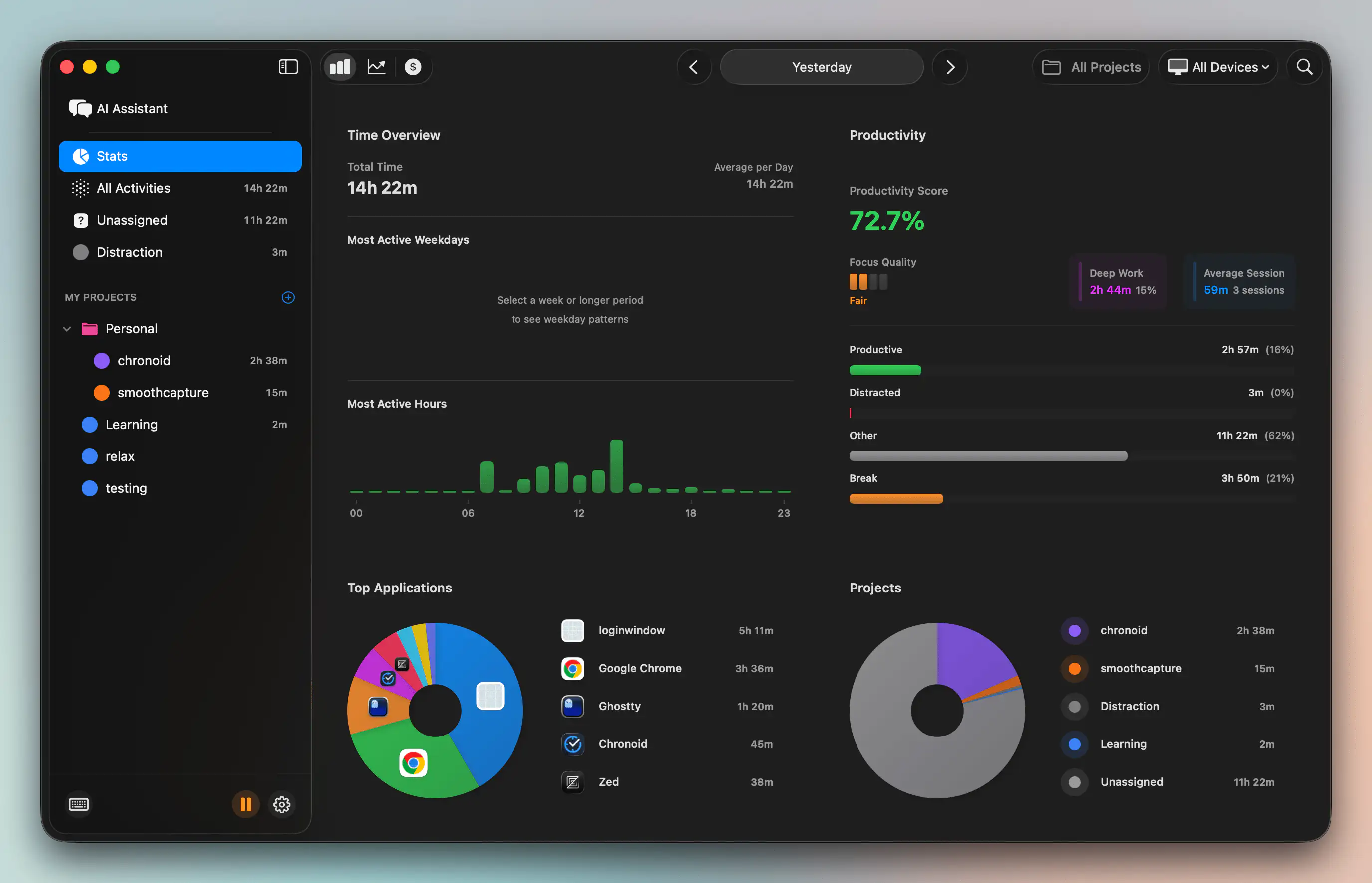
A demo shows the increment. It doesn’t show the conditions under which the increment was delivered. That missing context matters more than is often acknowledged.
If the sprint looked clean in Jira but the team spent large stretches reacting to bugs, support questions, or environment issues, the review should reflect that reality. Not as an excuse. As operational truth. When stakeholders understand the shape of the work, backlog trade-offs become easier to discuss.
What to bring into the room
You don’t need a giant dashboard. One or two simple visuals are enough if they answer useful questions.
For example:
- Planned versus interrupt-driven work: Useful when stakeholders ask why a roadmap item slipped.
- Project time allocation: Helpful when one initiative subtly consumed most of the sprint.
- Focus patterns across the sprint: Good for spotting whether the team had enough uninterrupted time to finish meaningful work.
- App or tool concentration: Sometimes it exposes that delivery time was swallowed by coordination tools instead of build tools.
Practical rule: Don’t use productivity data to judge people. Use it to explain delivery conditions and improve planning.
Why visuals improve the conversation
Without data, teams often fall back on opinion. One stakeholder thinks the team is overcommitting. Another thinks engineering is slow. Someone else thinks scope was unclear. A well-chosen chart doesn’t settle every argument, but it moves the discussion from blame to evidence.
AI-assisted analysis can be highly effective. A tool with AI insights for work patterns can surface trends that a team might otherwise miss, such as repeated context switching or heavy time spent in communication tools during delivery windows.
That kind of signal is especially useful when the review includes process-adjacent product questions, like why work reached demo state late or why confidence in a forecast changed mid-sprint.
Use the same principle in client-facing reviews
This approach also helps outside pure Scrum teams. Agencies and product studios already know that visuals make review cycles sharper. A good example is how teams handle build previews and feedback loops. This guide on improving client reviews on Vercel builds shows the same core lesson: people give better feedback when they can react to something concrete, visible, and contextual.
The point isn’t to turn the sprint review into a metrics meeting. It’s to make invisible work visible enough that stakeholders can make smarter decisions with the team.
Customizing the Template for Your Team’s Context
A sprint review template should be stable, but it shouldn’t be rigid. Teams work in different environments, and pretending otherwise is one reason so many reviews feel fake.
Remote teams need stronger facilitation
Remote reviews fail when the facilitator assumes presence equals engagement. It doesn’t. People mute themselves, watch passively, and leave with opinions they never voiced.
For remote teams, tighten the format:
- Use one shared demo path: Don’t make people follow multiple tabs and windows.
- Collect feedback in parallel: Chat, comments, or a virtual whiteboard helps quieter stakeholders contribute.
- Name responders directly: Ask specific people for input instead of opening the floor to silence.
- Summarize out loud often: Remote audiences lose the thread faster than in-person groups.
Small startups and large enterprises need different emphasis
In a startup, the sprint review often needs to connect product choices to immediate business realities. Founders care about sales friction, onboarding, support pain, and release timing. Keep the story close to those outcomes.
In a larger organization, the problem is usually fragmentation. Different departments attend with different goals. Here the facilitator has to make dependencies and trade-offs explicit. Otherwise the meeting turns into a stack of conflicting requests.
A simple comparison helps:
| Context | Adjust the review toward |
|---|---|
| Small startup | Fast prioritization and market learning |
| Enterprise team | Cross-functional alignment and risk clarity |
| Low stakeholder engagement | Shorter demos and more directed questions |
| Highly technical audience | More emphasis on constraints and release implications |
Internal projects need a different review design
This is the gap most sprint review template articles ignore. Some teams can’t do a classic external-facing demo. Internal platform teams, regulated teams, security-heavy teams, and backend groups often don’t have direct user feedback available in the room.
A 2024 Scrum.org forum discussion shows teams struggle with internal sprint reviews that lack demos or user feedback, and most templates still don’t offer structured alternatives such as simulation-based validation or peer-review workflows (Scrum.org discussion on internal sprint reviews).
When that’s your situation, adapt the template like this:
- Replace user demo with scenario validation: Walk through realistic internal use cases against acceptance criteria.
- Use stakeholder simulation: Have proxy stakeholders react from operations, compliance, support, or architecture perspectives.
- Show evidence of readiness: Test outcomes, workflow traces, or review artifacts can stand in for a polished UI demo.
- Use peer review deliberately: Another team can inspect fitness, risk, and integration implications.
If you can’t demo to real users, validate against real decisions. The review still has to produce product learning.
That change keeps the sprint review honest. It prevents internal teams from skipping the event or turning it into a technical update that nobody outside engineering can use.
Common Sprint Review Pitfalls and How to Avoid Them
Most sprint review problems are easy to recognize. Teams usually just tolerate them for too long.
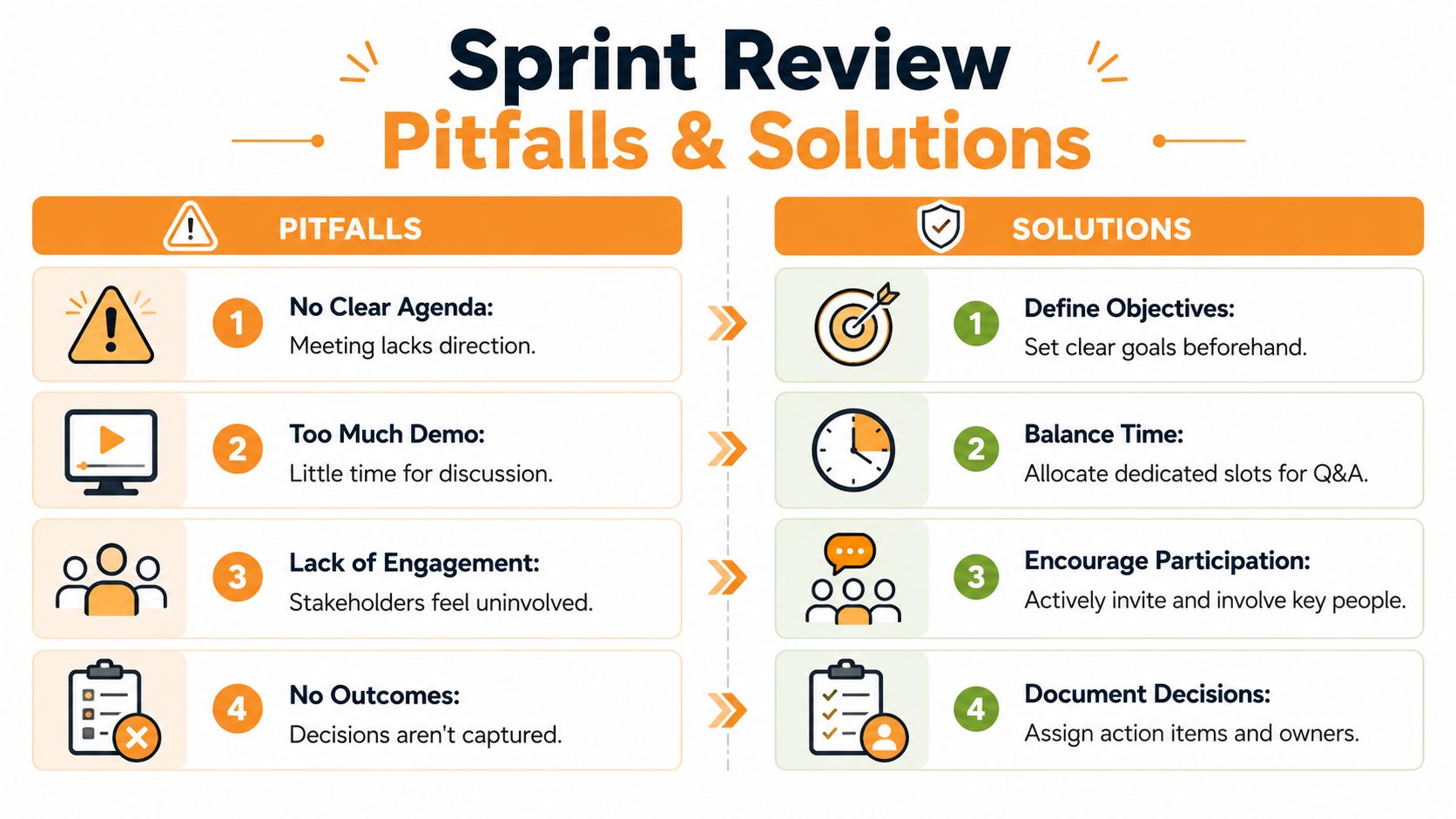
Here’s the short version.
- Don’t turn it into a retrospective. If the conversation shifts to team dynamics or internal frustrations, park it for the retrospective. The review is about the product and stakeholder input.
- Don’t let the demo consume the whole meeting. Showing work matters. Discussing what it means matters more. Leave room for that.
- Don’t accept passive stakeholders. If key people attend without offering input, ask direct questions tied to their expertise.
- Don’t let developers get defensive. Feedback on the increment is not a personal attack. The facilitator has to protect that tone.
- Don’t close without visible outcomes. If no one can state what changed in the backlog, the meeting was incomplete.
A sprint review template is only useful if it creates better behavior. The template gives structure. The team still has to bring clarity, discipline, and the willingness to let stakeholder feedback shape what happens next.
If you want better sprint reviews, start by understanding how your team spends its time between planning and demo day. Chronoid helps Mac users track apps, websites, documents, focus patterns, and meeting time automatically, so you can bring real delivery context into reviews instead of relying on guesswork.