
You’re in the middle of something that needs real thought. Maybe it’s a client proposal, a Figma file, a bug that only shows up in one edge case, or a draft you finally got into flow on. Then Slack pings. You check email while the file exports. A client texts. You jump into a quick call, answer two messages, reopen your original task, and suddenly your brain feels slower than it did ten minutes ago.
That drag has a name. It isn’t laziness, and it isn’t proof that you “just need more discipline.” It’s attention residue. For freelancers and remote workers, it’s one of the most expensive hidden costs in a digital workday because the switch itself is rarely the only problem. The unfinished task follows you into the next one.
You can feel it in small ways. You reread the same paragraph. You stare at code you wrote this morning and it looks unfamiliar. You open your task manager and know what matters, but can’t quite lock in.
The good news is that this problem is manageable once you understand the mechanism and stop treating every interruption like a harmless two-minute detour.
The Hidden Cost of Constantly Switching Tasks
A lot of modern work looks efficient from the outside. A freelancer might move from Notion to Gmail to Zoom to Figma to Slack in under half an hour. A developer might bounce between GitHub, Linear, a staging environment, and a “quick” message from a teammate. A consultant might spend the day replying fast, attending meetings, and clearing notifications, then wonder why the actual strategic work still isn’t done.
That pattern feels productive because there’s visible activity. But many professionals aren’t struggling because they have too much work. They’re struggling because they’re carrying fragments of every unfinished task into the next one.
A common mistake is assuming this is just multitasking. It isn’t exactly that. You’re often doing one thing at a time. The issue is that your mind hasn’t fully left the previous task, so the current task gets only partial attention. If you’ve ever tried to “stay responsive” all day and ended up mentally spent without much deep progress, that’s the pattern to look at.
Many people try to solve this by getting better at multitasking, but the smarter move is understanding when switching is cheap and when it creates real cognitive friction. If you want a useful contrast between juggling tasks and protecting focus, this guide on how to multitask more intentionally is a good place to sharpen that distinction.
You don’t lose focus only when you stop working. You also lose it when unfinished work stays active in the background.
For remote workers, the problem gets worse because the office now lives inside the same screen as the work. Your design file sits one click away from Slack. Your draft sits one tab away from Gmail. Your client call, task board, and invoices all compete for the same mental bandwidth.
The result isn’t just distraction. It’s mental carryover. That’s the hidden cost.
What Is Attention Residue and How It Works
Attention residue is what happens when part of your mind stays attached to Task A after you’ve already moved to Task B. The easiest way to understand it is to think about computer memory. You close one heavy app and open another, but the first one is still using resources in the background. Your machine still runs, just less smoothly.
Your brain does something similar with unfinished work.
Attention residue was first documented experimentally by Sophie Leroy in 2009. Her research found that when people switched from an unfinished task, approximately 20 to 30% of their cognitive working memory remained allocated to the prior task, which hurt performance on the new one. The strongest predictor of how intense the residue became was incompleteness. You can read that summary in this overview of Leroy’s attention residue research.
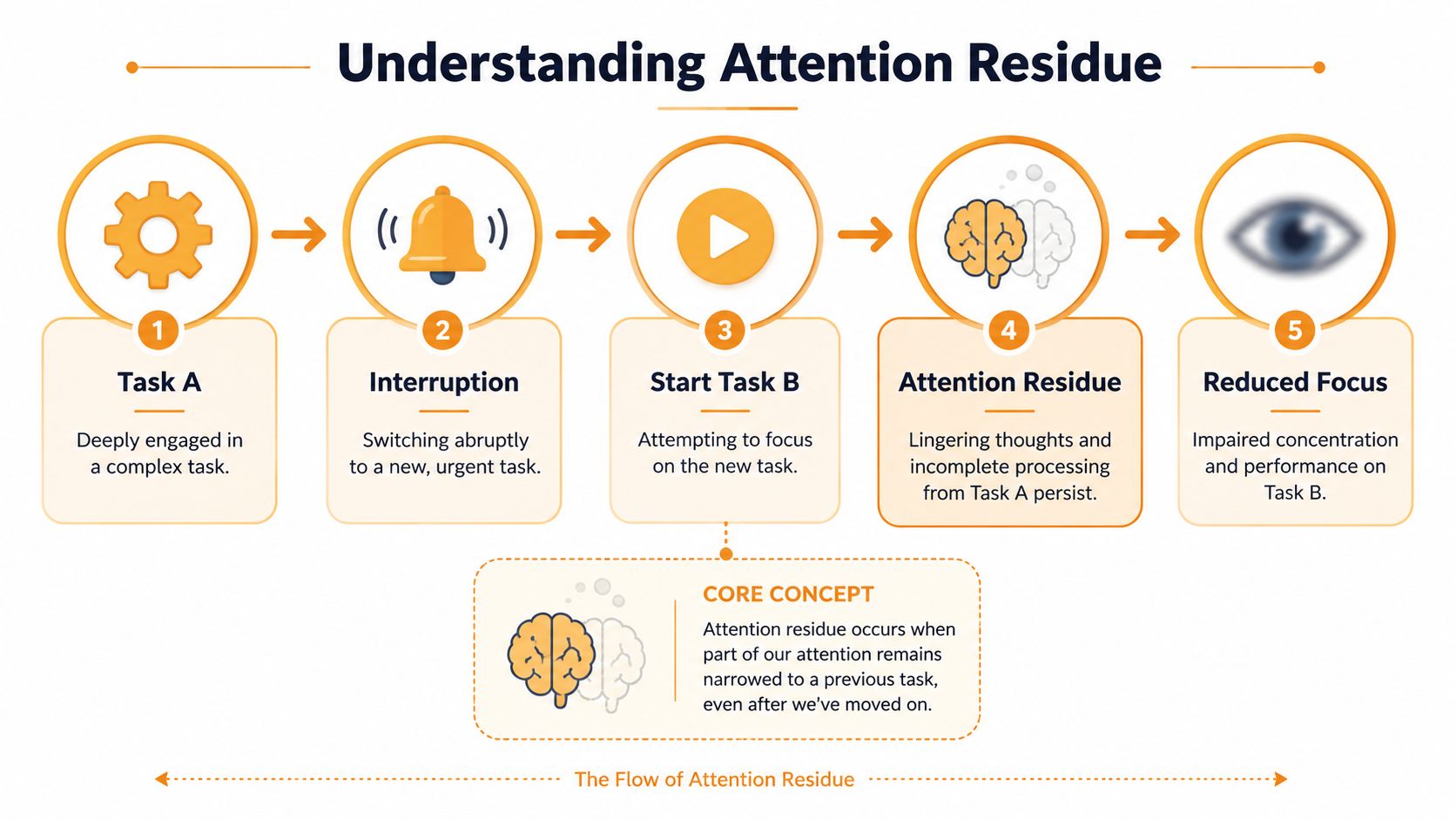
Definition: Attention residue is the lingering cognitive load from a previous task that stays active after a switch, leaving less working memory and executive attention for the task in front of you.
Why unfinished work sticks
An unfinished task creates an open loop. Your brain keeps a soft hold on it because, from a cognitive standpoint, the work isn’t settled yet. That’s why an interrupted client email, half-written report, or unresolved bug can keep tugging at your attention even after you’ve opened something else.
The key point isn’t just that switching feels annoying. It’s that some of your usable mental capacity stays occupied. That makes the next task feel harder than it should.
This is why a “quick interruption” often has effects that last much longer than the interruption itself. You may physically move on, but your attention doesn’t fully come with you.
What it looks like in practice
In daily work, attention residue rarely shows up as a dramatic collapse. It usually looks like this:
- Rereading without processing: You scan the same paragraph, ticket, or brief more than once.
- Slower re-entry: You return to a task and need extra time to remember where you were.
- Shallow thinking: You make progress, but not at the level the work demands.
- False urgency: The unfinished task still feels live, so it keeps intruding mentally.
That’s why people often misdiagnose the problem. They think they need more motivation, stricter discipline, or a better to-do list. Sometimes they just need fewer unresolved switches.
Why Attention Residue Sabotages Freelancers and Remote Teams
Freelancers and remote teams work in the exact environment that makes attention residue easy to trigger. The day is filled with digital pulls. Slack messages arrive while you’re writing. Your phone buzzes while you’re in a design review. Email waits in a pinned tab all day like an open invitation to switch contexts.
Its significance stems from how knowledge work depends on depth. A writer needs continuity of thought. A designer needs visual and conceptual continuity. A developer needs logic continuity. Once that line breaks, the restart cost is rarely visible on a calendar, but it shows up in the quality and pace of the work.
Research by Thornton and colleagues in 2014 found that external pulls from electronic devices, especially mobile phones, significantly increase attention residue. Participants exposed to mobile phone interruptions retained up to 40% more lingering cognitive load from the prior task than those without those interruptions. That finding is summarized in this discussion of electronic interruptions and attention residue.
Why remote work makes the problem worse
Remote work offers flexibility, but it often removes the natural boundaries that once protected focus. In one browser window, you can have a contract, a meeting link, your bank account, a client chat, and a YouTube tab you didn’t mean to open.
The issue isn’t only the volume of inputs. It’s the type of switching they create.
| Workflow moment | What you switch into | Why it creates drag |
|---|---|---|
| Writing a proposal | Incoming Slack reply | Social and administrative context interrupts analytical work |
| Editing a video | Client email about billing | Creative flow gets replaced by operational thinking |
| Coding a feature | Phone notification | Deep logic is interrupted by external urgency |
| Preparing a strategy deck | Calendar reminder for a call | You stop building one mental model and start another |
A remote worker who wants practical control over this should treat scheduling as focus protection, not just calendar hygiene. This resource on time management for remote workers is useful when your day keeps breaking into reactive fragments.
The freelance version of the problem
Freelancers carry an extra burden because they don’t switch only between tasks. They switch between roles.
In one afternoon, you might be:
- A maker: designing, coding, editing, writing
- A manager: planning deadlines and reviewing scope
- A salesperson: replying to leads and nudging proposals
- An operator: handling invoices, files, and admin
Each role uses a different mode of thinking. That means each interruption doesn’t just change the task. It changes the mental system behind the task. That’s why a day full of “small stuff” can leave you unusually tired.
Remote work doesn’t just increase the number of switches. It often increases the distance between them.
Proven Strategies to Minimize Attention Residue
Most productivity advice fails here because it stays abstract. “Focus more” isn’t useful. What helps is reducing open loops before a switch, giving your brain a cleaner exit from one task, and making your transitions less stimulating.
Here are the methods that hold up in practice.
Use a ready-to-resume plan
Sophie Leroy recommends a ready-to-resume plan. It’s a short written note that captures the last completed step, what remains, and the first action to take when you come back. Studies summarized here show that this sub-60-second habit can free up 15 to 30% of cognitive operating space, and that a 2 to 5 minute non-stimulating gap between tasks can further reduce residue. See the summary in this article on how attention residue affects focus and how to reduce it.
This note doesn’t need to be polished. It can be a line in Apple Notes, Notion, Obsidian, or a comment in the doc itself.
A good version looks like this:
- Last step finished: Revised sections 1 through 3 of the client deck
- What’s left: Update pricing slide and add competitor comparison
- Next action: Open slide 14 and replace old pricing screenshot
That small act matters because it gives your brain closure. You’re no longer trying to hold the whole unfinished map in working memory.
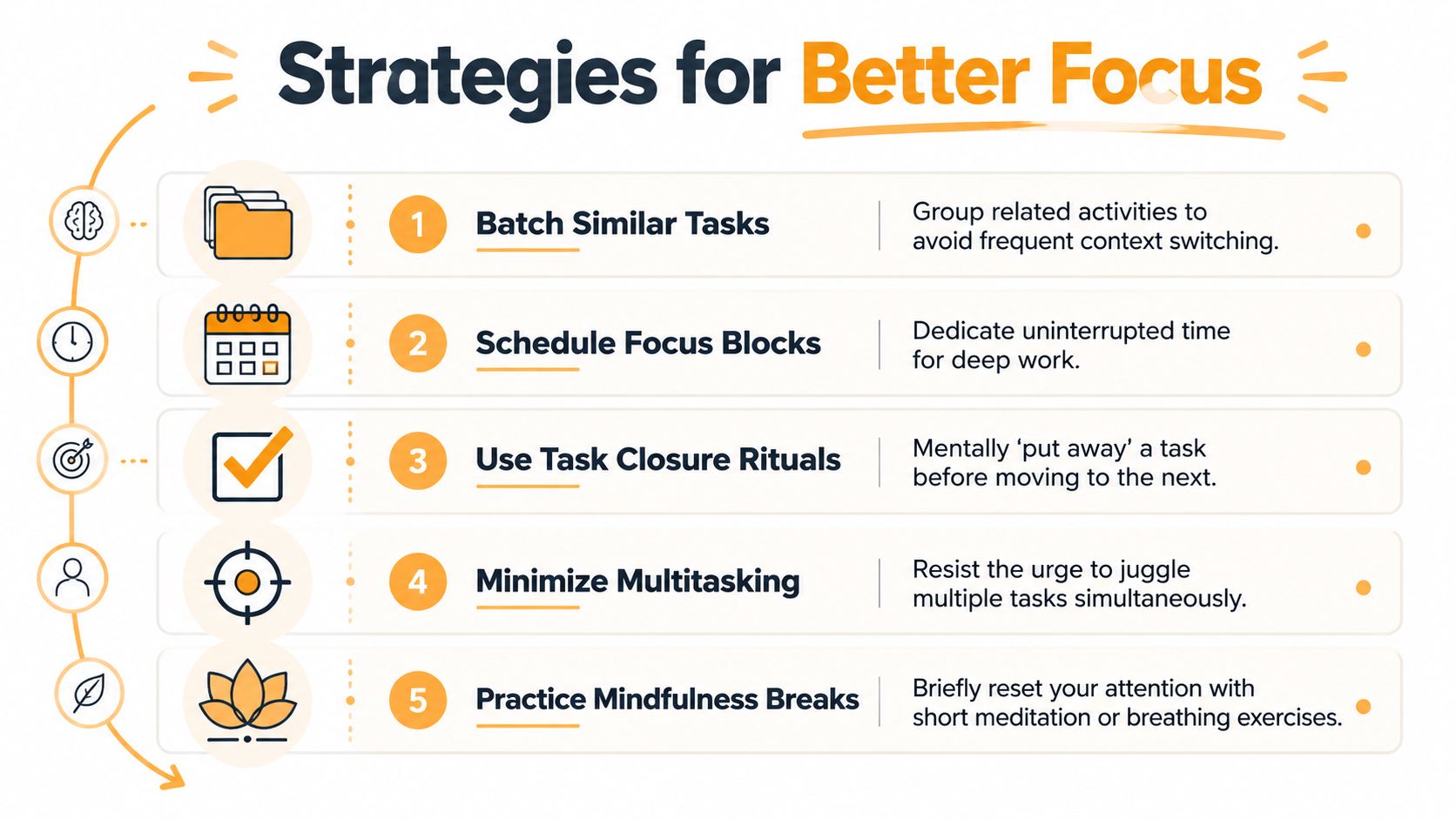
Insert a real transition
The break between tasks matters, but only if it helps you disengage.
Use a short gap for:
- Walking: even briefly, away from the screen
- Stretching: enough to interrupt the previous task state
- Breathing or sitting: simple, not performative
- Closing tabs and windows: a physical cue that the task is parked
Avoid breaks that create fresh cognitive residue. Opening social media, checking news, or playing a quick game often adds another active stream instead of clearing the first one.
Practical rule: Don’t put a stimulating break between two demanding tasks and expect your mind to feel reset.
Later, when you need a guided reset, this short video gives a useful framing for rebuilding focus after constant switching.
Batch by cognitive mode, not just topic
A lot of people batch tasks too loosely. They group items by project, but still switch thinking styles within that project.
A better approach is to batch by the kind of attention the work requires:
- Put client messaging, email, and Slack replies together.
- Group writing, outlining, and editing in one block.
- Keep admin work separate from creative or analytical work.
- Schedule meetings close together when possible, instead of scattering them across the day.
That reduces the depth of each switch. Moving from one writing task to another is still a switch, but it’s less costly than moving from deep writing to live messaging to spreadsheet cleanup.
Create stopping points on purpose
Sometimes you can’t finish a task before moving on. You can still leave it in a better state.
A solid stopping point has three features:
- A clear boundary such as finishing a section, function, or draft chunk
- A visible marker like a comment, highlight, or checklist item
- A next move that can be started without fresh decision-making
This works because decision friction is part of re-entry friction. If you return and immediately know what to do, the old task is easier to resume and easier to set aside in the meantime.
Design a Workflow That Prevents Cognitive Drag
Focus is often treated as a personal discipline problem. In practice, it’s often a workflow design problem. If your day allows interruptions at any moment, mixes shallow tasks with deep work, and relies on memory to hold unfinished threads, attention residue will keep showing up no matter how motivated you are.
The fix isn’t building a perfect day. It’s building a day with fewer expensive switches.
Separate maker time from maintenance time
Freelancers and remote workers usually have two kinds of work. There’s maker work, which needs sustained concentration, and maintenance work, which keeps projects moving but doesn’t require deep immersion.
When those are mixed minute by minute, both suffer. A better daily structure looks more like this:
| Block type | What goes in it | What stays out |
|---|---|---|
| Focus block | writing, design, coding, analysis | email, chat, admin |
| Communication block | Slack, inbox, client replies | strategy, drafting, editing |
| Admin block | invoicing, file cleanup, scheduling | creative production, technical problem-solving |
This isn’t rigid. It’s protective. You’re reducing the number of times your brain has to leave one operating mode and enter another.
For people trying to make that structure realistic, these block schedule examples are useful because they show how to separate types of work without pretending every day is predictable.
Build friction around common switches
Not every interruption deserves equal treatment. Some are necessary. Many are merely available.
A strong workflow adds light friction to the switches that hurt most:
- Keep chat closed during deep work unless you’re on call for something specific.
- Move email to defined windows instead of leaving it half-monitored all day.
- Use full-screen mode for work that needs continuity.
- Put your phone out of reach when the task requires analysis or creative judgment.
- Keep one capture tool handy so loose thoughts don’t force a switch. Notes app, paper notebook, or a simple task inbox all work.
The goal isn’t to become unreachable. It’s to make switching a decision instead of a reflex.
Use visible cues for task closure
A well-designed workflow leaves evidence. You shouldn’t have to remember everything in your head.
Use visible closure cues like:
- a checked-off subtask in your project manager
- a comment at the point you stopped in a document
- a branch note in code
- a named bookmark group for the current research set
- a draft message saved with the next required response
These cues reduce ambiguity, which is one of the biggest drivers of mental carryover. When the next step is obvious, the brain can let go more easily.
The best workflow doesn’t demand constant self-control. It removes unnecessary decisions before they happen.
That’s the shift many busy professionals need. Don’t ask, “How can I stay focused in chaos?” Ask, “Why is my workflow generating this much chaos in the first place?”
The Surprising Truth About Urgency and Focus
Most productivity advice treats urgency as the enemy. That’s too simple.
There’s a counterintuitive finding worth knowing if you work with deadlines. A 2009 study in the Journal of Business and Psychology found that time pressure while finishing a prior task was needed to disengage from it and contributed to higher performance on the subsequent task. The summary is available here in the study listing and abstract page.

What that actually means
This does not mean chronic stress is good for focus. It doesn’t mean overload helps. It means that controlled time pressure, applied at the end of a task, can sometimes force the kind of cognitive closure that helps your mind disengage.
That matters because some professionals get stuck in endless soft transitions. They leave tasks half-open, drift to the next one, and mentally carry both.
A sharper ending can help:
- decide what “done for now” means before the block starts
- work toward that stopping point with a visible countdown
- end by logging the next step instead of fading out of the task
When urgency helps and when it hurts
Useful urgency is specific. It creates an ending.
Unhelpful urgency is ambient. It makes everything feel equally unfinished.
A deadline for “finish this section and leave notes” can help you disengage. A day spent reacting to random pings does the opposite. One creates closure. The other creates fragmentation.
That’s the nuance many high performers miss. You don’t need a calm, slow, frictionless day to focus well. You need clean starts and clean stops.
Reclaim Your Focus from Attention Residue
Attention residue is one of the clearest explanations for why smart, capable people can work all day and still feel mentally scattered. The issue usually isn’t a lack of effort. It’s a work pattern full of unfinished exits, reactive switching, and digital interruptions that keep old tasks alive in the background.
For freelancers and remote workers, the practical takeaway is simple. Protect fewer, better transitions. Close loops before you switch. Batch work by cognitive mode. Stop treating your inbox, Slack, and phone as neutral tools when they repeatedly pull you out of deep work.
You don’t need a perfect system to improve this. You need awareness and intention. Awareness shows you where your attention keeps leaking. Intention changes how you exit tasks, how you schedule your day, and what you allow to interrupt your best thinking.
If you want more tactics for deep concentration, this guide on how to maximize your focus is a useful companion because it connects attention protection with practical deep work habits.
Focus isn’t something you either have or don’t have. It’s something your workflow either supports or quietly breaks.
Start small. Write one ready-to-resume note today. Put one real gap between two demanding tasks. Move one category of reactive work into a dedicated block. Those changes sound minor, but they directly target the mechanism that creates the drag.
When you reduce attention residue, work feels different. Not easier in a magical sense. Cleaner, steadier, and far less exhausting.
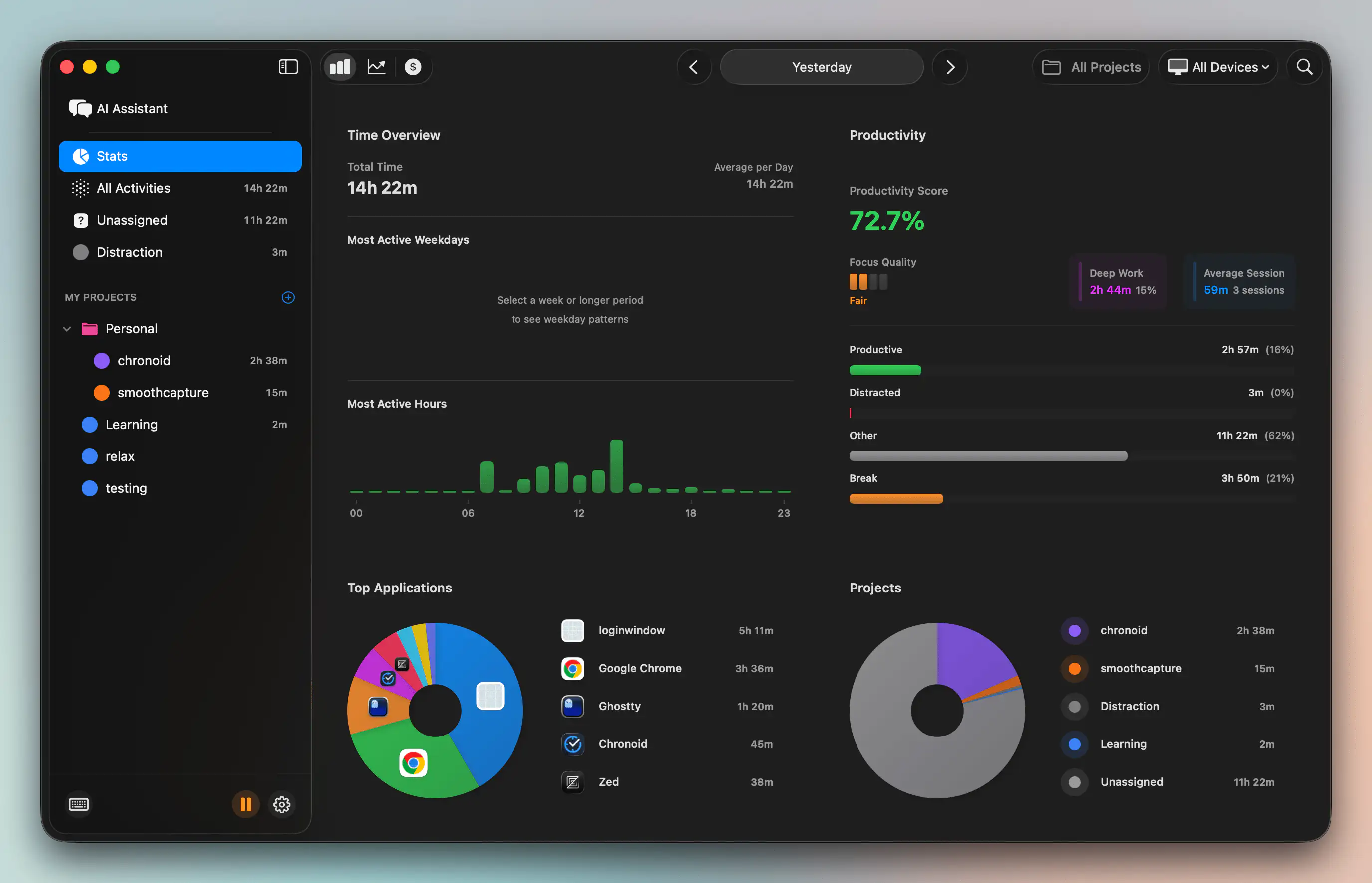
If you want a clearer picture of where your focus goes on your Mac, Chronoid can help. It automatically tracks apps, websites, and documents, so you can spot fragmented work patterns, see when context switching spikes, and build better focus blocks around real behavior instead of guesswork.