
Your last sprint ended. The retrospective starts. Someone says, “Communication could be better.” Someone else says, “We had too many interruptions.” A few sticky notes go up, everyone nods, and by the next sprint nothing has changed.
That’s the pattern many teams are stuck in.
A good sprint retrospective template doesn’t fix that by giving people prettier boxes to type into. It fixes it by creating enough structure that the team can talk openly, look at what occurred, and leave with a small number of actions they’ll really follow through on. The teams that improve don’t run more creative meetings. They run safer, sharper ones.
Why Most Sprint Retrospectives Fail
Most failed retrospectives don’t fail because the team is lazy. They fail because people don’t feel safe enough to say the useful thing.
That’s why the room goes quiet when the actual issue is a brittle handoff, a senior engineer dominating decisions, or constant Slack interruptions wrecking focus. People learn fast which comments are safe and which ones will make the next sprint harder for them.

Research indicates that 72% of team members withhold critical concerns during retrospectives due to fear of judgment, while only 15% of popular templates include mechanisms like anonymous health checks to surface emotional state and improve safety, which leaves major issues unaddressed, as noted in this discussion of psychological safety in retrospectives.
Safety beats cleverness
Teams often assume the problem is the format. They switch from Start/Stop/Continue to Sailboat, then to 4Ls, then to some game with emojis and timers. The meeting may feel fresher, but the conversation stays shallow if nobody trusts the room.
A useful sprint retrospective template does three things before it asks for ideas:
- Protects candor: It gives people a way to contribute without being interrupted or judged immediately.
- Removes blame language: It pushes the group to talk about conditions, decisions, and trade-offs instead of personalities.
- Slows reactions down: It creates enough pause that people can reflect instead of defending.
Practical rule: If your team can’t safely say, “This process is wasting my time,” the issue isn’t the template. It’s the environment around it.
The real goal
The point of a retrospective isn’t to let everyone vent. It’s to help the team name the few things that are making work harder than it needs to be.
That includes attention problems. A team may say “execution was messy,” when the actual problem was fragmented focus, constant context switching, or too much reactive work. If distraction is part of the team’s reality, it helps to understand the mechanics behind it. This short guide on how to stop getting distracted is useful because it turns a vague complaint into something observable.
When the room feels safe, people stop speaking in generalities. They start saying things like, “QA feedback came too late,” or “I spent half my day switching between support pings and planned sprint work.” That’s when a sprint retrospective template starts doing real work.
Choosing the Right Retrospective Template
Teams don’t need more templates. They need the right one for the problem in front of them.
The mistake is treating every sprint the same. A new team needs simplicity. A tired team may need emotional range. A mature team with recurring delivery issues needs diagnosis, not another round of generic brainstorming.
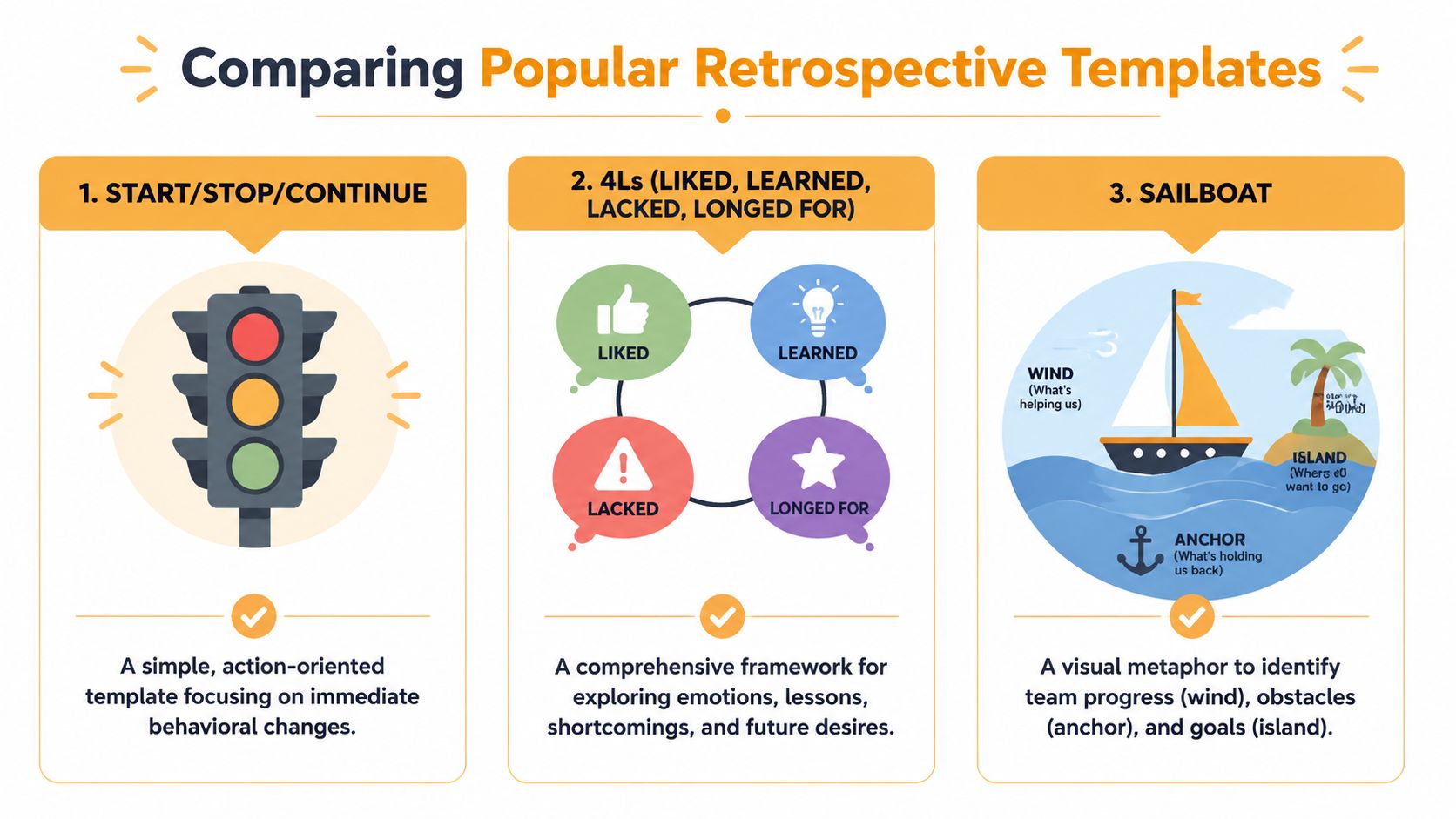
Data shows that 68% of teams report retrospectives as unproductive because they focus on surface symptoms, and many templates don’t force the kind of contrarian questioning needed for root-cause analysis, according to this analysis of retrospective questions and diagnosis-first formats.
Match the format to the friction
Here’s the simplest way to choose a sprint retrospective template.
| Template | Best for | What it does well | Where it breaks |
|---|---|---|---|
| Start/Stop/Continue | New teams, rushed teams, teams needing fast process fixes | Creates immediate action language | Often stays tactical |
| 4Ls | Teams that need reflection, learning, and emotional nuance | Surfaces what people valued and missed | Can drift if facilitation is weak |
| Sailboat | Teams dealing with blockers, dependencies, or direction | Makes obstacles and momentum visible | Sometimes turns abstract |
| 5 Whys | Mature teams with one recurring problem | Forces root-cause thinking | Bad for broad review |
| Sprint Clinic style diagnosis | Teams stuck in repeated failure patterns | Pushes symptom vs cause separation | Requires discipline and sharper facilitation |
What I’d use in practice
If the team is new or the sprint was chaotic, Start/Stop/Continue is still hard to beat. It’s plain, action-oriented, and easy to facilitate. It works well when the team needs to quickly say, “Stop pulling urgent work into the sprint,” or “Continue pairing on handoffs.”
If morale feels flat, 4Ls usually gives better signal. “Liked” and “Learned” prevent the meeting from becoming a complaint pile. “Lacked” and “Longed for” often reveal missing clarity, time, support, or decision access.
If the team keeps hitting the same wall, skip the feel-good format and use 5 Whys or a diagnosis-first session. Ask one hard question and stay with it. For example:
- Dependency issue: Which dependency cost us the most controllability?
- Speed issue: Where did we mistake speed for progress?
- Decision issue: Which decision was made without enough information?
Generic templates are fine for collecting opinions. They’re weak at exposing the operating system underneath the sprint.
A simple decision guide
Use this when you’re choosing:
- If the team is inexperienced: Pick Start/Stop/Continue.
- If the sprint felt emotionally heavy: Use 4Ls.
- If blockers and dependencies dominated: Use Sailboat.
- If the same issue keeps returning: Run 5 Whys on one problem.
- If the team says retros are repetitive: Move to a diagnosis-first format.
Keep a small pack of printable and digital board versions ready. The best facilitators don’t improvise structure every sprint. They pick from a short toolkit and use the same few formats well.
A Step-by-Step Facilitation Guide
A sprint retrospective template works best when the facilitator treats it like a sequence, not a free-for-all. The strongest pattern is the five-phase model from Esther Derby’s retrospective practice: Set the Stage, Gather Data, Generate Insights, Decide What to Do, and Close the Retrospective.
Research summarized in this guide to sprint retro templates notes that effective retrospectives are typically time-boxed to around 75 minutes, and that 83% of Scrum teams use a standardized template, which increases the likelihood of concrete action items and improves follow-through by 29% compared with unstructured discussions.
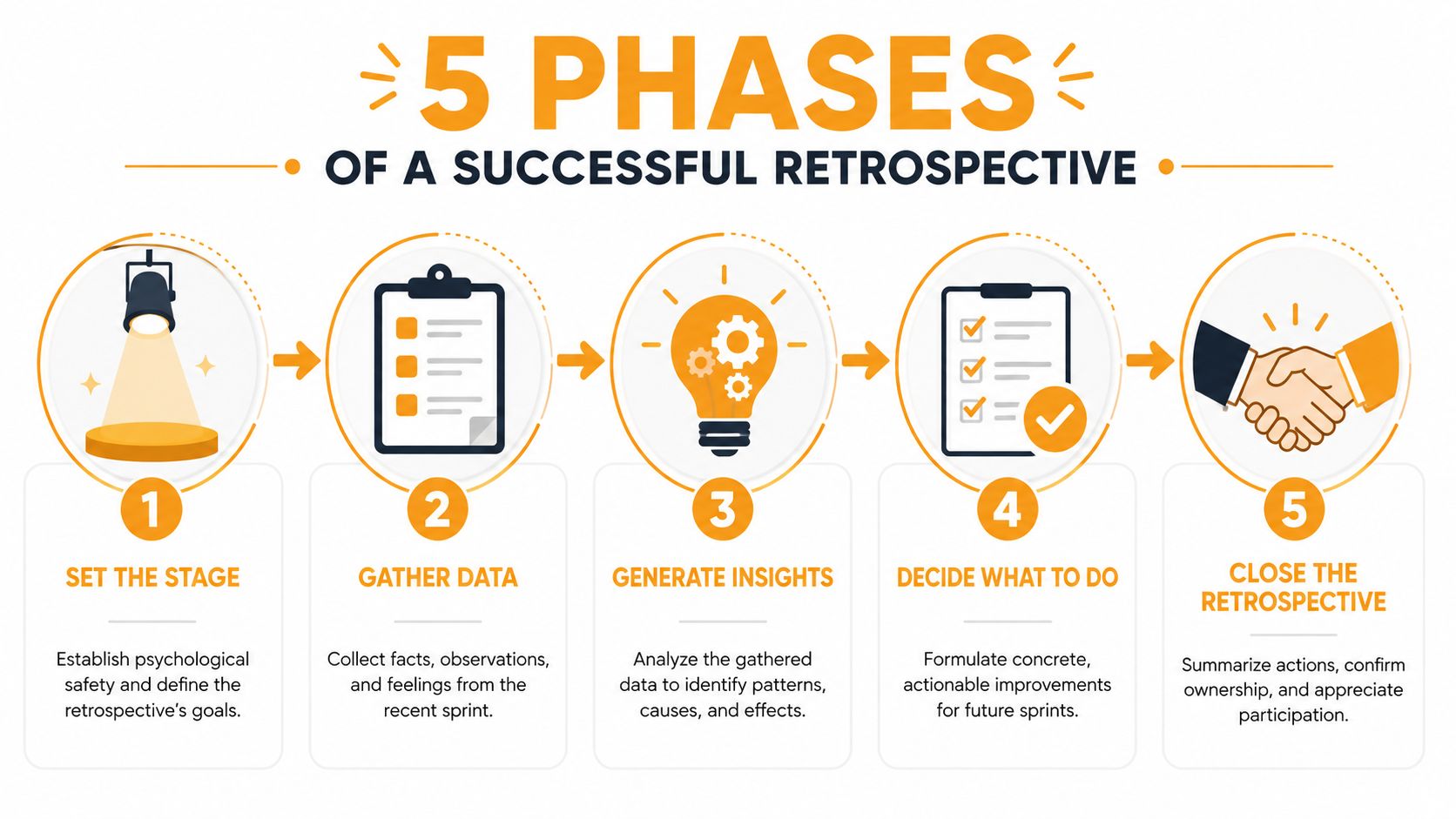
Set the stage
Start by making the room usable.
Read the prime directive or a simpler version of it. Remind people that the meeting is about understanding how the sprint unfolded, not assigning blame. Then set ground rules. No interruptions. No debating during collection. Speak from your own experience.
A short opener helps. Ask each person for one word on how the sprint felt, or have them rate confidence in the next sprint qualitatively. Don’t overdo the icebreaker. You’re trying to lower risk, not entertain people.
Gather data
Many retros go wrong. People jump straight to solutions before the team agrees on what happened.
Use a board and collect observations individually first. Ask for facts, not opinions disguised as facts. “Three stories rolled over” is data. “Planning was bad” is a conclusion.
Good prompts include:
- Delivery: What shipped, slipped, or got blocked?
- Flow: Where did work slow down?
- Quality: What caused rework, bugs, or confusion?
- Collaboration: Which handoffs felt clean, and which didn’t?
If your team wants stronger meeting discipline in general, this practical guide on how to conduct productive meetings is worth borrowing from. Retros benefit from the same basics: clear purpose, visible timing, and defined next steps.
Generate insights
Now look for patterns.
Group related notes. Ask what connects them. If several notes mention review delays, bug churn, and late clarification, don’t treat those as three separate problems if they all stem from weak acceptance criteria or overloaded reviewers.
Don’t ask, “Who caused this?” Ask, “What conditions made this likely?”
Useful prompts:
- What pattern shows up more than once?
- What’s the smallest root cause that explains several symptoms?
- What did we normalize that shouldn’t be normal?
This phase is where the facilitator earns their keep. Keep the team from scattering into ten mini-problems.
Decide what to do
This phase needs restraint. Teams often generate too many actions and complete almost none of them.
Pick one or two actions. Make them concrete. Each action should have one owner and a clear check-in point during the next sprint. “Improve communication” isn’t an action. “Add acceptance criteria review before stories move to ready” is.
A workable action has four parts:
- Specific change: What exactly will change
- Single owner: One person accountable for driving it
- Visible experiment: Something the team can observe next sprint
- Review point: When you’ll check whether it worked
Close the retrospective
End by summarizing decisions out loud. Name the owners. Thank people for specific contributions, especially if someone raised an uncomfortable issue well.
Then close the loop. The next sprint’s retro should begin by checking the previous actions first. If you skip that, the meeting teaches everyone that the board matters more than the outcome.
Using Time Tracking Data to Fuel Your Retrospective
A lot of retros get stuck because the team only brings feelings. Feelings matter, but they’re easier to dismiss when nobody can point to a pattern in the work itself.
That’s where personal productivity data becomes useful. Not as surveillance. Not as a leaderboard. As a way to make the conversation more objective.
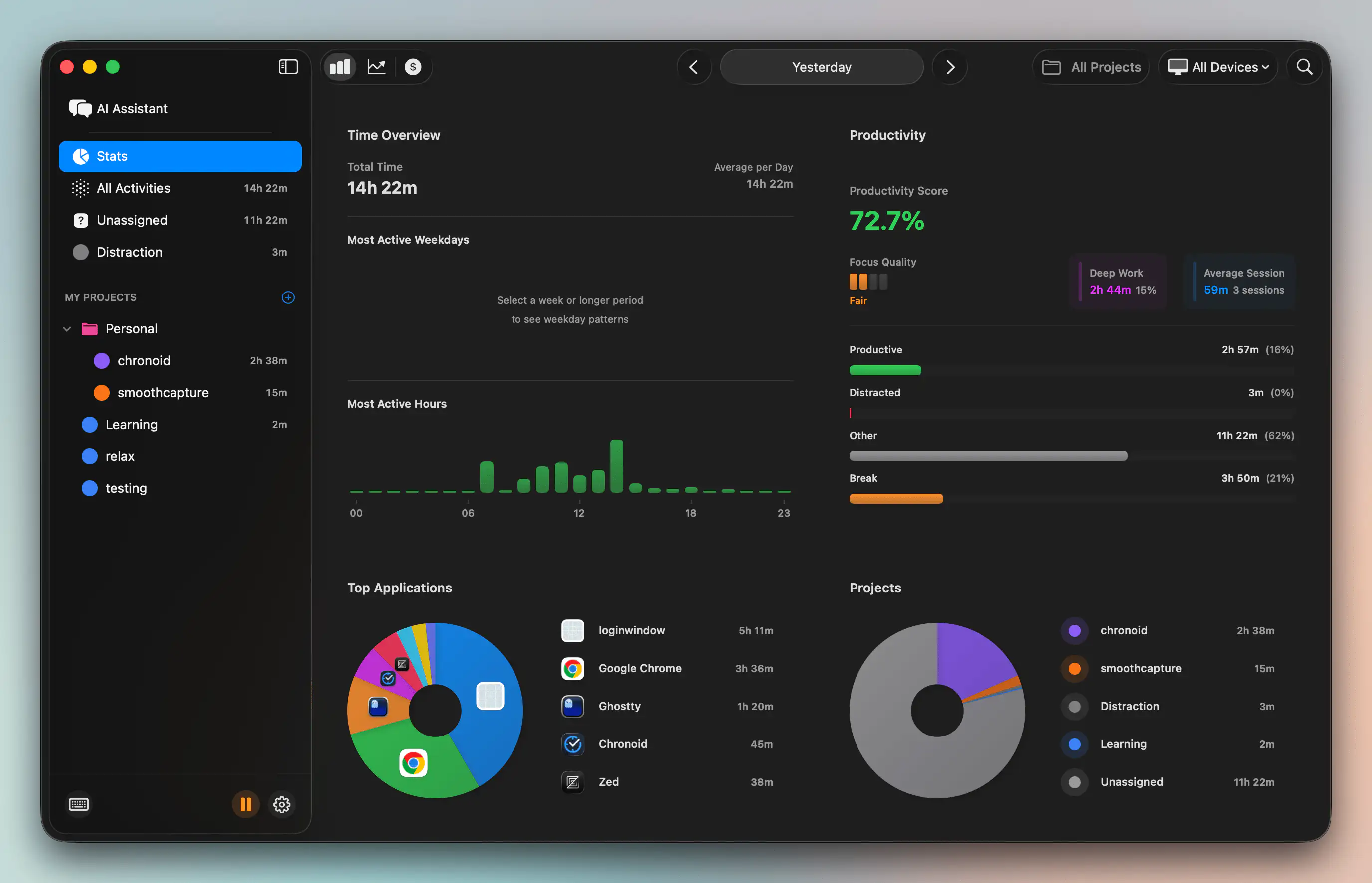
Analysis of team metrics shows that Cycle Time, Work in Progress, and Throughput are the most critical data points for a retrospective, and teams tracking WIP have found that when WIP exceeds 8 items, it correlates with a 34% increase in delays and a 22% drop in quality, as described in this retrospective metrics analysis.
Turn personal data into team insight
Here’s the practical connection.
A developer says, “I was slammed all sprint.” That may be true, but it’s still vague. Time data can sharpen it into something discussable:
- Reactive work swallowed planned work: A “quick fix” consumed far more time than expected.
- Context switching dominated the day: Work was spread across too many apps, tasks, or tickets.
- Waiting time hid inside the sprint: Long gaps appeared between active work sessions because someone was blocked on review, approval, or missing input.
- Deep work never happened: The day was fragmented into short bursts, which made substantial tasks feel harder than estimated.
That changes the tone of the retro. Instead of “I couldn’t focus,” the team can discuss “support interruptions repeatedly broke implementation blocks” or “review turnaround caused stop-start work.”
What to bring into the room
You don’t need everyone to dump raw logs into the retro. That would create noise fast.
Bring summaries that answer operational questions:
| Question | Useful evidence |
|---|---|
| Why did this task overrun? | Time spent across rework, bug fixes, or waiting |
| Why did estimates miss? | Large mismatch between planned effort and actual time concentration |
| Why did flow feel bad? | Frequent switching between unrelated categories of work |
| Why did work carry over? | Long inactive gaps and late-start execution |
If you want to get better at spotting patterns over time rather than looking at one bad week in isolation, this time series analysis methods guide is a good mental model. The point isn’t academic analysis. It’s learning to notice recurring spikes, dips, and drift in how work unfolds.
A lot of Mac-based teams also benefit from understanding what their tracking setup can and can’t surface. This article on time tracking on Mac is useful for that because it frames tracking as awareness, not administrative overhead.
Use data without turning the retro into a report
The risk here is obvious. Teams can overcorrect and make the retrospective feel like an audit.
Don’t do that.
Bring just enough evidence to support a conversation. One screenshot. One cycle-time trend. One example of fragmented work. Then ask, “What process created this?” Keep the focus on system fixes, not individual performance.
This kind of walkthrough helps teams see the idea in practice:
Objective data works best when it lowers defensiveness. The right question isn’t “Who spent time badly?” It’s “What in our system made good focus difficult?”
That’s the useful bridge between individual time awareness and team improvement. A sprint retrospective template should make that bridge easy to cross.
Adapting Retrospectives for Remote and Async Teams
Remote retros fail for different reasons than in-room ones. The problem usually isn’t silence. It’s uneven participation, weak attention, and too much talking from the people most comfortable on video.
The fix starts before the meeting. Send prompts in advance and let people add notes asynchronously. That gives quieter teammates time to think, and it reduces the pressure to perform live. It also makes the meeting shorter and more focused because the raw input is already there.
What works in distributed teams
For live remote sessions, use a digital whiteboard with simple columns and strict facilitation. Call on people deliberately. Use chat for parallel input. Keep discussion rounds short. If the topic is sensitive, allow anonymous note collection first.
For async retros, threaded discussion can work well if you keep the scope narrow. Don’t run an open-ended brainstorm across multiple days. Post the prompts, set a cutoff, cluster responses, and then ask the team to vote or comment on the top issues.
A few habits matter more than platform choice:
- Pre-work first: Collect thoughts before the meeting, not during it.
- Visible norms: State how feedback should be phrased and how decisions will be made.
- Social check-in: Give people a small space to acknowledge energy, friction, or uncertainty.
- Shorter sync time: Use the live portion for prioritization and action, not idea generation.
Teams trying to improve distributed collaboration often benefit from practical advice outside the agile bubble too. This guide on boosting remote team productivity has useful habits that map directly to retros, especially around clarity and communication rhythm.
If your remote setup is also creating focus problems, this roundup of productivity tools for remote workers can help you think through the wider environment around the retro, not just the meeting itself.
Keep the human signal
Remote retros need more explicit care than in-person ones. Watch for people who contribute in writing but not aloud. Notice who always speaks first. Treat lag, camera fatigue, and timezone mismatch as design constraints, not personal flaws.
The template matters. Facilitation matters more.
From Talk to Action Common Pitfalls to Avoid
The biggest failure mode in any sprint retrospective template is simple. The team leaves with a list, not a commitment.
That’s why so many retros feel busy but useless. People generate ideas, nobody owns them, and by next sprint the board is forgotten. Data from agile practice shows that 65% of generated tasks are created without owners or deadlines, a pattern described in this guide to sprint retrospective mistakes and fixes.
The mistakes that keep repeating
Two problems show up constantly:
- Action item abandonment: Good ideas die because no single person owns the follow-up.
- Recency bias: The team only talks about the last couple of days, which hides patterns from earlier in the sprint.
A few habits fix most of this:
- Assign one owner: Every action needs one named person, even if several people help.
- Set a review date: If it won’t be checked, it probably won’t happen.
- Use I statements: “When X happened, I lost context” lands better than “You kept interrupting.”
- Collect input early: Asynchronous prompts help people remember the full sprint, not just the painful ending.
Fewer actions create more change. One finished improvement beats five forgotten promises.
A better standard
Hold your retro to a higher bar. If the action can’t be tested next sprint, it’s too vague. If nobody can tell whether it helped, it’s too fuzzy. If it requires three teams and a steering committee, it probably doesn’t belong in this retro.
Good retros don’t end with optimism. They end with ownership.
If you want sharper evidence for your next retrospective, Chronoid helps you see where work time went on your Mac, across apps, websites, and documents, without manual timers. That makes it easier to bring concrete patterns into the room, reduce blame, and turn “we were busy” into a useful team conversation.