
At some point, most freelancers end up doing invoices at the worst possible time. The client work is done, your brain is fried, and you’re staring at notes that say things like “research,” “calls,” “revisions,” and “misc admin” as if that’s enough to bill from with confidence.
Then the mess begins. You open a template, copy over dates, rebuild line items from memory, and try to remember whether that quick Slack back-and-forth counted as billable time. Maybe it did. Maybe it didn’t. Either way, you’re making pricing decisions while tired, which is how underbilling becomes a habit.
That’s why freelance billing software matters. Not because it makes invoices look prettier, although that helps. It matters because billing is part of the operating system of a one-person business. If the system is manual, fragmented, and based on guesswork, payment delays and avoidable disputes follow.
Your Last Late Night Invoicing Session
It’s late. You meant to send the invoice two days ago. Instead, you finished a deliverable, answered three client emails, jumped into a revision round, and told yourself you’d “do admin later.”
Now later has arrived.
You’ve got a spreadsheet in one tab, a PDF invoice in another, calendar notes on your phone, and maybe a half-used timer app that only captured the hours you remembered to start. The rest of the work lives in browser history, documents, messages, and memory. That’s the part nobody likes admitting. A lot of invoicing isn’t recordkeeping. It’s reconstruction.
For hourly freelancers, that reconstruction creates two bad outcomes. You either bill less than you worked, or you send an invoice you can’t defend cleanly if the client asks questions.
Most billing mistakes don’t happen because freelancers are careless. They happen because the billing process starts too late and relies on memory.
I’ve seen the same pattern across writers, consultants, designers, and developers. The admin side grows steadily. One client becomes four. A simple invoice becomes line items, payment terms, follow-ups, currency issues, and overdue reminders. The work is still one-person work, but the billing starts behaving like back-office operations.
Where manual invoicing breaks down
- Time gets lost: Small tasks vanish first. Review time, quick edits, research detours, and client communication often never make it onto the invoice.
- Errors creep in: Dates, rates, project names, and tax details are easy to mistype when you’re copying everything by hand.
- Collections slow down: The longer it takes to build and send invoices, the longer it takes to get paid.
- Confidence drops: If a client pushes back, you need records, not vague recollection.
Freelance billing software fixes more than formatting. Used properly, it turns billing from a monthly scramble into a repeatable workflow. The best setups don’t begin when you create the invoice. They begin while you work.
That difference matters more than most buying guides admit.
What Is Freelance Billing Software Really
A lot of freelancers treat billing software like a digital cash register. Enter services, send invoice, collect payment, done. That’s too narrow. Good freelance billing software is closer to a financial cockpit. It helps you steer the business, not just request money.
If your current setup is a template plus a payment link, you’re missing the bigger job. Billing software should tell you who owes you, what work is profitable, which clients drag out approvals, and where your admin process leaks time.
It should be your single source of truth
When billing works well, several things happen in one place:
- Client records stay organized: You’re not searching email for legal names, addresses, or old rates.
- Invoice history stays searchable: You can see what you billed, when you billed it, and whether it was paid.
- Payment status stays visible: Outstanding, overdue, partial, and paid invoices should be obvious at a glance.
- Business patterns become visible: You can spot repeat delays, scope creep, and inconsistent project margins.
That’s the difference between “sending invoices” and running a business system.
If you’re still patching this together with documents, spreadsheets, and reminders in your head, it helps to review practical basics on how to streamline your invoicing and billing. The value isn’t just speed. It’s reducing friction every time money needs to move.
What it should replace
Bad billing setups usually involve too many disconnected tools. A note app for hours. A spreadsheet for totals. A template for invoices. A separate payment processor. Maybe accounting software that doesn’t quite match what you sent the client.
That patchwork can work for a while. Then one of these happens:
A freelancer doesn’t need enterprise finance software. They do need one reliable system that makes billing consistent.
What strong software actually does day to day
A solid billing tool should help you:
- Create invoices quickly without rebuilding the same structure every time.
- Track what’s unpaid without checking bank deposits manually.
- Keep records clean for accounting, reconciliation, and tax prep.
- Support your pricing model whether you bill hourly, by project, or on retainer.
- Connect upstream to your work so the invoice reflects reality, not rough memory.
If the tool only helps with the final PDF, it’s not doing enough. Real freelance billing software supports the whole chain from work performed to money received.
Essential Features Your Billing Software Must Have
Most feature lists are padded with things you’ll never touch. A freelancer doesn’t need every option under the sun. You need the features that remove repetitive work, reduce billing errors, and make payment easier for clients.
The easiest test is simple. If a feature saves you from copying, retyping, chasing, or double-checking, it probably matters.
The core features that pay for themselves
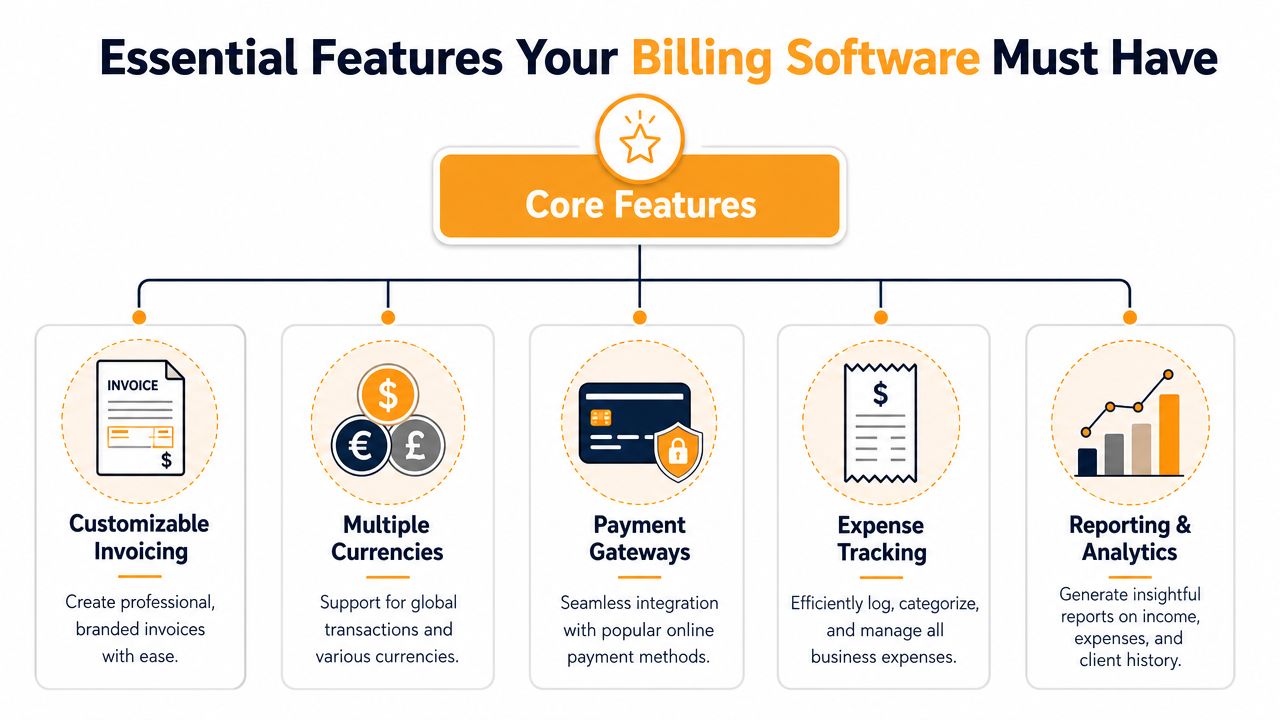
- Customizable invoicing: You need templates you can tailor to your services, terms, and branding. A generic invoice works, but a clean invoice with clear line items, due dates, and project references gets fewer questions.
- Multiple currencies: If you work across borders, this stops invoicing from turning into a manual conversion exercise.
- Payment gateways: Clients should be able to pay without extra steps. Fewer obstacles usually means fewer delays.
- Expense tracking: Even if you keep books elsewhere, having project-related expenses visible helps you protect your margins.
- Reporting and analytics: Not for vanity dashboards. For practical questions like which client pays slowly, which service line earns well, and whether your hourly work is worth the admin load.
Automation is not a luxury feature
The distinction between weak and useful tools becomes evident. Advanced freelance billing software can use API-driven integration with time-tracking and accounting platforms to turn unbilled time logs into customizable invoices. According to Wise’s overview of invoicing software for freelancers, that setup can reduce manual entry errors by up to 78% and accelerate cash flow cycles by 12 to 15 days on average for hourly freelancers.
That same source notes that tools with automated time-to-invoice conversion process 3.2× more invoices per user per week while maintaining 99.4% accuracy in client-facing billing details, and that templating plus multi-currency support helps 92% of global freelancers bill clients across 15+ countries without intermediary conversion services.
Those numbers explain why integration matters. The invoice shouldn’t start from a blank page if the work is already logged somewhere.
Must-haves versus nice-to-haves
Here’s how I’d separate them after trying different setups.
| Feature | Priority | Why it matters |
|---|---|---|
| Custom invoice templates | Must-have | Cuts repeat admin and keeps invoices consistent |
| Payment links or gateways | Must-have | Makes it easier for clients to pay fast |
| Client records | Must-have | Prevents data mix-ups and repeat manual entry |
| Time-to-invoice connection | Must-have for hourly work | Stops you from rebuilding hours manually |
| Expense tracking | Strongly recommended | Helps protect profit on project work |
| Reports | Strongly recommended | Shows whether your pricing is working |
| Multi-currency support | Must-have for international work | Keeps global billing manageable |
| Deep customization | Nice-to-have | Useful, but not as important as reliability |
Practical rule: Buy software for the billing friction you already have, not the advanced workflow you might have next year.
If you bill by the hour, integration belongs near the top of the list. If the software can’t pull clean work records into billing, you’re still doing too much by hand.
Matching Your Workflow to a Billing Model
The software matters, but your billing model matters first. Pick the wrong model and even good software feels clumsy. Pick the right one and invoicing gets simpler because the structure matches how you already work.
Most freelancers end up using one of three approaches: hourly, project-based, or retainer. Some mix them, but one usually drives the business.
Hourly billing
Hourly billing works best when scope moves around. Consultants, developers, editors, and ongoing support freelancers often need it because the work isn’t fully predictable upfront.
The upside is straightforward. You get paid for time spent. The downside is that weak time records create friction fast.
If you use hourly billing, your contract language matters almost as much as your software. Clear approval terms, billing intervals, and definitions of billable work reduce disputes before they start. For that side of the workflow, SignWith for sales contracts is useful reading because bad contracts create billing problems no invoice tool can fix.
You should also look at tools through the lens of time capture, not just invoice design. A good comparison of invoicing options for that kind of setup is this guide to freelance invoicing software.
Project-based billing
Project pricing is common for designers, copywriters, strategists, and creative work where the client wants a fixed number. It’s easier for the client to budget and easier for you to sell when the deliverable is well defined.
The risk is hidden labor. If revisions expand, meetings multiply, or the brief changes, a flat fee can become a bad deal. Project billing works best when your scope language is tight and your software lets you track what happened behind the scenes, even if the client only sees a fixed amount.
Retainer billing
Retainers suit monthly advisory work, content production, maintenance, and recurring client support. They create steadier revenue and reduce the need to re-sell every month.
The trade-off is expectation management. If you don’t define response times, included work, rollover rules, and out-of-scope tasks, clients can treat a retainer like unlimited access.
Side-by-side comparison
| Billing Model | Best For | Pros | Cons |
|---|---|---|---|
| Hourly | Consulting, development, support, revision-heavy work | Flexible when scope changes, easy to justify extra work with good records | Requires reliable time tracking, clients may question hours |
| Project-Based | Design, writing, branding, defined deliverables | Easy for clients to understand, simpler pricing conversation | Scope creep can hurt margins, hidden labor gets absorbed |
| Retainer | Ongoing advisory, content, maintenance, recurring services | Predictable revenue, smoother monthly operations | Needs strong boundaries, can blur into unlimited support |
The best billing model is the one your records can support consistently. A pricing method you can’t document clearly will create stress later.
A lot of freelancers blame software when the actual problem is that their billing model and work style don’t match. Fix that first, then choose the tool that supports it cleanly.
The Missing Link Automatic Time Tracking Integration
Most guides stop at “use time tracking.” That advice is incomplete. The key question is what kind of time tracking feeds your billing process.
Manual timers sound fine until you use them in a real workweek. You forget to start one. You stop it late. You switch tasks without changing projects. You answer a client email between deep work sessions and never log it. By the time invoicing day arrives, your record is already distorted.
Why manual timers break under real work
Hourly freelancers don’t work in neat, uninterrupted blocks. A normal day includes context switching, research detours, document review, communication, and short bursts of problem-solving. Manual timers capture the work you remember to track. They often miss the work that makes the result possible.
According to Steph’s Books on freelancer bookkeeping software, 78% of hourly billers report frustration with inaccurate time logs leading to client disputes or underbilling. That lines up with what happens in practice. The weak point isn’t invoice formatting. It’s incomplete source data.
No major billing platform currently integrates passive, AI-categorized activity data directly into invoice line items, which that same source identifies as a critical missing link for hourly billers.
What passive tracking changes
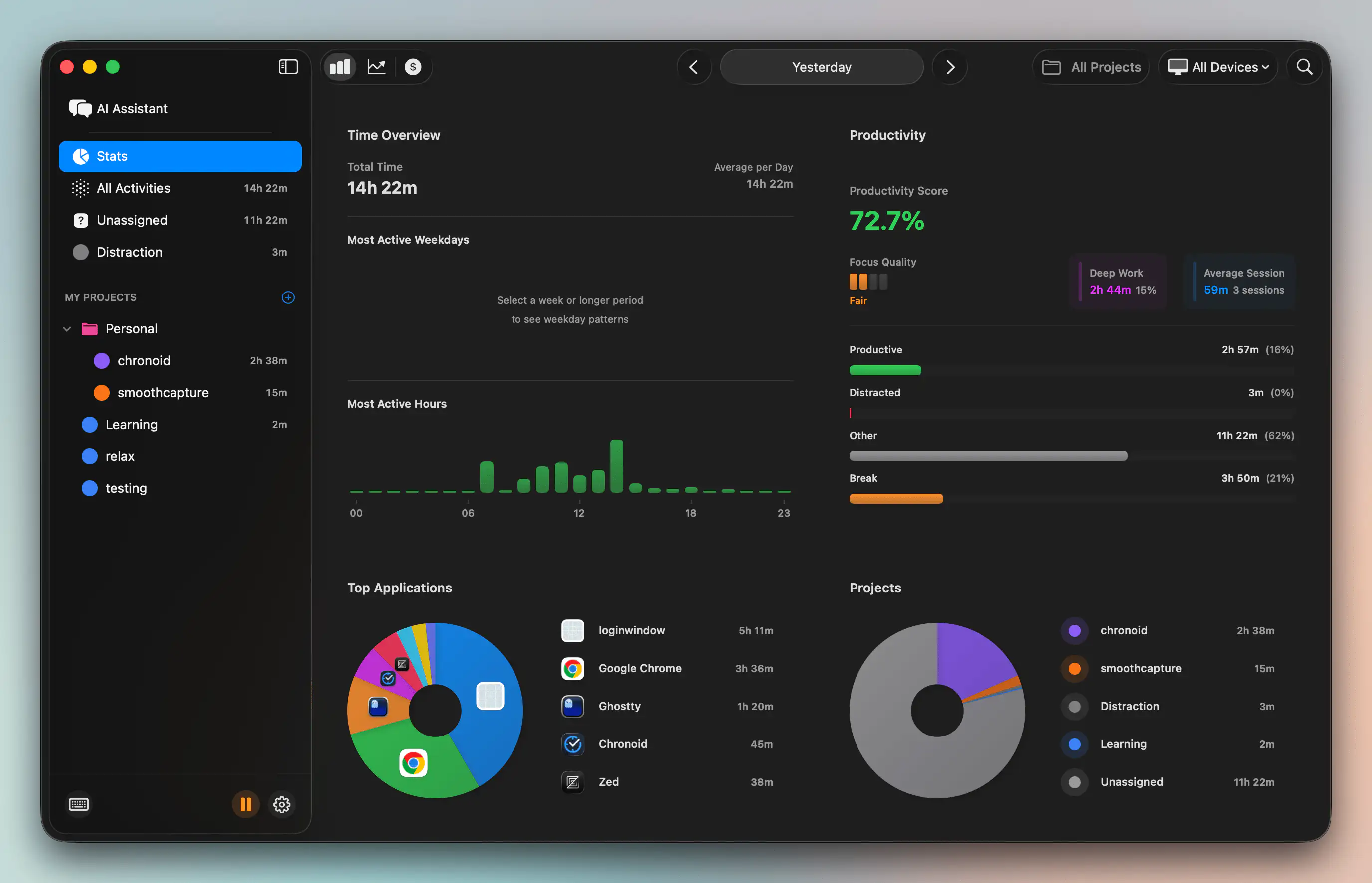
Passive tracking starts from observed work, not remembered work. Instead of asking you to press start and stop all day, it builds a record from the apps, websites, and documents you used. That matters because billing gets stronger when your source record reflects the full work session.
For hourly freelancers, that can improve three things at once:
- Accuracy: Small chunks of billable effort stop disappearing.
- Defensibility: You can support line items with a clearer activity trail.
- Speed: Invoice prep becomes review and approval, not reconstruction.
If you’re comparing tools that support that style of workflow, this roundup of the best time tracker for freelancers is a useful place to evaluate the difference between passive and manual approaches.
What a dispute-proof invoice actually looks like
A weak hourly invoice says “10 hours, consulting.”
A stronger one breaks work into categories the client recognizes. Research. Review. Calls. Revisions. Strategy. Implementation. Admin, if billable and agreed. That doesn’t mean overloading the invoice with noise. It means the time record maps to real work instead of vague totals.
If a client questions an hourly invoice, a clean activity trail lowers friction immediately. You’re not arguing from memory.
That’s why passive tracking is the missing link. The best billing workflow for hourly freelancers starts before billing software opens. It starts when work begins, captures the work automatically, categorizes it sensibly, and hands billing software something trustworthy to convert into line items.
Without that front-end record, even polished billing tools are doing cleanup on top of flawed inputs.
How to Choose Your Software Key Considerations
The wrong way to choose freelance billing software is to compare feature grids until every tool looks the same. The better way is to ask where your current process breaks. Then choose the tool that removes that specific friction without creating two new problems elsewhere.
Start with daily use, not marketing claims. If the software is annoying to use, you won’t keep it updated, and stale data ruins the whole point.
What to evaluate first
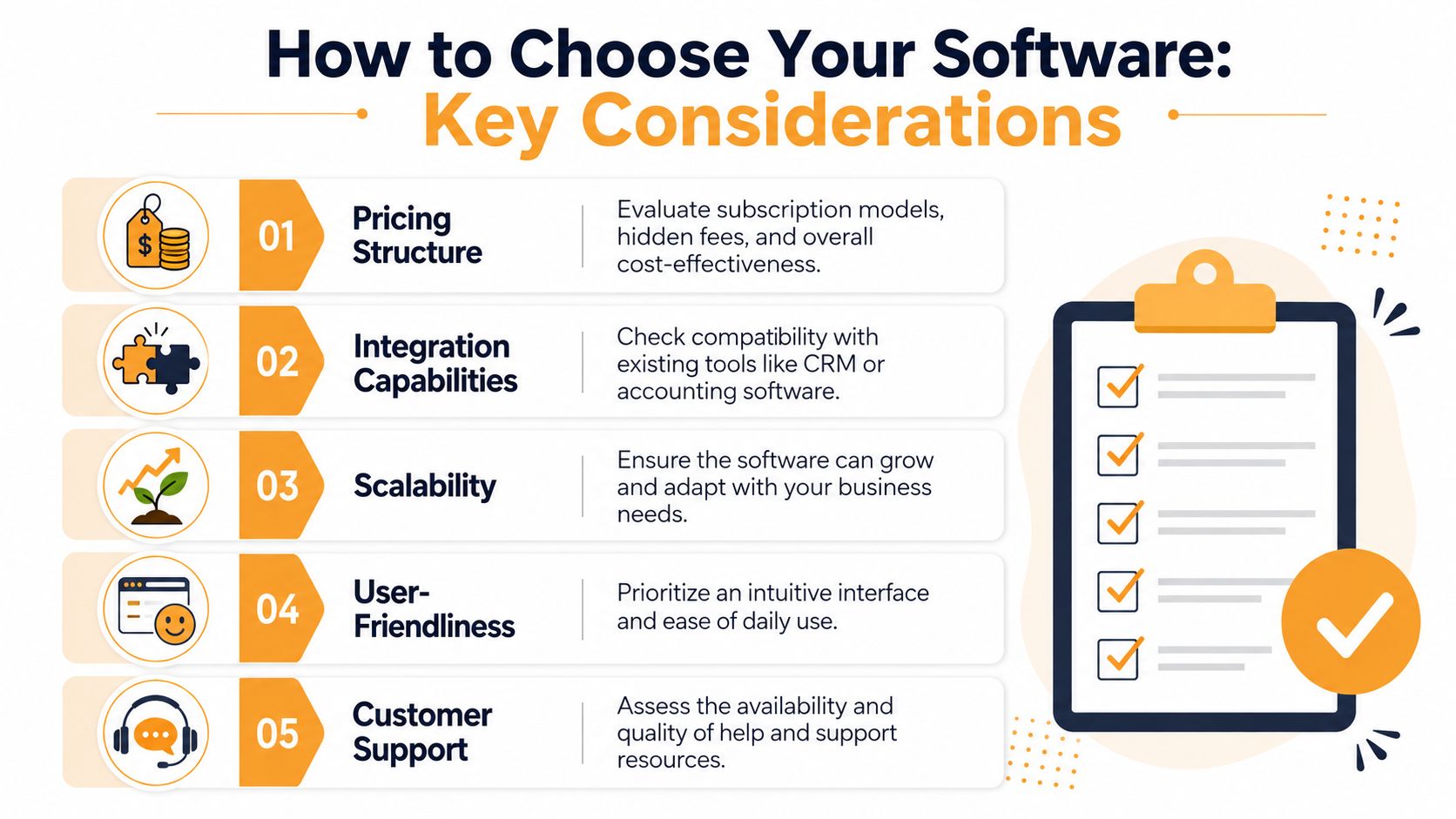
- Pricing structure: Look beyond the base subscription. Check payment processing, client limits, add-ons, and whether useful features sit behind higher tiers.
- Integration capabilities: Your billing tool should fit with how you already work, especially if you use accounting software, a separate payment processor, or a time tracker.
- Scalability: Today you may have a few clients. Later you might need recurring invoices, contractor support, or more detailed reporting.
- User-friendliness: The best feature set is useless if sending an invoice feels like filing taxes.
- Customer support: When payment settings break or an invoice goes missing, responsive support matters.
A short demo can help you spot weak interfaces faster than a long pricing comparison. This walkthrough on time tracking invoicing software is worth reviewing if your workflow depends on accurate hour-based billing.
Here’s a video that helps frame the buying decision:
Don’t ignore the legal setup
This is the part many buying guides skip. Some freelancers are ready to invoice but not ready to register a company or manage all the tax administration that usually comes with it.
According to Abillio’s overview of freelance invoicing software, almost no billing software guides users on using third-party business entities to issue compliant invoices, even though services like Abillio offer that model. The same source notes this matters because 62% of global freelancers are in informal economies.
That’s a real decision point if you’re freelancing on the side, testing a niche, or working across jurisdictions. Mainstream platforms often assume you’ve already sorted out the legal business structure. Some freelancers haven’t.
A practical decision checklist
Before you commit, answer these questions:
- How do you bill now? Hourly, project-based, or retainer.
- Where does billing data come from? Memory, manual timers, spreadsheets, or tracked activity.
- What has to connect? Accounting software, payment gateways, or client portals.
- Will you invoice internationally? If yes, currency handling matters early.
- Do you need legal invoicing support without forming a company yet? If yes, that narrows the field fast.
- Will you use it every week? If not, simpler is better.
The best software is the one that makes your real workflow cleaner. Not the one with the longest feature list.
From Billing Chaos to Financial Clarity
The difference between chaotic billing and clear billing usually isn’t effort. Most freelancers are already putting in the effort. The difference is whether the system asks you to rebuild your work after the fact or captures it properly as you go.
That’s why so many invoicing setups feel frustrating. They focus on the final document instead of the workflow behind it. The invoice is only the output. The underlying system includes time capture, scope control, payment terms, client records, and follow-up.
For hourly freelancers, the biggest blind spot is still manual time entry. If your billing starts from memory, your invoices will always be weaker than they need to be. If your billing starts from a reliable work record, everything downstream gets easier. The invoice is faster to create, easier to justify, and less likely to trigger pushback.
What good freelance billing software should give you
- Cleaner records: You stop guessing what happened last Tuesday.
- Less admin drag: Repetitive invoice work shrinks.
- Better cash flow habits: Invoices go out faster and with fewer errors.
- More confidence: You can explain what you billed and why.
- A calmer business: You spend less energy untangling money issues.
Billing clarity also helps with the rest of freelance life. If your income isn’t perfectly predictable, solid invoicing makes planning easier, and resources on managing fluctuating income become much more useful when your records are current and trustworthy.
The smartest next move isn’t just shopping for software. It’s checking where your billing process begins. If it begins too late, after the work is already finished and half-remembered, that’s the first problem to solve.
If you bill by the hour on a Mac, Chronoid is worth a serious look. It automatically tracks apps, websites, and documents, detects idle time, and keeps activity data local by default, so you can build invoices from a more complete work record instead of memory and manual timers.