
Most productivity advice starts from a false assumption. It assumes you can estimate your time accurately, plan your week cleanly, and then follow that plan without much drift.
That isn’t how real work happens.
Real work gets interrupted. Energy changes by the hour. Client messages blow up a careful schedule. A task you thought would take half an hour swallows an afternoon. If your personal productivity system only works in calm conditions, it isn’t a system. It’s a fair-weather routine.
A useful system does two jobs at once. It helps you plan, and it helps you recover when the plan breaks. It also has to show you what happened, not what you meant to do. That’s the missing piece in most guides.
Why Feeling Busy Is Not the Same as Being Productive
A packed day can still produce very little.
That’s not a personal failure. It’s usually a system failure. The average employee is productive for just 2 hours and 53 minutes each day, and 82% of people don’t have a formal time management or personal productivity system, according to employee productivity statistics from WorkTime. If you often end a day thinking, “I worked all day, so why did nothing important move?”, you’re in very crowded company.
The problem isn’t just volume of work. It’s that days are often run from memory, urgency, and guilt. That creates a workflow where email, chat, and random admin win by default. Important work gets whatever attention is left.
Busy work has a convincing disguise
Low-value work rarely looks pointless in the moment. It looks responsible.
You answer messages quickly. You reorganize notes. You tweak a task list. You sit in meetings and call it collaboration. Each action feels legitimate, but together they can crowd out the work that changes outcomes.
Practical rule: If your day is driven by what appeared most recently, you’re not managing priorities. You’re managing interruptions.
A personal productivity system fixes that by turning vague intention into a repeatable operating model. It gives every input a place, every task a decision, and every week a review loop. Done right, it reduces friction instead of adding more process.
What a system should actually do
A good personal productivity system isn’t a prettier to-do list. It’s a structure for translating effort into meaningful output.
It should help you do four things:
- Capture commitments: Tasks, ideas, follow-ups, and obligations need a trusted home.
- Decide priorities: You need a way to distinguish urgent noise from important work.
- Protect focus: Deep work won’t happen if distraction has equal access to your attention.
- Recover quickly: Bad days happen. A real system tells you how to restart.
Most advice stops at planning. The better question is this: when the day goes sideways, does your system help you regain control, or does it collapse with the plan?
The Six Core Components of a Productivity System
When people say they need a better system, they usually mean one of two things. They need fewer loose ends, or they need better control over their time.
A complete personal productivity system handles both. I think of it as a personal operating system. Not because that sounds clever, but because the analogy is accurate. If one core function is missing, the whole thing gets unstable.
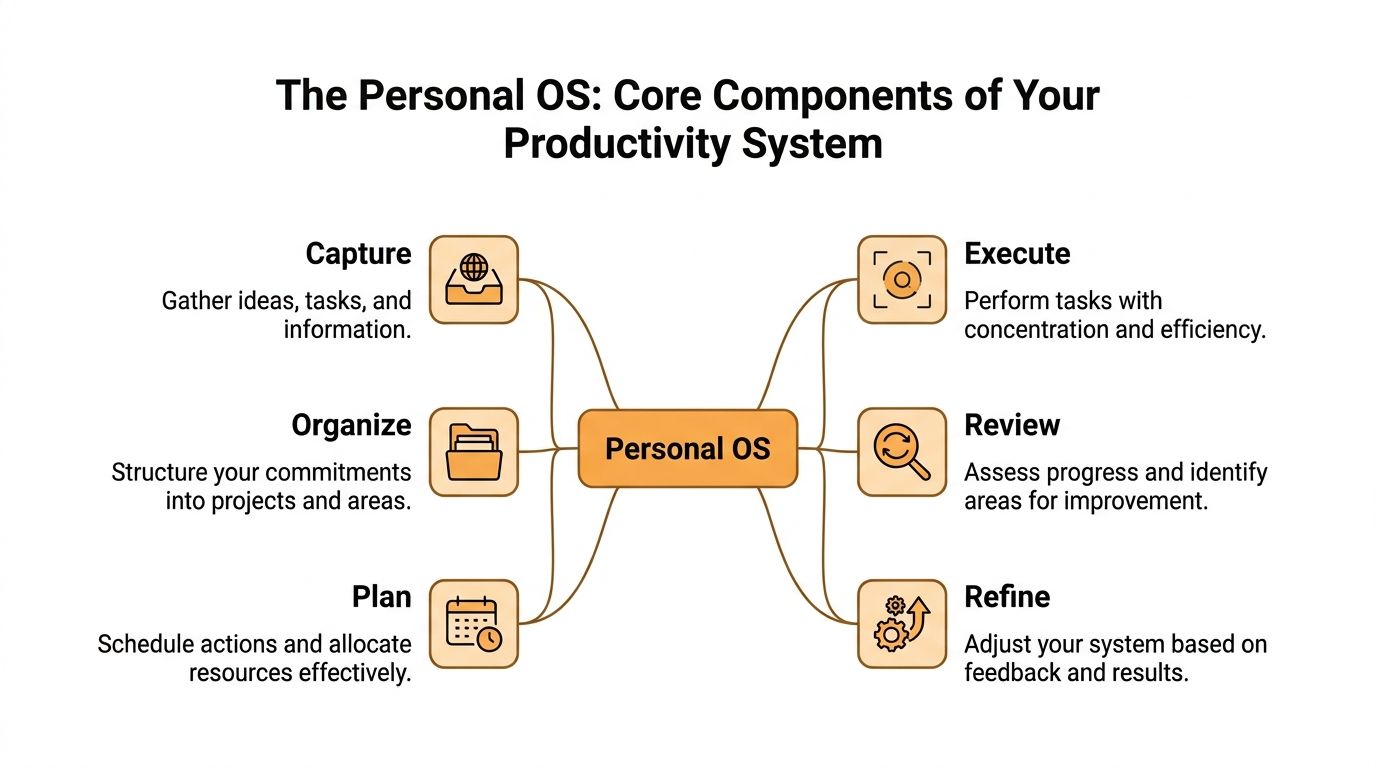
An effective system needs five technical tools: a calendar, a time tracker, a contact manager, a note taker, and a task manager. Remove any one of them and the system degrades, as outlined in Asian Efficiency’s breakdown of five personal productivity tools. On top of those tools, you need one more layer: review and refinement. That’s what keeps the machine honest.
For a broader look at how different methods fit into this structure, this overview of methods of productivity is useful.
Capture and organize
Most systems fail at capture first.
If ideas, requests, and obligations live in five places, your brain becomes the backup database. That’s a terrible role for a brain. It should think, not store.
- Capture: Use a note taker and a task inbox to collect everything quickly.
- Organize: Sort inputs into projects, areas, waiting-for items, reference notes, and calendar commitments.
A contact manager matters more than people think, especially if you work with clients, collaborators, or recurring stakeholders. A lot of work is relationship-driven. If you lose track of who needs what, tasks slip for reasons that don’t show up on a checklist.
Plan and execute
Planning is where a calendar and task manager start working together.
A task list without a calendar becomes fantasy. A calendar without a task list becomes theatre. You need both. The calendar shows when work can happen. The task manager shows what should happen next.
Execution needs fewer options, not more. Your system should surface the handful of actions that are appropriate now. Not every possible task you could do this month.
A system becomes usable when it answers one question fast: what is the next meaningful thing I should do in this block of time?
Review and refine
Individuals often skip review because it doesn’t feel urgent. That’s exactly why it matters.
Without review, you keep repeating broken estimates, overloaded schedules, and vague priorities. Your system turns into storage, not guidance.
The six components work like this:
| Component | Job |
|---|---|
| Capture | Gather tasks, ideas, and obligations fast |
| Organize | Turn raw inputs into clear categories |
| Plan | Match work to time and constraints |
| Execute | Focus on the right task at the right moment |
| Review | Check what happened and what changed |
| Refine | Improve the system based on evidence |
This is why a personal productivity system is more than an app stack. It’s a loop. Capture feeds organization. Organization feeds planning. Planning supports execution. Review improves the next round.
Choosing Your Systems Core Framework
You don’t need to copy someone else’s system. You need a framework that matches the kind of friction you deal with most.
Frameworks are useful when you treat them as engines, not religions. Each one solves a different failure mode. If you pick the wrong one, you’ll spend more time maintaining the method than doing the work.
Four frameworks worth considering
The Pomodoro Technique is the easiest to describe because it’s highly structured. Francesco Cirillo developed it in the late 1980s, and its 25-minute work sprints followed by short breaks became a foundational timer-based method for reducing procrastination and supporting focus, as noted in this timeline of personal productivity.
Time blocking is different. It assumes the calendar is the main battlefield. GTD is about clearing mental clutter. The Eisenhower Matrix is about deciding importance under pressure.
Here’s the practical comparison.
Productivity Framework Comparison
| Framework | Core Principle | Best For | Main Challenge it Solves |
|---|---|---|---|
| GTD | Capture everything, then clarify and organize | People overwhelmed by open loops and mental clutter | Forgotten commitments and constant background stress |
| Time Blocking | Assign work to specific calendar blocks | People whose days get hijacked by meetings and reactive work | Lack of protected time for important tasks |
| Pomodoro | Work in timed focus intervals with short breaks | People who procrastinate or struggle to start | Task initiation and sustained attention |
| Eisenhower Matrix | Separate urgent work from important work | People drowning in requests and false urgency | Poor prioritization |
If you want a practical way to make calendar-based planning stick, this guide on how to time block is a solid companion.
What works and what doesn’t
GTD works when your main problem is psychic clutter. If every unfinished task nags at you, a trusted capture and clarification process is a relief. GTD fails when people turn it into endless list maintenance.
Time blocking works when your schedule is the constraint. Consultants, managers, and remote workers usually benefit from it fast. It fails when people schedule every hour too tightly and leave no room for interruption or spillover.
Pomodoro works when resistance is the enemy. It’s especially effective for boring admin, writing starts, and tasks that feel heavier than they are. It fails when used mechanically for work that needs longer uninterrupted immersion.
The Eisenhower Matrix works when you say yes too easily. It forces harder decisions. It fails when every task gets labeled important and nothing changes.
The right framework should remove friction from your real work. If it creates more friction than it removes, it’s the wrong framework for you.
Build around your failure pattern
Choose based on the mistake you repeat most often.
- You forget things constantly: Start with GTD.
- You never make time for hard work: Start with time blocking.
- You can’t get started: Start with Pomodoro.
- Everything feels urgent: Start with the Eisenhower Matrix.
You can combine them later. In practice, most durable systems do. The mistake is starting with a mashup of everything at once.
Practical Workflows for Different Roles
A good personal productivity system should feel different for different kinds of work. A freelancer needs billing clarity. A developer needs clean task breakdown. A creative needs protected depth. A manager needs a way to think while everyone else needs something.
This is also where self-reporting breaks down. 68% of professionals misestimate their work hours, and ADHD-prone individuals can overestimate productivity by 40%, according to this discussion of measurement bias in productivity systems. If your system depends on memory alone, the design is already compromised.
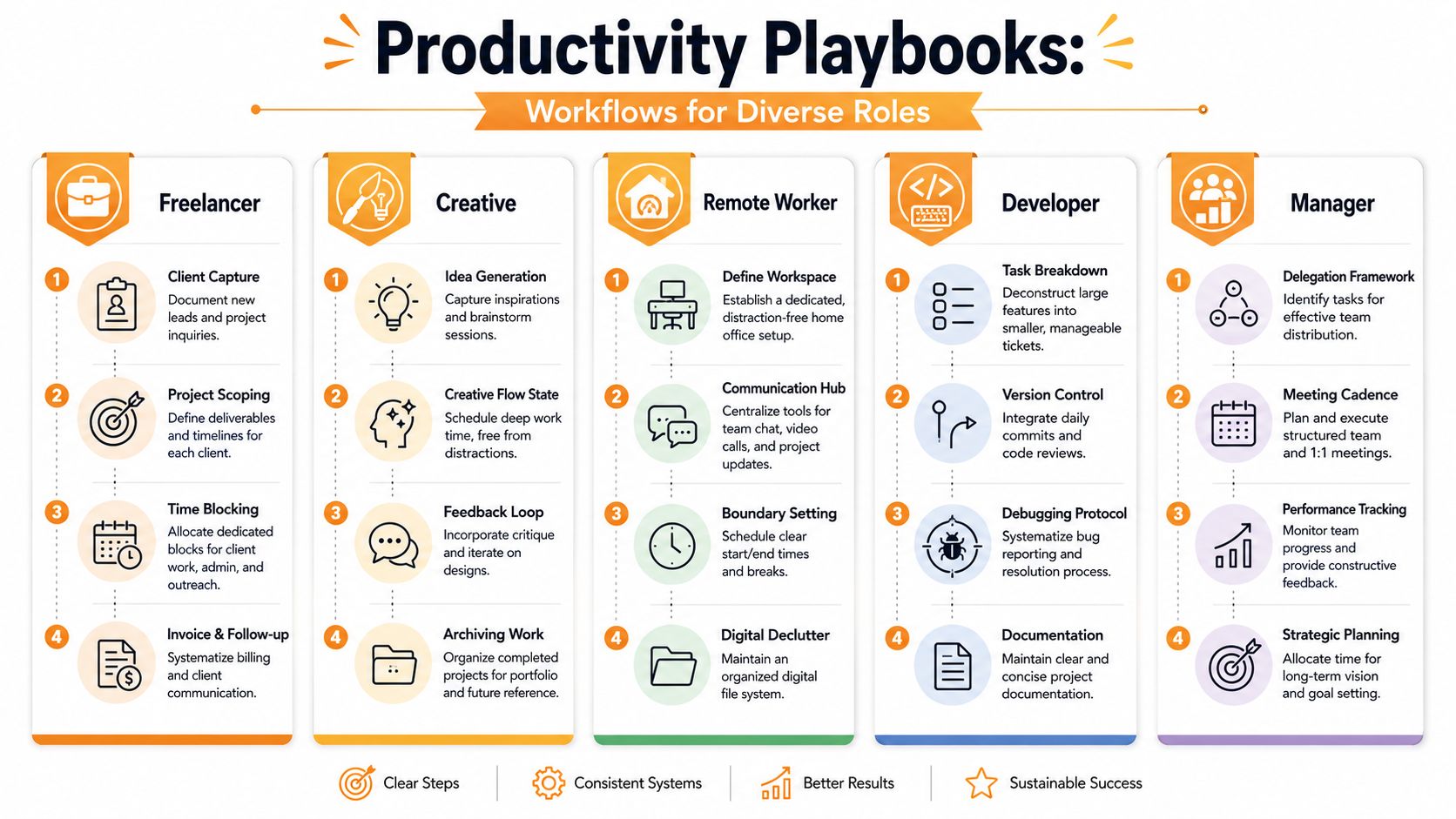
Freelancer workflow
Freelancers often confuse motion with delivery. Client communication can consume the day while project work slips.
A simple workflow works better:
- Capture every inbound request in one place.
- Scope the job into deliverables, deadlines, and questions.
- Block work by client or project type so context switching doesn’t eat the afternoon.
- Close the loop daily with follow-ups, status updates, and billing notes.
The key trade-off is flexibility versus control. Freelancers like open days until open days become fragmented days. Put structure around the hours you sell.
Creative workflow
Creatives need room, but “room” can become drift if the system is too loose.
The practical setup is usually this:
- Idea capture stays frictionless: notes app, voice memo, sketchbook, whatever you will use.
- Execution gets scheduled: deep work needs a calendar appointment, not a vague intention.
- Feedback gets separated from creation: don’t mix making time with revision time.
- Archive finished work properly: not for tidiness. For reuse and portfolio value.
For students, junior creatives, and anyone building study-heavy habits, this guide to student productivity has useful ideas on structuring focused sessions and keeping schedules realistic.
Creative work doesn’t need less structure. It needs structure in the right places so your best energy reaches the work instead of getting spent on setup.
Remote worker workflow
Remote work rewards people who create boundaries on purpose. Without them, work expands into every corner of the day.
A remote workflow needs three anchors:
- A defined start ritual: review calendar, check key messages, choose top outcomes.
- Protected focus windows: not “when things calm down.” Actual blocked time.
- A shutdown routine: clear loose ends and signal that work is done.
The common failure is staying available all day and mistaking availability for contribution.
Developer workflow
Developers suffer when tasks are too large and progress is invisible.
The better approach is operational:
| Step | What to do |
|---|---|
| Break down work | Split features into small tickets or next actions |
| Protect coding blocks | Batch meetings and messages outside build time |
| Record blockers | Capture bugs, questions, and dependencies immediately |
| Document decisions | Save future time by writing down why something changed |
The trade-off is obvious. Planning too little creates chaos. Planning too much creates overhead. Developers usually do best with a lean task system and aggressive interruption control.
Manager workflow
Managers need a different kind of system because they often produce results through other people.
That means the workflow should center on delegation, decision tracking, and meeting hygiene. If you’re a manager, your task list should include fewer “do” items and more “ensure” items. Who owns this? When is the check-in? What needs clarification before work stalls?
Managers also need thinking time on the calendar. If every open slot goes to meetings, strategy gets replaced by reaction.
Automating Your System with Modern Tools
Manual tracking looks disciplined until real work starts. Then the system depends on perfect memory, clean task boundaries, and a calm day. Few knowledge workers get any of those. People forget to start timers, reconstruct their hours from memory, and log what they meant to do instead of what happened. Automation fixes that weak point by recording behavior as it happens.
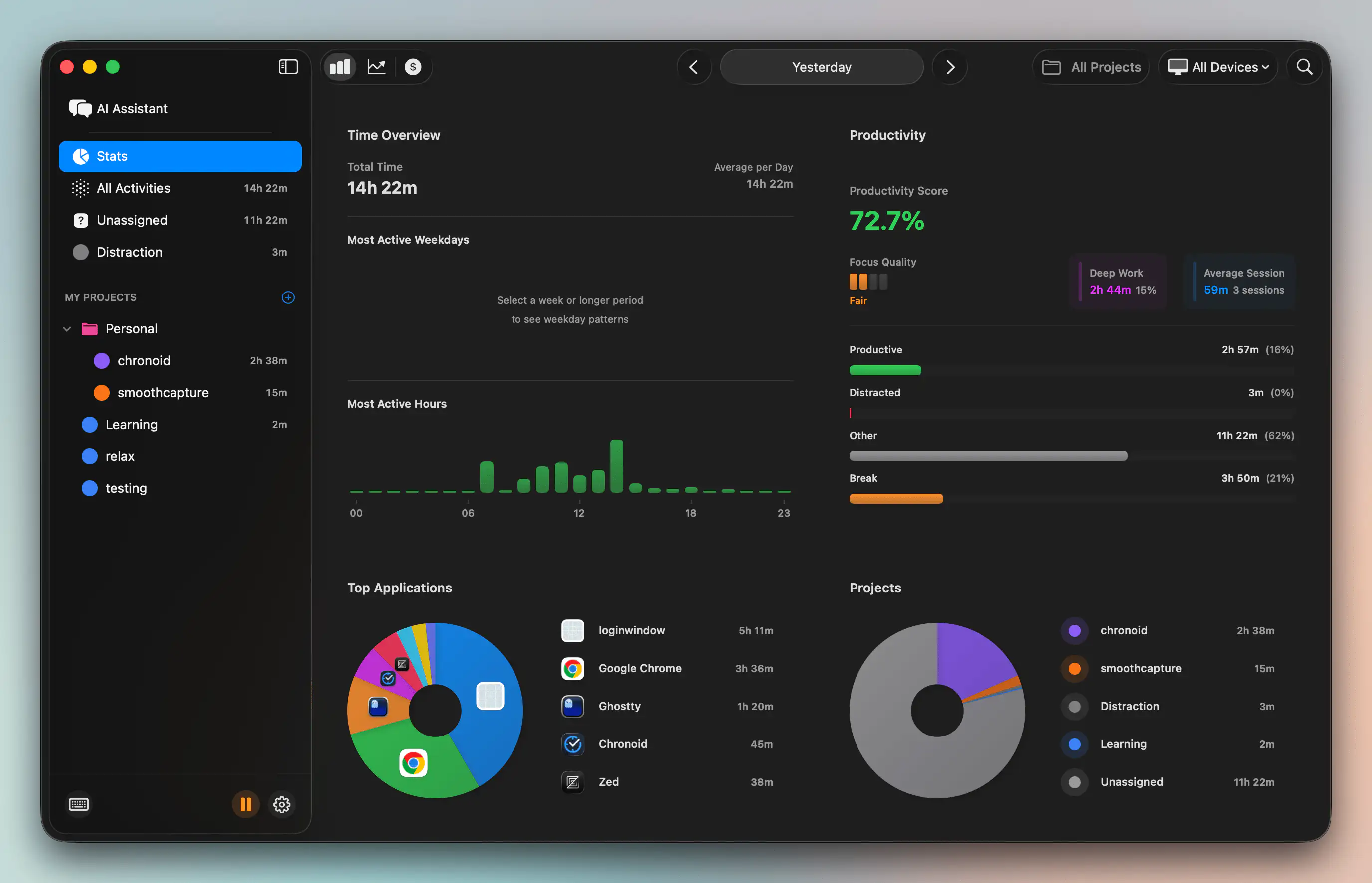
Interruptions create a second problem. Planning assumes a straight line. Actual work looks more like stop, switch, recover, restart. A resilient personal productivity system has to account for that. If your tools only help you plan the ideal week, they fail on the week you have.
Automation works best in a narrow set of jobs. It should capture reality, reduce setup friction, and make restart easier after a derailment.
- Passive time tracking: records what received attention without asking you to remember every switch
- Idle detection: separates active work from a screen that isn’t locked
- Focus sessions: starts work blocks with less negotiation
- Distraction blocking: adds friction to the sites and apps that repeatedly break momentum
- Pattern analysis: shows where your time goes across days and weeks without manual spreadsheet cleanup
Calendar data matters here too. Bad calendar hygiene breaks a system before the task list even enters the picture. If your commitments live in multiple tools, learning how to sync Google Calendar with Outlook reduces preventable scheduling errors and gives your planning layer a cleaner foundation.
Do not hand your judgment to software.
Tools are good at remembering, measuring, surfacing patterns, and triggering routines on time. They are bad at deciding what matters. A task manager cannot tell you whether a meeting should exist. A focus timer cannot tell you whether you are doing low-value work with impressive consistency. That trade-off matters because many productivity stacks become elaborate reporting systems for the wrong priorities.
I recommend choosing tools that support your operating rules instead of forcing a full methodology. Chronoid is one example on macOS. It automatically tracks apps, websites, and documents, detects idle time, includes focus tools such as a website blocker and Pomodoro timer, and lets you query local activity data through an on-device chat interface. That setup makes sense for people who want less manual logging and better evidence during reviews, especially if they already know they are poor judges of where their time went.
If you want a practical look at reducing friction on Apple devices, this guide to using AI tools on a Mac without adding another dashboard is a useful companion read.
A short product walkthrough helps make the category more concrete:
Automation’s strongest advantage is faster recovery
Better charts are nice. Recovery is what changes behavior.
When your day gets knocked off course, you need answers fast. What grabbed your attention? Where did the context switching start? Which planned work got displaced? Manual systems break down here because the distracted person is also the historian. That is a bad setup.
The more chaotic your day is, the less you should rely on memory as your productivity tool.
Use automation to shorten the gap between drift and reset. A good tool should help you spot the interruption, see the cost, and restart with less friction. That is the difference between a system built for ideal conditions and one that still holds up on messy Tuesdays.
The Review Cadence That Drives Improvement
Most systems don’t fail during planning. They fail because nobody looks back critically.
Review is where your personal productivity system becomes adaptive. Without it, you keep carrying the same overloaded lists, the same unrealistic estimates, and the same distraction patterns into the next week. A review cadence turns activity into learning.
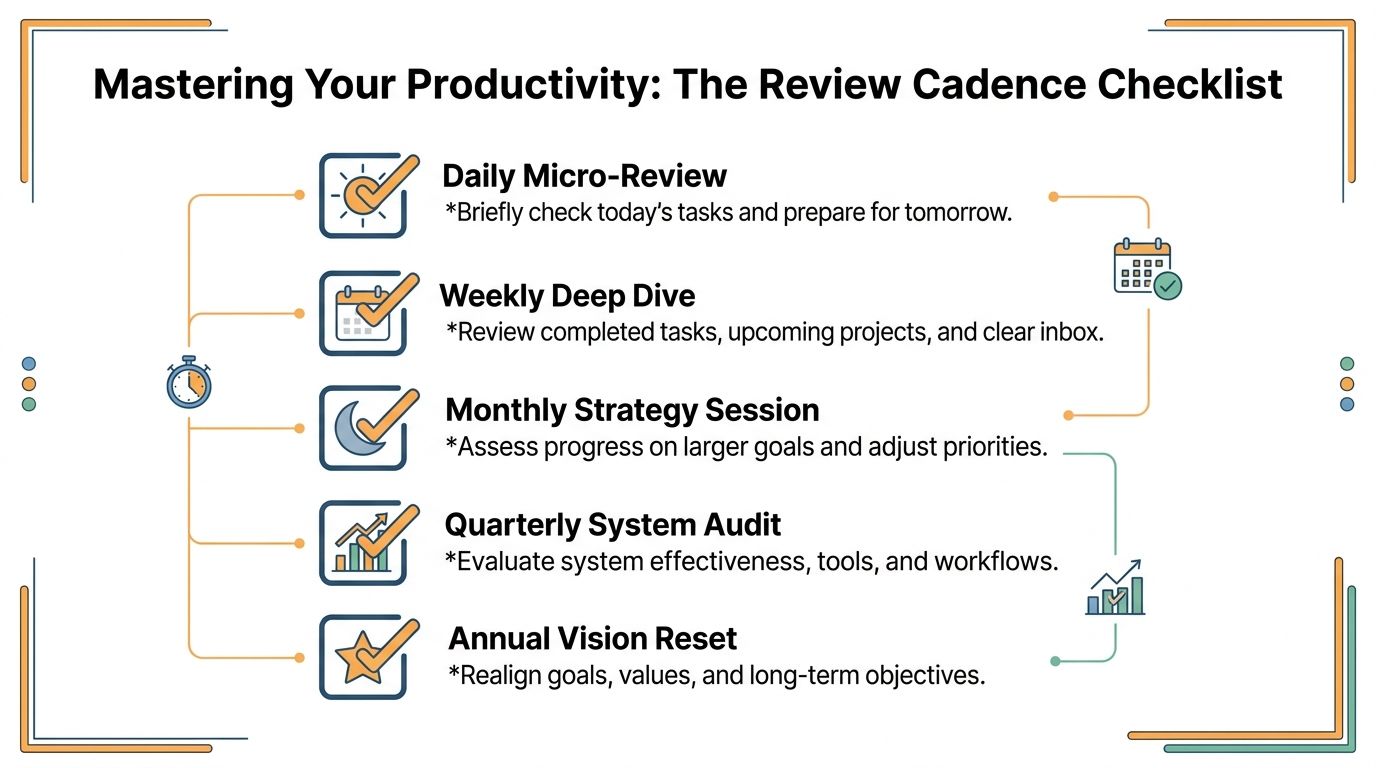
Daily shutdown
A daily review should be short enough that you’ll complete it.
Use five minutes to clear residue from the day:
- Close open loops: capture loose tasks, decisions, and follow-ups
- Check tomorrow’s calendar: spot conflicts before the morning starts
- Choose a starting task: remove friction for tomorrow’s first work block
- Reset your workspace: digital and physical
This is less about reflection and more about reducing restart cost.
Weekly deep dive
The weekly review is the primary control center. In this review, you stop running on momentum and start making corrections.
Ask blunt questions:
| Question | Why it matters |
|---|---|
| What moved forward this week? | Separates effort from output |
| What stalled and why? | Reveals friction, not just delay |
| What distracted me most? | Identifies repeat drains on attention |
| What should I stop carrying? | Cuts dead weight from the system |
A good weekly review also checks project lists, waiting-for items, calendar commitments, and note capture. If you’re using automatic tracking and activity data, this is the best time to compare your planned week with your actual week.
Monthly reset
Monthly reviews should be slower and more strategic.
Look at themes, not just tasks. Which kind of work got too little time? Which commitments generated drag without much return? When did you do your best focused work? From these insights, priorities get adjusted, not just reorganized.
Review isn’t admin. It’s the point where your system stops being a storage unit and starts becoming a decision tool.
You don’t need a complex ritual. You need consistency and honest inputs. Daily shutdown reduces clutter. Weekly review drives control. Monthly reset keeps the whole system aligned with real goals instead of inherited busyness.
Building a Resilient System That Lasts
A productivity system should be judged by how it performs on bad days, not clean ones.
The true test is simple. You get pulled into an urgent request, underestimate a task, lose an afternoon to fragmented attention, then come back to a plan that no longer fits reality. Fragile systems fail here because they assume steady focus and accurate self-reporting. Durable systems expect drift. They give you a fast way to capture fallout, reset priorities, and get back to useful work without rebuilding your whole setup.
That is the standard worth using.
Keep the system boring enough to survive pressure. In practice, that means fewer moving parts, tighter defaults, and clear recovery rules. If you miss a block, decide whether to reschedule it, shorten it, or drop it. If your task list keeps growing, cut active work until the list becomes believable again. If your calendar says one thing and your actual week shows another, trust the evidence and replan from there.
Automated tracking earns its place. Memory edits the story in your favor. Activity data gives you a cleaner record of where attention went, which types of work expand, and where context switching keeps wrecking the day. Plans improve faster when they are built on observed behavior instead of optimistic guesses.
I have seen elegant systems collapse because they required too much maintenance. I have also seen plain, lightly automated systems hold up for years because they were built for interruption, not perfection.
If you want a useful lens for improving repeatable parts of your workflow, ReceiptsAI’s BPI guide is a solid companion. Personal productivity and process design overlap more than people admit.
Chronoid can serve as the measurement layer in that setup, especially if you work on a Mac and need a factual record of how time was spent. Use it to compare planned work against actual work, tighten future estimates, and spot patterns that signal when a reset is needed.
A system you still trust after a messy week is the one that lasts.