
Idle time is the stretch of the workday when you’re available to work but can’t make real progress because something outside your control is blocking you. It’s common, expensive, and often confused with intentional breaks, even though they’re not the same thing.
If you’re freelancing or working remotely, you already know the feeling. You opened the brief, replied to the client, queued the files, and sat ready to work. Then nothing moved. You waited for approval on a design, for a developer to send access, for a video to export, or for someone on Slack to answer the one question holding up the whole task.
That’s idle time.
It isn’t lunch. It isn’t a planned walk. It isn’t you deciding to scroll for ten minutes because your brain needs air. It’s the period where you’re still in work mode, still available, but your next useful action is blocked. For freelancers and consultants, that distinction matters because blocked time can turn into unbilled time fast.
The High Cost of Invisible Time Drains
You block off an hour for paid client work, sit ready to continue, and spend most of that hour waiting for one missing approval, file, or answer. The calendar shows work time. Your invoice often does not.
Idle time is often misread as poor discipline when it is really a coordination problem. For freelancers, consultants, and remote workers, that distinction affects revenue. If a task stalls because a client has not replied or a tool has not finished processing, the lost time does not disappear just because you stayed available.
A common version looks like this. You send a homepage draft at 10:00 and get, “We’ll review shortly.” You stay near your laptop because the next step depends on that response. An hour later, you have cleared a few small admin tasks, but the deliverable you planned to finish is still stuck.
Why this costs more than it looks
For hourly billers, this impact is direct and financial.
A salaried employee may absorb idle time as a slower day. A freelancer has to decide whether that waiting time is billable, whether the schedule needs to shift, and whether other client work can be pulled forward without blowing up focus. That is a pricing problem, a workflow problem, and sometimes a scope problem.
The cost also shows up in planning. One blocked hour can split the day into fragments that are too short for deep work but still too committed to use well. That usually leads to context switching, partial task starts, and the kind of administrative busywork that feels productive without moving paid work forward.
Practical rule: If time disappears because you are waiting on someone or something else, treat it as a workflow issue first.
What these invisible drains look like in practice
They usually show up in ordinary remote work patterns:
- Approval bottlenecks: work pauses until a client confirms direction
- Access delays: logins, assets, or permissions arrive late
- System waits: exports, uploads, syncs, and updates hold the next step
- Dependency stalls: one contributor cannot proceed until another finishes their part
None of this looks dramatic in the moment. That is why idle time is easy to miss and expensive to ignore. If you do not spot these gaps, you cannot explain them to clients, build them into your rates, or fix the process causing them.
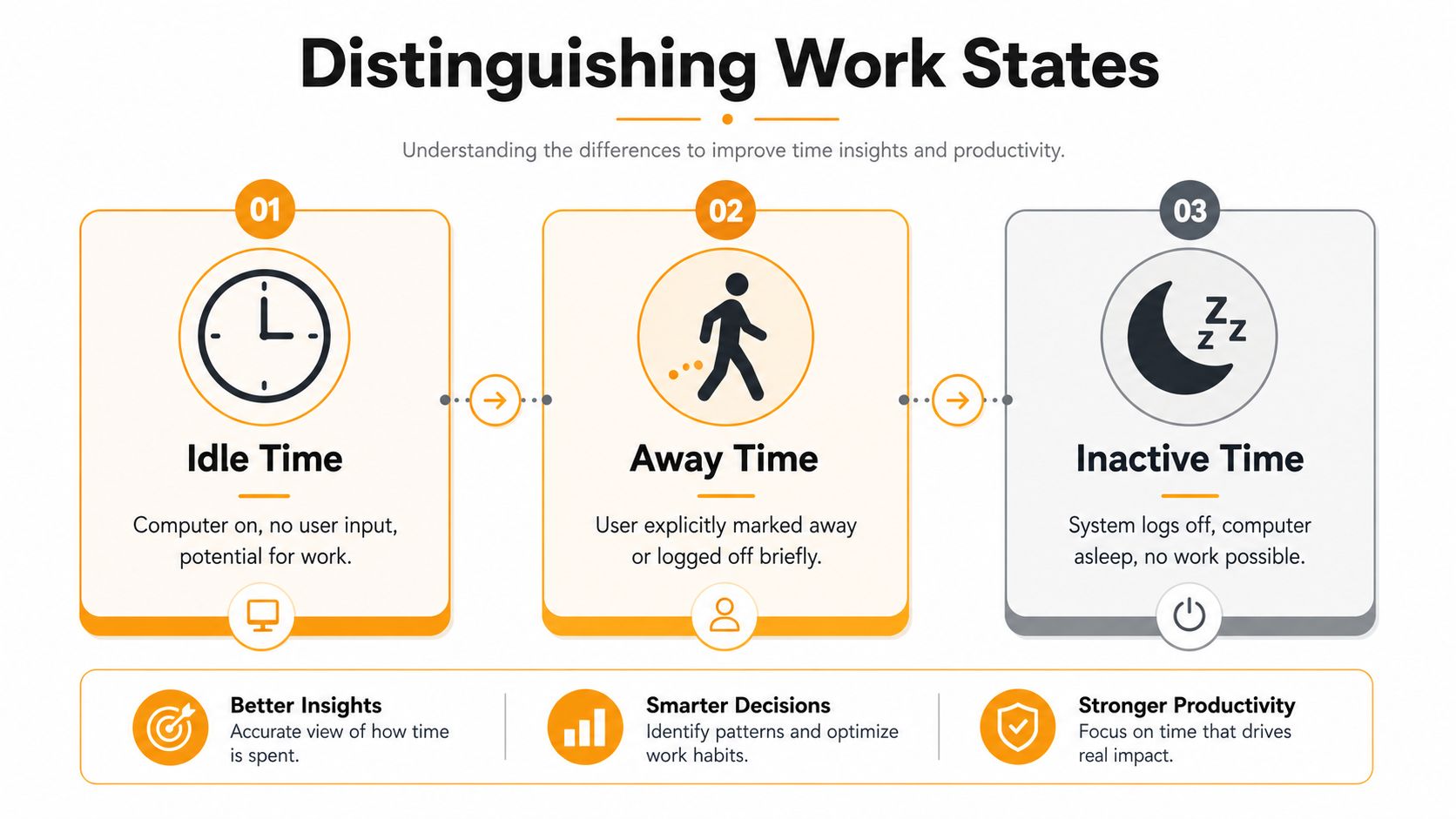
Idle Time vs Away Time vs Inactive Time
A remote work tracker can log the same silent stretch three different ways, and that difference affects billing, scheduling, and how you explain your day to clients. Avoid blurring these categories, because each one points to a different fix.
Idle time usually means you were at your desk and available, but no keyboard or mouse input was detected for a period. Away time means you deliberately stepped away for lunch, a break, a call, or an errand. Inactive time is the broadest label. It means the system did not detect active input, which can include both idle time and away time, plus quiet work such as reading or planning.
The practical difference
For freelancers and consultants, the distinction is not academic. It changes what goes on the timesheet.
| Work state | What it means in practice | How to treat it |
|---|---|---|
| Idle time | You are ready to work but blocked, waiting, or stalled | Review the workflow, dependency, or client handoff |
| Away time | You chose to leave the desk | Log it as a break, meeting, or personal time |
| Inactive time | The tracker saw no input, but the reason is still unclear | Check the context before labeling it wasted time |
The main split is voluntary versus involuntary time. If you took a walk, that is away time. If you are waiting on client approval, a file export, or access to a shared drive, that is idle time. If your tracker only shows inactivity, you still need to interpret what happened.
That matters because remote work includes plenty of legitimate low-input tasks. You might be reviewing a proposal, outlining on paper, reading a contract, or thinking through a pricing decision. The tracker sees silence. Your job is to separate real thinking time from preventable delay. If attention keeps getting broken during those waits, the attention residue from task switching makes the productivity cost even worse.
A cleaner vocabulary for timesheets
Use terms that help you diagnose the problem and justify the time.
- Idle: “I was available, but something blocked the next step.”
- Away: “I intentionally stepped away from work.”
- Inactive: “The system logged no input, and I need context before classifying it.”
This wording also improves client communication. “Waiting for feedback on round two” is specific and defensible. “Inactive for 37 minutes” is not.
Common Causes of Idle Time for Remote Workers
You block off two hours for paid client work, open the project, and hit a wall in the first ten minutes. The brief is missing a key detail. The client has not approved the last round. The file you need is still uploading. Your calendar says you are working, but nothing billable is moving.
That gap is expensive for freelancers, consultants, and remote workers because idle time rarely looks dramatic. It shows up as short waits, repeated inbox checks, and half-finished tasks that keep stealing attention from the work you could finish today.

Client delays and approval loops
This is one of the biggest idle-time triggers in freelance work. You send a draft, proposal, design, or revision and cannot complete the next step until the client responds. If feedback arrives late, arrives in pieces, or changes the scope, the project stops being active work and turns into waiting time you still have to manage.
The billing problem is obvious. Some freelancers can charge for revision rounds or meetings, but very few can invoice for checking Slack every 20 minutes to see whether a decision came in.
The focus problem is worse. A pending approval keeps the project open in your head, so you hesitate to start deeper work elsewhere. That split attention is part of why attention residue after task switching cuts into output even when the actual delay looks small on paper.
Tool friction and technical stalls
Remote work depends on software, networks, and cloud services behaving as expected. When they do not, idle time piles up fast.
Common examples include:
- Large exports, renders, or uploads that tie up the next step
- VPN drops or weak home internet during calls and file transfers
- App crashes, browser issues, or forced updates
- Cloud sync delays that leave you unsure which version is current
- Access problems with client folders, project tools, or shared drives
Each stall might last only a few minutes. Across a week, those minutes can wreck scheduling. They also create awkward billing choices. Do you log that time as project work, admin time, or lost time you absorb yourself? Remote workers run into that judgment call constantly.
Communication bottlenecks inside remote teams
Remote collaboration turns small gaps in communication into real downtime. In an office, a missing detail might get resolved in 30 seconds. In a distributed team, the same question can sit in Slack, email, or a project board for hours.
Three patterns show up often. Missing inputs, unclear ownership, and time-zone lag.
A copywriter cannot finish landing page copy because the offer changed and nobody confirmed the final version. A consultant is ready to build the report but still lacks logins or source data. A designer needs one approval from a product lead who has already signed off for the day. None of that is personal laziness. It is work blocked by handoffs.
Self-created idle time
Some idle time starts with your own setup. You begin a task without the files, questions, or next steps ready. You stack too many active projects in one day. You leave a kickoff call without confirming who owns approvals, what “done” means, or what happens if the client goes quiet.
That kind of idle time feels different because the blocker is closer to home, but the fix is practical. Better scoping, better checklists, and cleaner project handoffs.
A useful rule is simple. If a task depends on something external, identify that dependency before you start the clock. If it depends on you, remove the setup friction before you sit down to work.
How to Measure and Interpret Your Idle Time
Older industries measure idle time differently than digital workers do. In manufacturing, the standard formula for Idle Time Rate is (Total Available Time – Actual Working Time) / Total Available Time, which captures periods when assets are available but not producing output, as described in TRACTIAN’s glossary entry on idle time.
That formula is clean for machines. It gets messier for people doing creative or knowledge work.
Measurement is the easy part
You have two practical options.
Manual estimation works if you keep notes during the day, but consistent note-taking is uncommon. Individuals tend to remember the obvious delays and forget the smaller stalls. History is also often rewritten. A thirty-minute approval wait becomes “a few minutes” by the end of the day.
Automatic tracking is more accurate for digital idle periods because it records the simple signal of no keyboard or mouse input. That gives you a baseline. Then you add context after the fact.
Here’s a useful way to review idle blocks:
- Blocked waiting: You couldn’t proceed because of approval, access, or dependency.
- Processing time: A render, upload, import, or sync was running.
- Thinking time: You were planning, outlining, reviewing, or deciding without much input.
- True waste: You drifted, checked apps compulsively, or stayed stuck without a plan.
Interpretation is where most people get it wrong
The common mistake is treating all idle time as bad. It isn’t.
If you’re a consultant waiting for a file export that’s required to deliver the work, that time may belong in your project notes even if it doesn’t belong on every invoice. If you’re reading a brief carefully before making a decision, low input activity doesn’t mean low-value work. If you’re staring at the inbox refreshing for client feedback, that’s different again.
Don’t ask only, “How much idle time did I have?” Ask, “Which part was necessary, which part was preventable, and which part should be visible in billing?”
A simple interpretation framework
| Type of pause | Usually billable? | What to do with it |
|---|---|---|
| Client-caused waiting | Sometimes, depending on your agreement | Document it clearly |
| System processing | Sometimes, if it’s part of delivery work | Note the dependency |
| Intentional break | Usually no | Mark it as away time |
| Unplanned drift | Usually no | Fix the trigger |
That’s the shift that matters for freelancers. Don’t just measure idle time. Classify it well enough that it becomes useful.
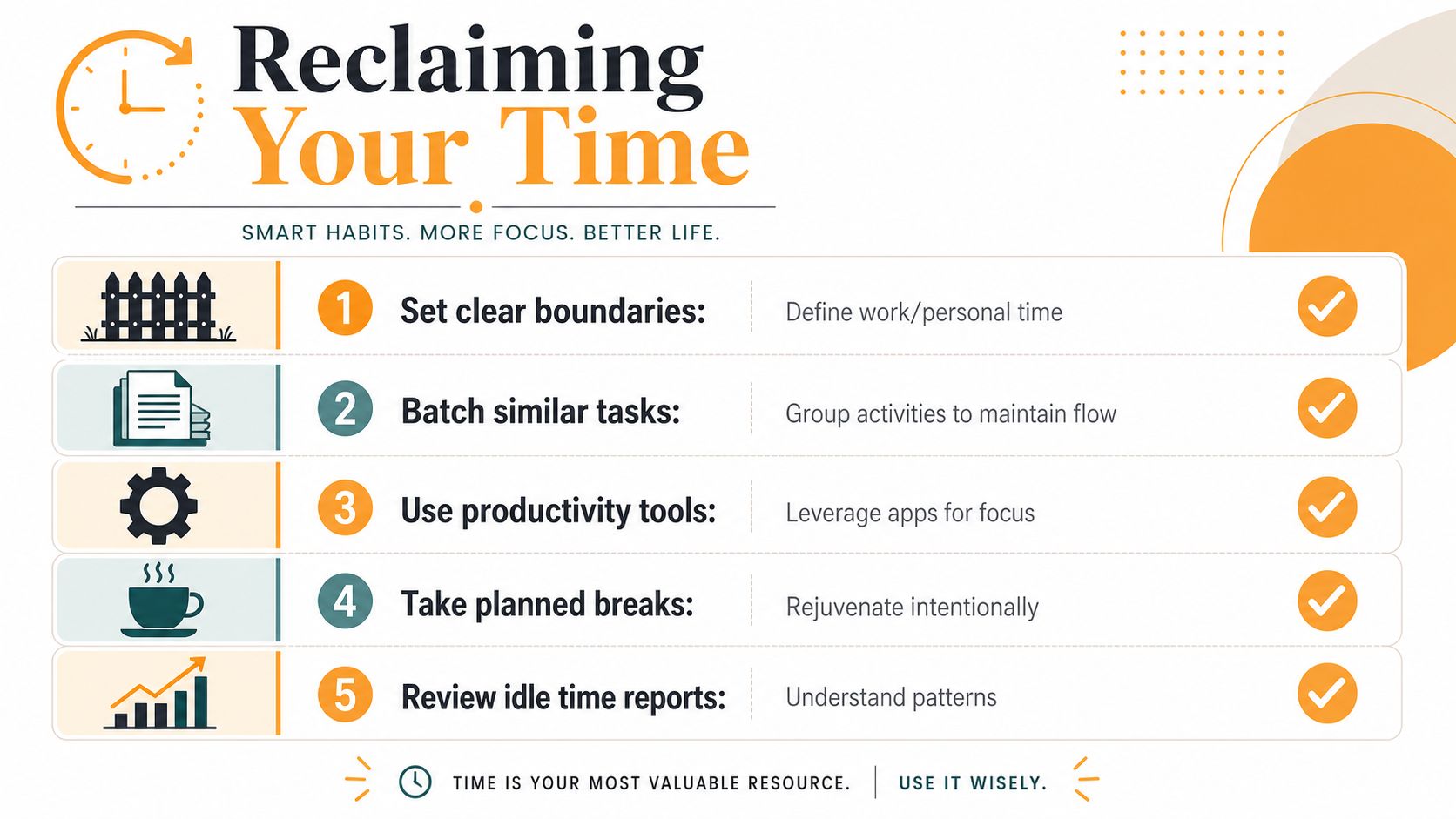
Strategies to Reduce and Reclaim Idle Time
You finish a focused hour of client work, then lose the next 30 minutes waiting on a login, a reply, or a decision no one owns. For freelancers and remote consultants, that block is not a vague productivity problem. It affects delivery dates, invoice clarity, and how much of the week turns into unpaid overhead.
The goal is to protect billable attention and give unavoidable pauses a better use.
Tighten the points where work gets stuck
Idle time usually starts upstream. The primary fix often happens before the task begins.
Set client review windows instead of saying “get back to me when you can.” Confirm access, files, and decision-makers before kickoff. Name one person who can approve the work. If three people can stall a project, they usually will.
These steps sound basic, but they change billing conversations. A missed deadline is easier to explain when the dependency was documented in advance and tied to a date.
If your projects keep stalling on admin work, it also helps to automate your daily tasks so reminders, follow-ups, and recurring prep do not rely on memory.
Keep a standby task bench ready
Remote work punishes context switching, so the backup task list has to be deliberate.
Useful standby tasks are short, self-contained, and worth doing even in a fragmented block. Good examples include invoice cleanup, proposal revisions, documentation, portfolio updates, outline drafting, or organizing research notes. Bad examples are random chores you only touch because they feel easier than deciding what matters.
Use three filters:
- Low startup friction
- Clear stopping points
- No outside dependency
That gives you somewhere to redirect attention when a client disappears for 40 minutes or a system process is still running.
Some people manage that queue in Notion, Trello, or Linear. Others review work patterns with tracking tools. If you want a practical example of that category, this guide to an activity monitor app for work patterns gives a useful overview.
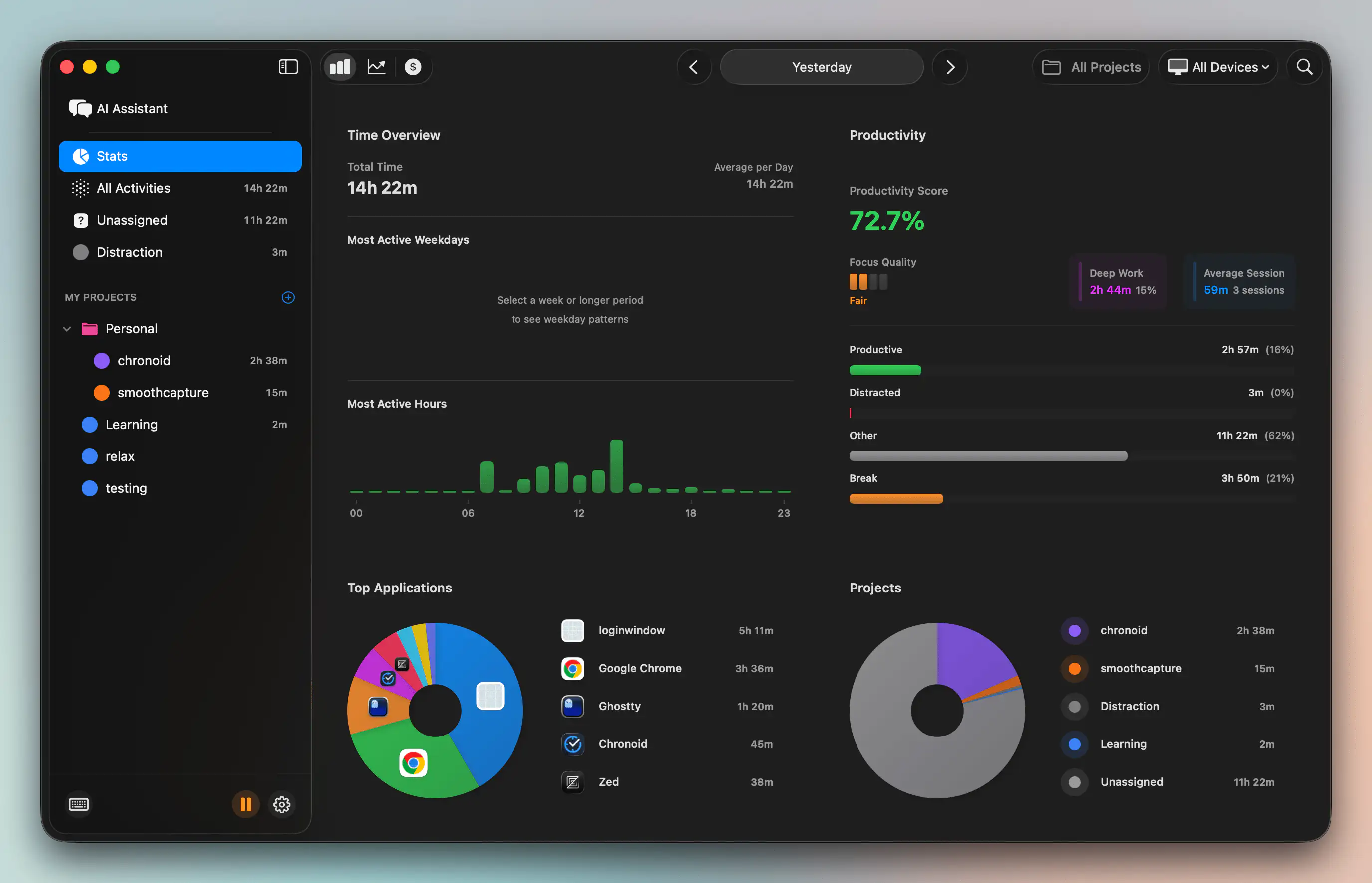
Later in your workflow, a tracker like Chronoid can surface repeated idle blocks by logging apps, websites, documents, and inactivity automatically on macOS. That makes review easier because you are working from records instead of memory.
Change how you bill and communicate
A lot of freelancers lose money by handling waiting time badly. They either charge for every blocked minute with no explanation and create client tension, or they absorb every delay and train clients to be disorganized.
A better system is simple: define how delays affect delivery, note when waiting time is tied to project progress, and mention it in status updates before it becomes a dispute.
“If work is delayed by missing approvals, files, or access, timelines may shift and waiting time directly related to delivery may be logged where applicable.”
That wording does two jobs. It protects your schedule and makes the cost of delay visible without sounding combative.
A short video can also help reset how you think about interruptions and recovery during the day:
Let an Automatic Tracker Surface Idle Time for You
A freelancer can lose billable time without noticing it. You finish a call, wait for a file, answer two Slack messages, glance at email, then try to remember later whether that 40-minute block belonged on the invoice or should be written off. Memory is a poor timesheet.
Automatic tracking solves that problem. Instead of asking you to start and stop timers every time your day shifts, it records activity in the background and flags stretches with no input. That matters most when your work includes review cycles, client approvals, renders, uploads, and meetings that interrupt focused production.
What good tracking changes
The practical benefit is better judgment. You can review a flagged block and label it correctly: waiting on a client, stepping away, sitting in a meeting, or drifting into low-value admin work. That makes your records cleaner and your billing easier to defend.
It also helps with pattern recognition. Remote workers often discover that lost time is not random. One client always creates stop-start afternoons. One project gets fragmented by messages. One day each week disappears into calls that produce weak notes and even more follow-up. If meetings are part of the problem, it helps to discover top AI meeting summary tools so discussion time turns into usable action items.
Use idle review to make better billing decisions
Idle tracking is useful after the fact, during review. It is not a tool for policing every quiet minute. The job is to separate billable waiting from non-billable downtime and to leave yourself a clear record if a client asks why a task took longer than expected.
For freelancers and consultants, that distinction matters. A 15-minute pause caused by a missing approval may belong in project notes or even in billable time, depending on your agreement. A 15-minute break to reset probably does not. Automatic records give you something firmer than guesswork.
If you use Chronoid on macOS, the idle detection settings guide explains how pause detection works and how to tune it for real workflows. That setup is useful when you need accurate timesheets, cleaner client communication, and a clearer view of whether the problem is focus, process, or dependency on someone else.