Agent CLI: Claude Code or Codex as Your Assistant
If you already use Claude Code or Codex, Chronoid’s chat can run through it. Answers come from the subscription that CLI is signed in to, so there is no API key to create, paste, or pay for separately — and the CLI can read your real tracked time to answer questions, the same way the built-in chat does.
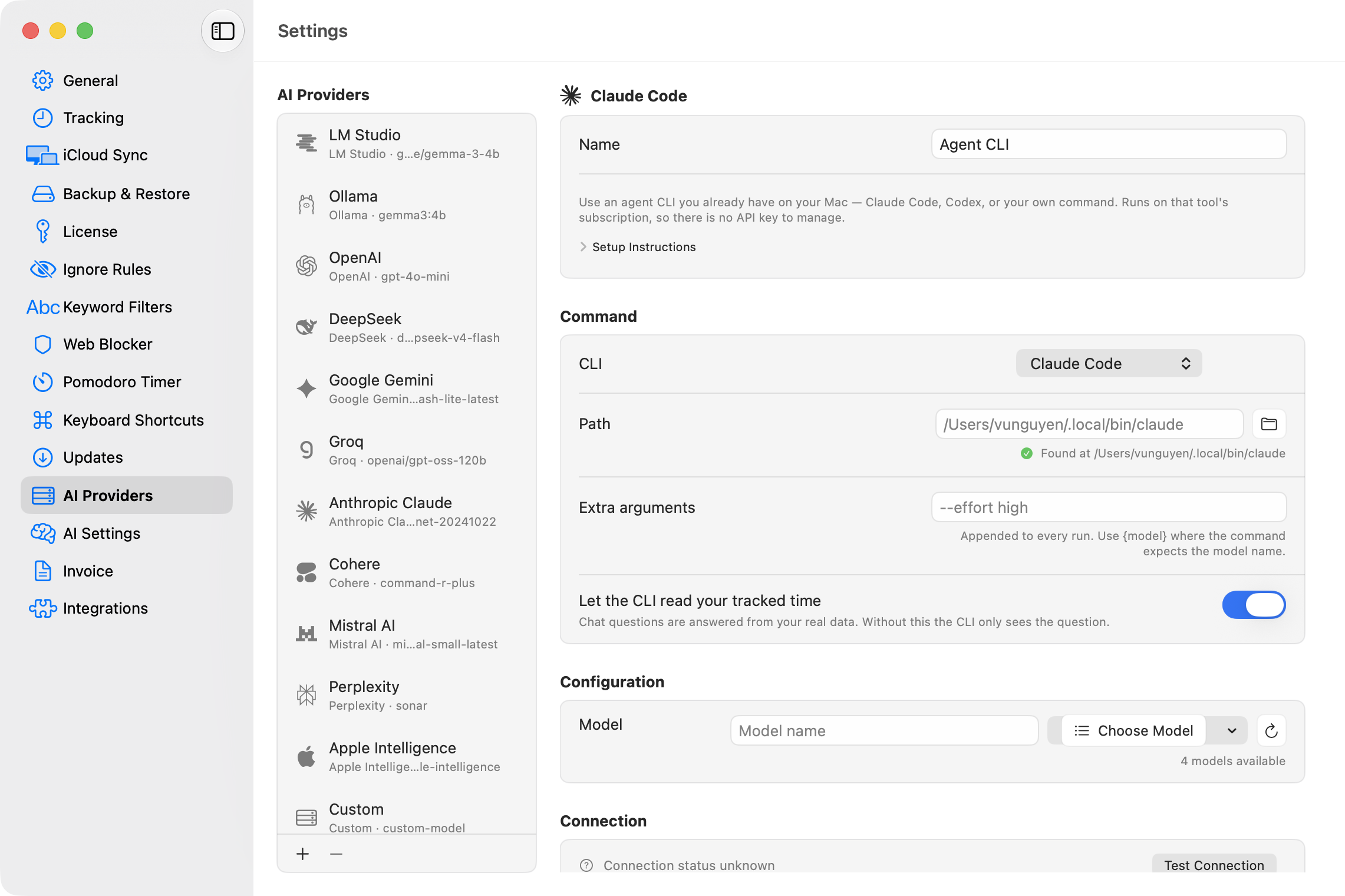
Setting It Up
- Open Settings → AI Providers and add a provider with the + button, choosing Agent CLI.
- In the CLI picker, choose Claude Code, Codex CLI, or Custom command.
- Chronoid finds the command automatically and shows a green Found at … check. If you installed it somewhere unusual, set the full path in the Path field.
- Click Test Connection, then pick the new provider in chat.
The CLI must already be installed and signed in — run claude or codex once in Terminal first if you have not. Requests run on that tool’s subscription; no key is stored in Chronoid.
Choosing a Model
With Claude Code you can pin Opus, Sonnet, or Haiku, or leave CLI default to use whatever the CLI is already set to. Codex and custom commands use the CLI’s default unless you pass your own model flag via Extra arguments (use {model} where the command expects the model name).
Access to Your Time Data
The “Let the CLI read your tracked time” toggle (on by default) gives the CLI the same local tools the built-in chat uses, served from Chronoid’s authenticated local MCP server. Each lookup appears in the chat transcript as it happens — you see every tool call, its input, and its result. Turn the toggle off and the CLI only sees your question.
Custom Commands
Custom command points Chronoid at any executable that reads a question on standard input and prints the answer on standard output. Chronoid appends nothing beyond the model and the extra arguments you set, and treats everything the command prints as the answer. Custom commands do not get tool access; relevant data is included in the prompt instead.
Limits
- Image attachments are not supported through an Agent CLI — attachments are described in text instead.
- Each request has a 5-minute ceiling; long-running commands are stopped after that.
Related Guides
For help, email support@chronoid.app